
Spring Sale Special Limited Time 70% Discount Offer - Ends in 0d 00h 00m 00s - Coupon code: buysanta

Exact2Pass Menu

OS X Support Essentials 10.9

Last Update 16 hours ago Total Questions : 218

The OS X Support Essentials 10.9 content is now fully updated, with all current exam questions added 16 hours ago. Deciding to include 9L0-415 practice exam questions in your study plan goes far beyond basic test preparation.

You'll find that our 9L0-415 exam questions frequently feature detailed scenarios and practical problem-solving exercises that directly mirror industry challenges. Engaging with these 9L0-415 sample sets allows you to effectively manage your time and pace yourself, giving you the ability to finish any OS X Support Essentials 10.9 practice test comfortably within the allotted time.

Question # 4

Which folder contains instructions for the launchd process to start certain items when a user logs in to an OS X Mountain Lion computer?

A.

/etc/launchd/

B.

/Library/LaunchAgents/

C.

/var/run/launchd/

D.

/Library/Extensions/

Question # 5

What ' s the purpose of Internet Protocol v4 (IPv4) addresses and subnet masks?

A.

The Finder doesn ' t show items with periods at the beginning of their filenames or items with the hidden file flag enabled. Both methods for hiding items can only be managed from the command line interface.

B.

The master password is used to reset local account passwords.

C.

The Internet Protocol (IP) address identifies the location of a specific network device. IP addresses are the primary identification used by the Internet protocol suite TCP/IP for both local area and wide area networks. Subnet masks are used by network devices to identify their local network range and to determine whether outgoing data is destined for a network device on the LAN.

D.

The Ping tab of Network Utility allows you to test basic connectivity to another network host by sending and then waiting for the return of a ping packet.

Question # 6

What ' s the locked file flag?

A.

The Disk Utility Repair Permissions feature repairs only the ownership and permissions for items installed by Apple. However, this may resolve issues with third-party products.

B.

The OS X built-in firewall inspects each incoming network connection to determine if it ' s allowed. Connections are allowed or denied on a per-application basis.

C.

The locked file flag prevents anyone, including the item ' s owner, from editing an item. Only the item ' s owner can unlock the item to then allow modification.

D.

The system keeps applications from interfering with one another by segregating their memory usage using protected memory. Mac computers with 64-bit-capable processors allow processes to run in 64-bit mode, which allows them to individually access more than 4 GB of memory.

Question # 7

In OS X Mountain Lion, where do most applications that are NOT sandboxed store their user-specific preferences?

A.

In a preferences database file in /Library/

B.

In .DS_Store files, at the root level of ~/

C.

In a preferences database file in ~/Library/

D.

In application-specific preferences files in ~/Library/Preferences/

Question # 8

Review the screenshot, and then answer the question below.
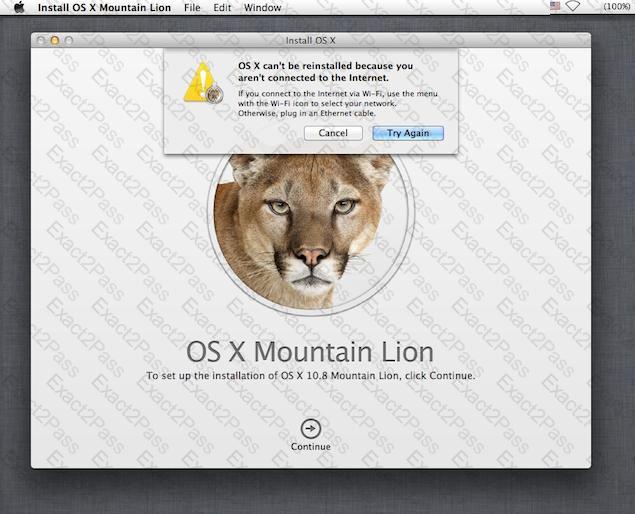
While attempting to reinstall OS X Mountain Lion in Recovery mode, you get the error message shown above. Your Mac is physically connected to an Ethernet network. Which tool can you use to diagnose the problem further?

A.

Internet Connect

B.

Network Preferences

C.

Network Diagnostics

D.

Network Utility

Question # 9

Which statement best describes how Time Machine stores files from an OS X Mountain Lion computer, when backing up to a directlyconnected FireWire hard disk drive?

A.

Each file is saved to the external hard disk once. Files that do not change between backups are represented by hard links to save space.

B.

Each file is saved to the external hard disk once. Files that do not change between backups are represented by symbolic links to save space.

C.

Each file is saved to the external hard disk once. File changes are stored in a database on the external hard disk.

D.

Each file is rewritten to the external hard disk during each backup.

Question # 10

You have configured several network locations on your OS X Mountain Lion computer. How can you change from one location to another?


A.

In Network preferences, click Advanced, click Manage Locations, and then select a network location.

B.

Choose a network location from the Network Locations Input menu on the right side of the Finder menu bar.

C.

Choose Location from the Apple menu, and then choose a network location from the submenu.

D.

In Network preferences, choose Manage Locations from the Action pop-up menu below the Interfaces list, and select a network location.

Go to page: