Exact2Pass

Last Update 12 hours ago Total Questions : 45
The Dell SONiC Deploy Exam content is now fully updated, with all current exam questions added 12 hours ago. Deciding to include D-SNC-DY-00 practice exam questions in your study plan goes far beyond basic test preparation.
You'll find that our D-SNC-DY-00 exam questions frequently feature detailed scenarios and practical problem-solving exercises that directly mirror industry challenges. Engaging with these D-SNC-DY-00 sample sets allows you to effectively manage your time and pace yourself, giving you the ability to finish any Dell SONiC Deploy Exam practice test comfortably within the allotted time.
Configure a VRF called " VrfGreen " and the static route in it to network 172.16.128.64/28 through next-hop 10.10.10.1. Set an administrative distance of 213.

VLAN 40 is configured in Switch A with an anycast-address of 192.168.40.254/24. The ARP neighbor suppression is enabled. Use the simulator to create a VTEP named vtep1 and assign an IP address of
10.10.10.1. Map the VNI 400 to VLAN 40.
Configure the system to meet these requirements.
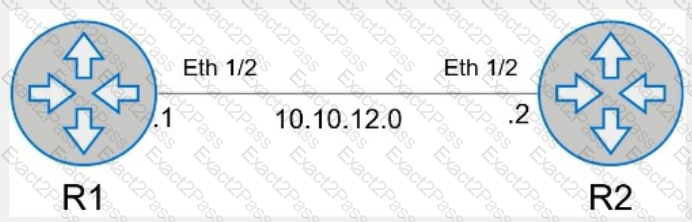
. Configure R1 with AS 1.
. R1 must use a static neighbor assignment for BGP peering.
. R1 needs to redistribute all current and future connected IPv4 routes.
All the required BGP configurations have already been completed on R2.
R2 resides in BGP AS 2.
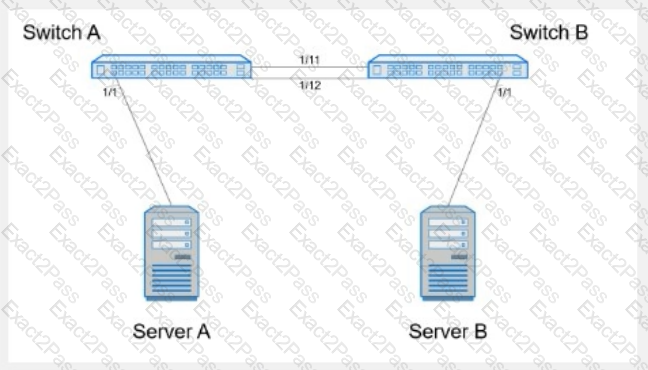
Create port channel 10 on interfaces Eth 1/11 and 1/12, so that it connects to an already configured switch. A server will be connected on Eth 1/1. Both the server and port channel need VLAN 1 untagged and only VLAN 10 tagged.
Complete the configuration on Switch A.
Use the simulator to perform the following configuration task.
1. Map a single-tagged CVLAN 100 to SVLAN 200 translation on PE
switch interface Eth1/1.
2. Map a double-tagged VLAN packet with an outer CVLAN 100 and an
inner dot1q 200 to SVLAN 300 translation on PE switch interface
Eth1/2.
The necessary VLANs and VLAN stacking have already been configured.

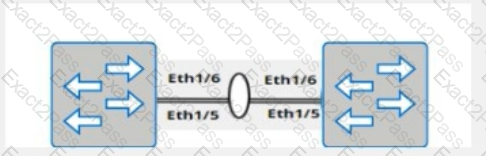
A customer must configure a peer link between two switches in the L2 MC-LAG scenario.
SwitchB has already been configured. Configure the peer link on SwitchA.
Use the following configuration information:
MC-LAG domain 1
VLAN 101
Peer link Port-Channel 100
SwitchA IP: 192.168.1.1/24
SwitchB IP: 192.168.1.2/24
MC-LAG system MAC: 00:00:00:11:11:11
The physical ports to connect the peer switch are Eth 1/5 and Eth 1/6 for each switch.
Refer to the exhibit.
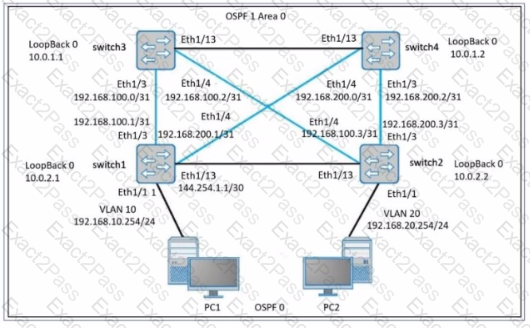
The router ID has not been manually configured. What router ID is used for Switch 3?

