Exact2Pass

Last Update 23 hours ago Total Questions : 41
The Red Hat Certified Specialist in Ansible Automation exam content is now fully updated, with all current exam questions added 23 hours ago. Deciding to include EX407 practice exam questions in your study plan goes far beyond basic test preparation.
You'll find that our EX407 exam questions frequently feature detailed scenarios and practical problem-solving exercises that directly mirror industry challenges. Engaging with these EX407 sample sets allows you to effectively manage your time and pace yourself, giving you the ability to finish any Red Hat Certified Specialist in Ansible Automation exam practice test comfortably within the allotted time.
Using the Simulation Program, perform the following tasks:
Static Inventories Task:
1. Add a new group to your default ansible host file. call the group [ec2]
2. Add a new host to the new group you created.
3. Add a variable to a new host entry in the /etc/ansible/hosts file. Add the following. localhost http_port=80 maxRequestsPerChild=808
4. Check to see if maxRequestsPerChild is pulled out with an ad-hoc command.
5. Create a local host file and put a target group and then a host into it. Then ping it with an ad-hoc command.
===================================================================================
control.realmX.example.com _ workstation.lab.example.com
node1.realmX.example.com _ servera.lab.example.com
node2.realmX.example.com _ serverb.lab.example.com
node3.realmX.example.com _ serverc.lab.example.com
node4.realmX.example.com _ serverd.lab.example.com
node5.realmX.example.com
- username:root, password:redhat
- username:admin, password:redhat
note1. don’t change ‘root’ or ‘admin’ password.
note2. no need to create ssh-keygen for access, its pre-defined
note3. SELinux is in enforcing mode and firewalld is disabled/stop on whole managed hosts.
===================================================================================
Create a playbook called web.yml as follows:
* The playbook runs on managed nodes in the " dev " host group
* Create the directory /webdev with the following requirements:
-- > membership in the apache group
-- > regular permissions: owner=r+w+execute, group=r+w+execute, other=r+execute
s.p=set group-id
* Symbolically link /var/www/html/webdev to /webdev
* Create the file /webdev/index.html with a single line of text that reads:
“Development”
-- > it should be available on http://servera.lab.example.com/webdev/index.html
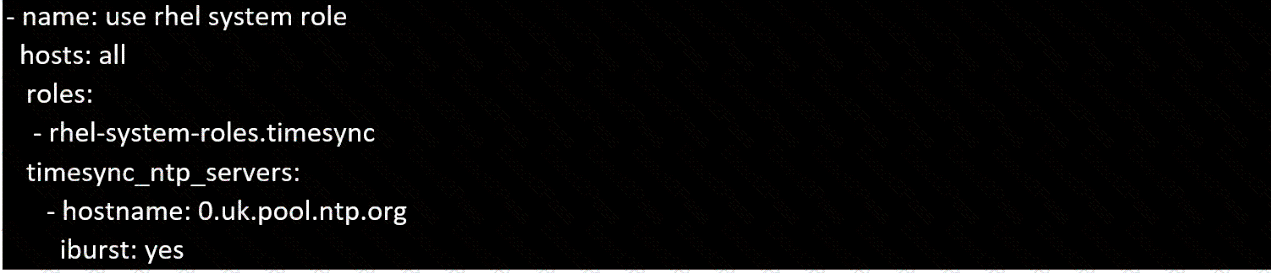
Create a playbook /home/bob/ansible/timesync.yml that runs on hosts in the webservers host group and does the following:
• Uses the timesync RHEL system role.
• Sets the ntp server to 0.uk.pool.ntp.org
• Sets the timezone to UTC
Create a playbook called issue.yml in /home/sandy/ansible which changes the file /etc/issue on all managed nodes: If host is a member of (lev then write " Development " If host is a membe r of test then write " Test " If host is a member of prod then write " Production "
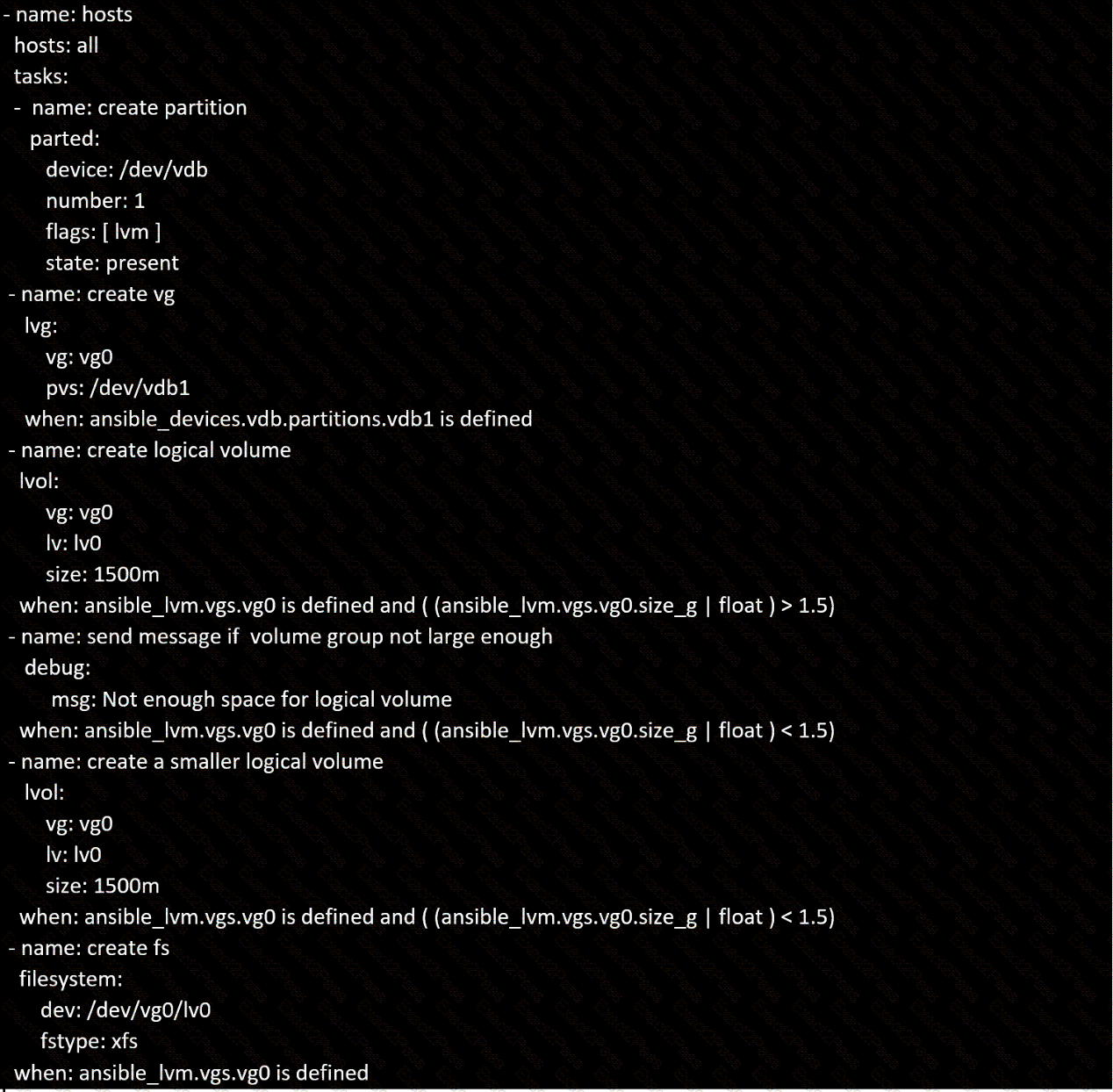
In /home/sandy/ansible/ create a playbook called logvol.yml. In the play create a logical volume called Iv0 and make it of size 1500MiB on volume group vgO If there is not enough space in the volume group print a message " Not enough space for logical vol ume " and then make a 800MiB Iv0 instead. If the volume group still doesn ' t exist, create a message " Volume group doesn ' t exist " Create an xfs filesystem on all Iv0 logical volumes. Don ' t mount the logical volume.
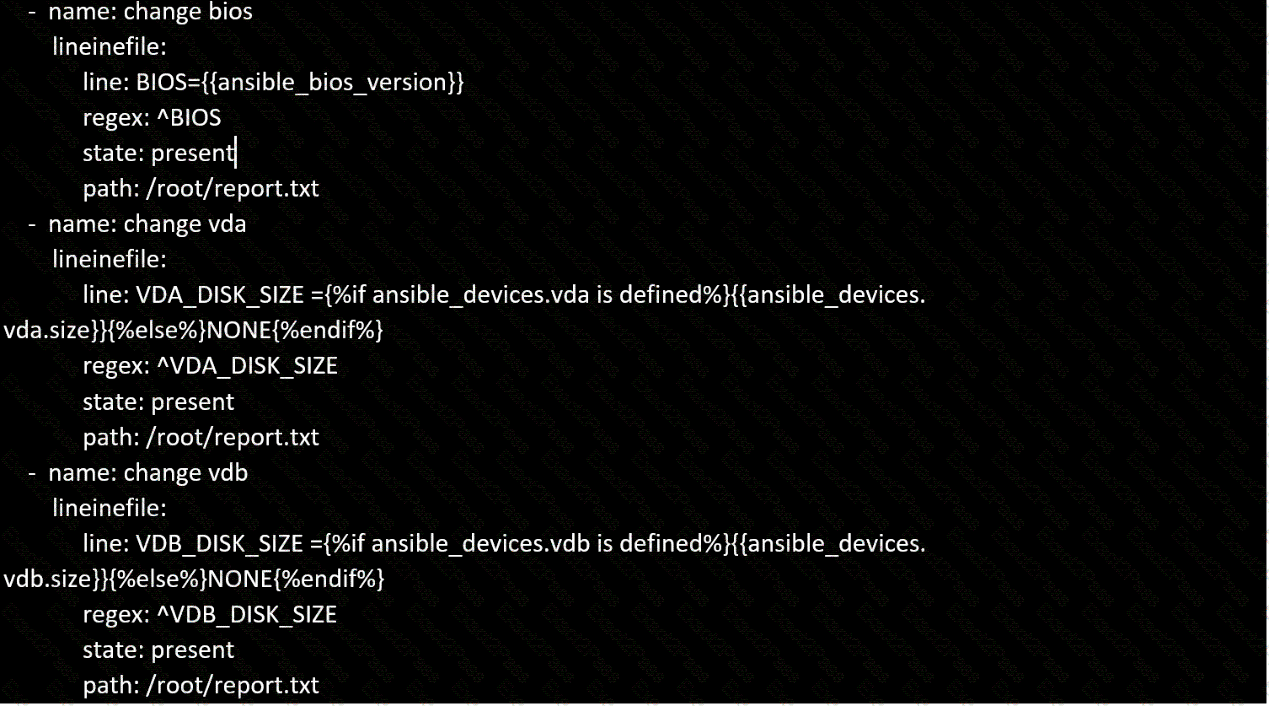
Create a file in /home/sandy/ansible/ called report.yml. Using this playbook, get a file called report.txt (make it look exactly as below). Copy this file over to all remote hosts at /root/report.txt. Then edit the lines in the file to provide the real information of the hosts. If a disk does not exist then write NONE.

Create a playbook that changes the default target on all nodes to multi-user tarqet. Do this in playbook file called target. yml in /home/sandy/ansible
===================================================================================
control.realmX.example.com _ workstation.lab.example.com
node1.realmX.example.com _ servera.lab.example.com
node2.realmX.example.com _ serverb.lab.example.com
node3.realmX.example.com _ serverc.lab.example.com
node4.realmX.example.com _ serverd.lab.example.com
node5.realmX.example.com
- username:root, password:redhat
- username:admin, password:redhat
note1. don’t change ‘root’ or ‘admin’ password.
note2. no need to create ssh-keygen for access, its pre-defined
note3. SELinux is in enforcing mode and firewalld is disabled/stop on whole managed hosts.
===================================================================================
Create user accounts
------------------------
-- > A list of users to be created can be found in the file called user_list.yml
which you should download from http://classroom.example.com/user_list.yml and
save to /home/admin/ansible/
-- > Using the password vault created elsewhere in this exam, create a playbook called
create_user.yml
that creates user accounts as follows:
-- > Users with a job description of developer should be:
-- > created on managed nodes in the " dev " and " test " host groups assigned the
password from the " dev_pass "
variable and these user should be member of supplementary group " devops " .
-- > Users with a job description of manager should be:
-- > created on managed nodes in the " prod " host group assigned the password from
the " mgr_pass " variable
and these user should be member of supplementary group " opsmgr "
-- > Passwords should use the " SHA512 " hash format. Your playbook should work using
the vault password file
created elsewhere in this exam.
while practising you to create these file hear. But in exam have to download as per
questation.
user_list.yml file consist:
---
user:
- name: user1
job: developer
- name: user2
job: manager
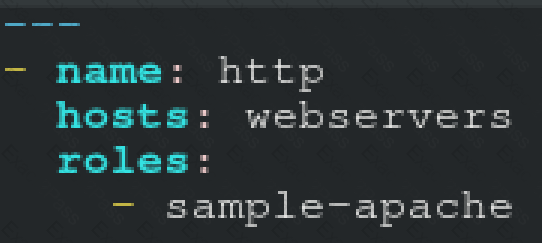
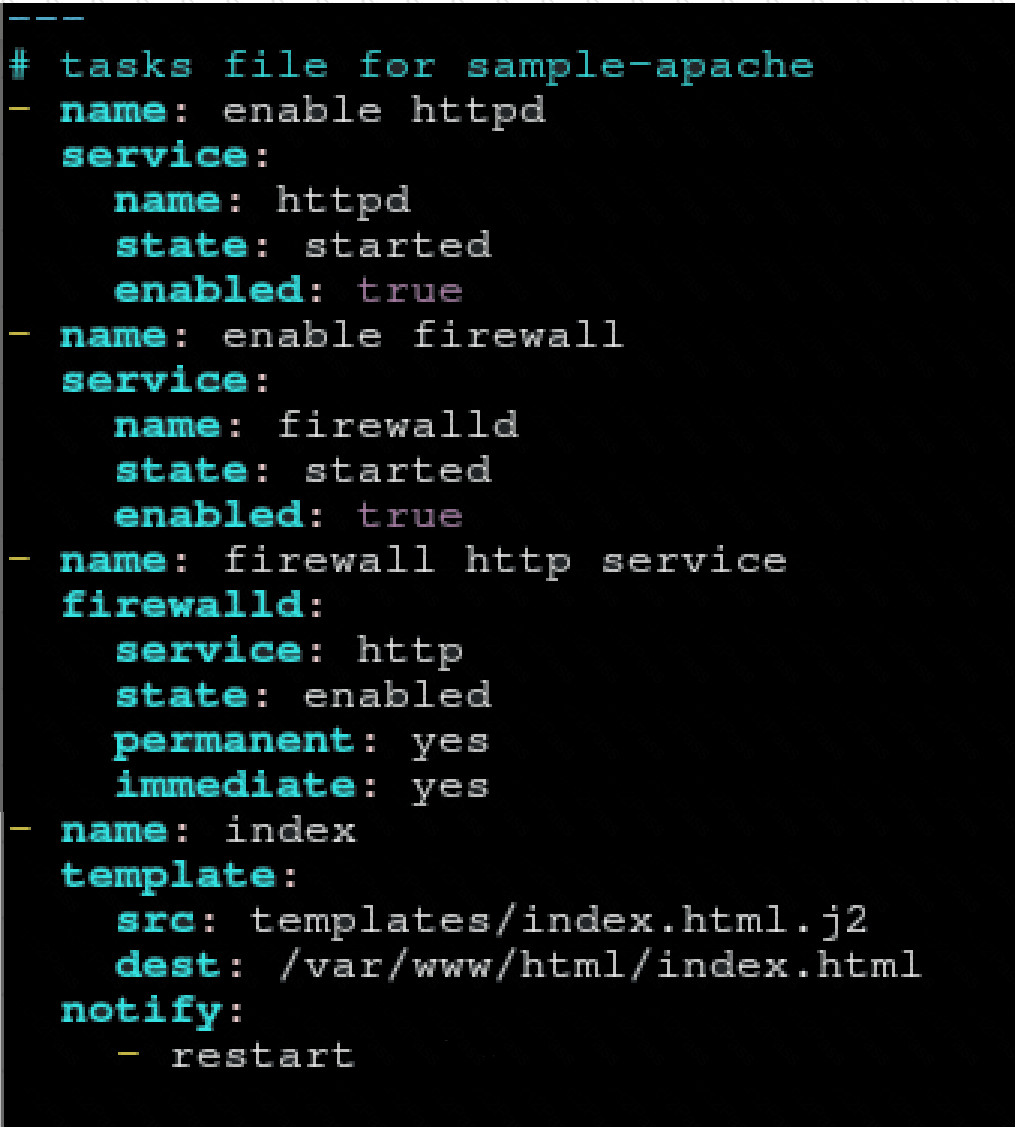
Create a role called sample-apache in /home/sandy/ansible/roles that enables and starts httpd, enables and starts the f irewall and allows the webserver service. Create a template called index.html.j2 which creates and serves a message from /var/www/html/index.html Whenever the content of the file changes, restart the webserver service.
Welcome to [FQDN] on [IP]
Replace th e FQDN with the fully qualified domain name and IP with the ip address of the node using ansible facts. Lastly, create a playbook in /home/sandy/ansible/ called apache.yml and use the role to serve the index file on webserver hosts.
Create a playbook called regulartasks.yml which has the system that append the date to /root/datefile every day at noon. Name is job ' datejob '