Exact2Pass

Last Update 16 hours ago Total Questions : 26
The Red Hat Certified Specialist in Advanced Automation: Ansible Best Practices content is now fully updated, with all current exam questions added 16 hours ago. Deciding to include EX447 practice exam questions in your study plan goes far beyond basic test preparation.
You'll find that our EX447 exam questions frequently feature detailed scenarios and practical problem-solving exercises that directly mirror industry challenges. Engaging with these EX447 sample sets allows you to effectively manage your time and pace yourself, giving you the ability to finish any Red Hat Certified Specialist in Advanced Automation: Ansible Best Practices practice test comfortably within the allotted time.
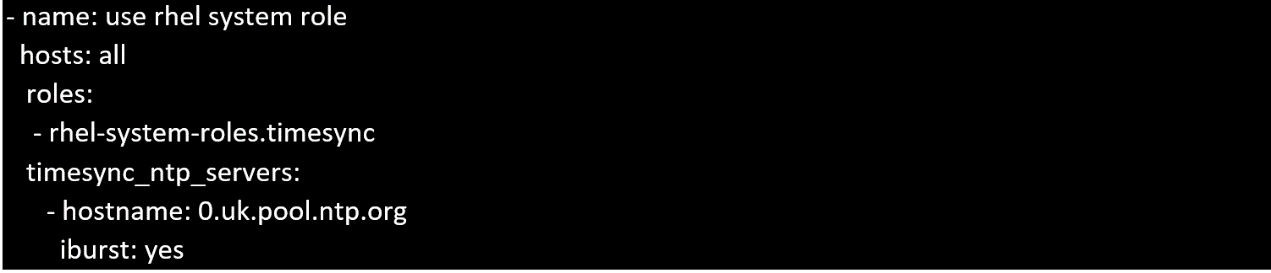
Create a playbook /home/bob/ansible/timesync.yml that runs on hosts in the webservers host group and does the following:
• Uses the timesync RHEL system role.
• Sets the ntp server to 0.uk.pool.ntp.org
• Sets the timezone to UTC
Install and configure ansible
User bob has been created on your control node. Give him the appropriate permissions on the control node. Install the necessary packages to run ansible on the control node.
Create a configuration file /home/bob/ansible/ansible.cfg to meet the following requirements:
• The roles path should include /home/bob/ansible/roles, as well as any other path that may be required for the course of the sample exam.
• The inventory file path is /home/bob/ansible/inventory.
• Ansible should be able to manage 10 hosts at a single time.
• Ansible should connect to all managed nodes using the bob user.
Create an inventory file for the following five nodes:
nodel.example.com
node2.example.com
node3.example.com
node4.example.com
node5.example.com
Configure these nodes to be in an inventory file where node1 is a member of group dev. nodc2 is a member of group test, nodc3 is a member of group proxy , nodc4 and node 5 are members of group prod. Also, prod is a member of group webservers.
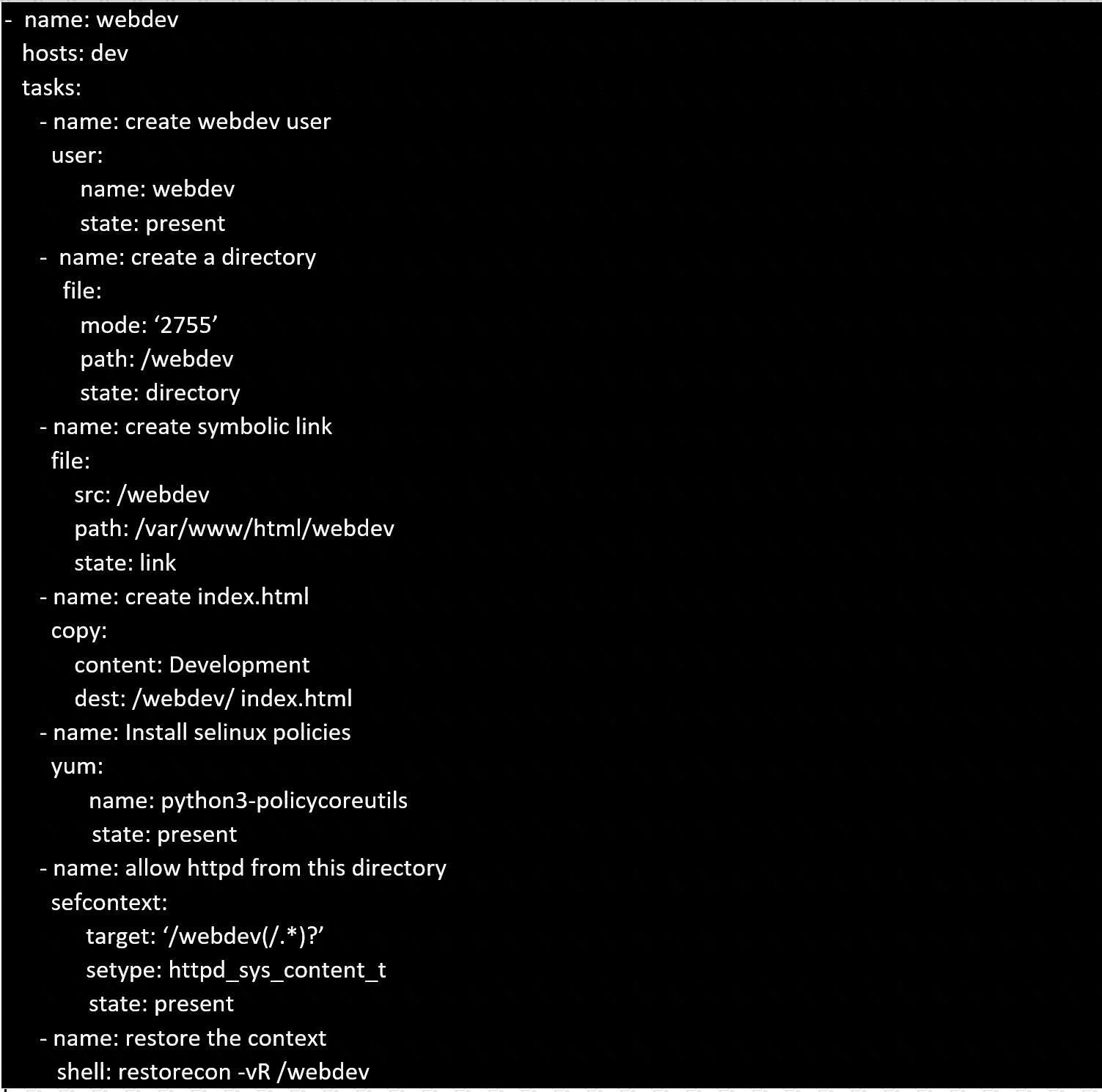
Create a playbook called webdev.yml in 'home/sandy/ansible . The playbook will create a directory Avcbdev on dev host. The permission of the directory are 2755 and owner is webdev. Create a symbolic link from /Webdev to /var/www/html/webdev. Serve a file from Avebdev7index.html which display s the text "Development" Curl http://nod e1 . e xample.com/w e bd e v/index.html to test
Create a jinja template in /home/sandy/ansible/ and name it hosts.j2. Edit this file so it looks like the one below. The o rder of the nodes doesn't matter. Then create a playbook in /home/sandy/ansible called hosts.yml and install the template on dev node at /root/myhosts

Using the Simulation Program, perform the following tasks:
Ad-Hoc Ansible Commands (Number Two) Task:
1. Use the ad-hoc command to make sure php is installed.
2. Use the ad-hoc command to make sure that php is installed and is the latest version.
3. Use the ad-hoc command to make sure that httpd is installed.
4. Use the ad-hoc command to remove httpd from the servers.
Create the users in the file usersjist.yml file provided. Do this in a playbook called users.yml located at /home/sandy/ansible. The passwords for these users should be set using the lock.yml file from TASK7. When running the playbook, the lock.yml file should be unlocked with secret.txt file from TASK 7.
All users with the job of 'developer' should be created o n the dev hosts, add them to the group devops, their password should be set using the pw_dev variable. Likewise create users with the job of 'manager' on the proxy host and add the users to the group 'managers', their password should be set using the pw_mg r variable.

Create a playbook that changes the default target on all nodes to multi-user tarqet. Do this in playbook file called target. yml in /home/sandy/ansible