Exact2Pass

Last Update 14 hours ago Total Questions : 89
The Oracle Inventory Cloud 2024 Implementation Professional content is now fully updated, with all current exam questions added 14 hours ago. Deciding to include 1z0-1073-24 practice exam questions in your study plan goes far beyond basic test preparation.
You'll find that our 1z0-1073-24 exam questions frequently feature detailed scenarios and practical problem-solving exercises that directly mirror industry challenges. Engaging with these 1z0-1073-24 sample sets allows you to effectively manage your time and pace yourself, giving you the ability to finish any Oracle Inventory Cloud 2024 Implementation Professional practice test comfortably within the allotted time.
What does order promising do when Promising Mode is set to Supply Chain Availability Search in the ATP rule definition?
Item AS56001 has 10 on-hand quantities. In the Item Availability window, Available to Transact is equal to On-Hand Quantity. However, Available to Reserve is 0 and no reservations exist for this item.
What could be two reasons for 0 Available to Reserve?
Your customer wants to track and approve inventory transactions between two inventory organizations handling high value goods.
What are the two types of inventory transactions recommended?
How Back-to-Back Fulfillment Works
The back-to-back process flow is one in which specific sales order demand triggers supply creation and a link is established between the sales order and the supply.
An organization procures goods from an internal or external supplier or source to a specific warehouse from where you can combine those goods with others to create a single shipment to the customer.
Back-to-back supply processes are similar to regular supply processes that deliver supply to a warehouse except for one difference; the back-to-back supply is always reserved to an order management fulfillment line.
At a high level, you can think of back-to-back fulfillment as a three-step process:
1. Creation of a customer sales order (source of demand).
2. Creation and fulfillment of supply document (source of supply) to the fulfillment warehouse.
3. Shipment of sales order from the fulfillment warehouse to the customer.
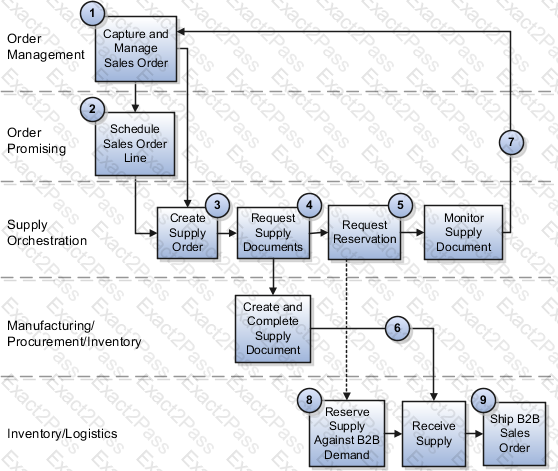
However, the back-to-back flow is truly a highly integrated process flow involving several Oracle Fusion Cloud applications. The following figure shows the back-to-back process flow in detail. An explanation for each number follows the figure.
Where do Oracle Supply Chain applications derive their legal entity information from?
Item A is transacted in lots. Your customer wants to pick more than the requested quantity for Item A during pick slip confirmation.
How can this requirement be achieved?
Against a Purchase Order quantity of 100, your receiving agent has received 50 items in the receiving type subinventory. Later in the day, 25 items have been put away to inventory. What is the item availability in the Manage Item Quantity UI?
Back-to-Back Supply Creation Make Flow
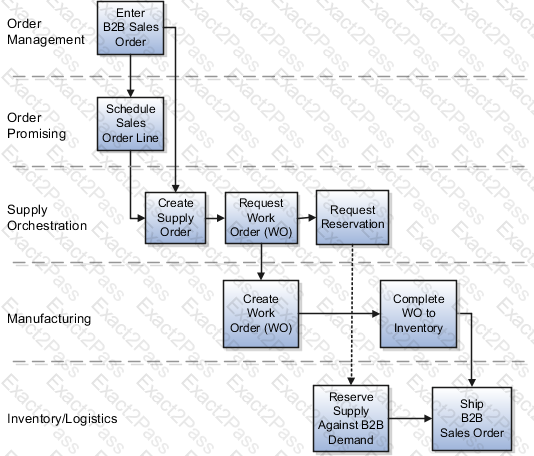
The supply document for a back-to-back make flow is a work order. As soon as the work order is created in Oracle Fusion Cloud Manufacturing, it ' s tied to the back-to-back sales order in the form of a reservation in inventory. The work order goes through the regular production process and the work order completion transaction issues finished goods to inventory.
Note: Back-to-back flow is currently supported for only discrete manufacturing.
The following figure shows the back-to-back supply creation make flow.
Back-to-Back Supply Creation Transfer Flow
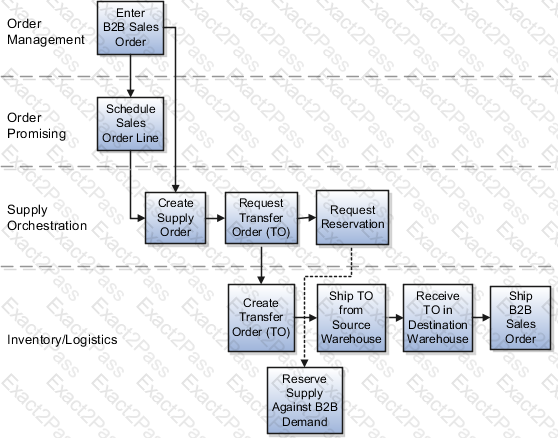
The supply document for a back-to-back transfer flow is a transfer order. The transfer order is created in inventory and reserved against the back-to-back sales order. When the transfer order is ready to be fulfilled, an interorganization shipment moves goods from the source organization to the destination organization. An interorganization receipt in the destination organization (which is also the fulfillment warehouse on the back-to-back sales order) creates on hand to fulfill the sales order.
The following figure shows the back-to-back supply creation transfer flow.
Set Up Back-to-Back Transfer Flow
The topic explains what you need to do for setting up back-to-back transfer flow.
In the Oracle Product Information Management, ensure that the Item is Back-to-Back enabled.
In Oracle Global Order Promising:
1. Set up a global sourcing rule with Type as Transfer from. Set the organization as the organization requesting the transfer (example, Warehouse 1).
2. Set up a local sourcing rule for the organization (in this example, Warehouse 1) Type as Transfer from, from the organization that has the stock from which the transfer will take place (example, Warehouse 2).
3. Set up an ATP rule with the Promising Mode as Supply chain availability search.
4. Ensure that the Supply chain availability search attributes are enabled according to your requirements. For example, you might want the application to search components and resources to include on-hand or in-transit Supply Types or fulfillment lines Demand Types.
5. Set the ATP Rule Assignment as required.
6. Set the sourcing assignments for the sourcing rules that you defined in steps 1 and 2.
7. Ensure that the assignment level used for the global sourcing rule doesn ' t include any Organization.
8. Refresh and restart the Order Promising Server for ATP Rules and Sourcing.
With this setup:
• The global rule is used to source the item from Warehouse 1 if there is stock available to reserve.
• If there ' s no stock on hand, Global Order Promising uses the local rule to transfer the item from Warehouse 2 to Warehouse 1.


 A screenshot of a computer
AI-generated content may be incorrect.
A screenshot of a computer
AI-generated content may be incorrect.