Exact2Pass

Last Update 21 hours ago Total Questions : 49
The Flutter Certified Application Developer content is now fully updated, with all current exam questions added 21 hours ago. Deciding to include AFD-200 practice exam questions in your study plan goes far beyond basic test preparation.
You'll find that our AFD-200 exam questions frequently feature detailed scenarios and practical problem-solving exercises that directly mirror industry challenges. Engaging with these AFD-200 sample sets allows you to effectively manage your time and pace yourself, giving you the ability to finish any Flutter Certified Application Developer practice test comfortably within the allotted time.
Assume that you designed a Flutter app as illustrated in the image of this question. When you tapped the "Bottom Sheet" button, you got a bottom sheet including the text "Welcome to Android ATC".
But, you were not able to tap the "Test Button" button in this app interface when this bottom sheet was
active.
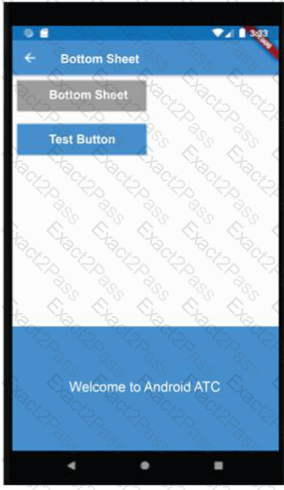
Which of the following choices about the type of this Bottom Sheet Widget is correct?
To configure a CheckboxGroup or a RadioButtonGroup in a Flutter app, first you should set the configurations which are illustrated in the image of this question.
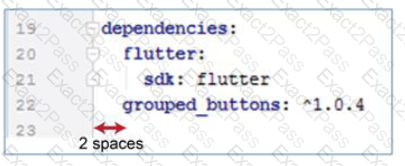
What is the file name which includes these configurations?
When you want to create a Flutter app, you need to configure a lot of widgets and change their format. You don't need to create everything from scratch. You can easily add the Scaffold class or widget to your app. This class implements the basic material design visual layout structure for your app.
If you install the Flutter SDK on your computer and configure it as a plug-in for Android Studio or another IDE software, Android Studio will be able to create Flutter apps.

