Exact2Pass

Last Update 12 hours ago Total Questions : 115
The Salesforce Certified CRM Analytics and Einstein Discovery Consultant Exam (SP25) content is now fully updated, with all current exam questions added 12 hours ago. Deciding to include CRM-Analytics-and-Einstein-Discovery-Consultant practice exam questions in your study plan goes far beyond basic test preparation.
You'll find that our CRM-Analytics-and-Einstein-Discovery-Consultant exam questions frequently feature detailed scenarios and practical problem-solving exercises that directly mirror industry challenges. Engaging with these CRM-Analytics-and-Einstein-Discovery-Consultant sample sets allows you to effectively manage your time and pace yourself, giving you the ability to finish any Salesforce Certified CRM Analytics and Einstein Discovery Consultant Exam (SP25) practice test comfortably within the allotted time.
Universal Containers has a dashboard for sales managers that want to visualize their win rate.
Which chart type should the consultant use to keep track of targets?
A manager at Cloud Kicks asks for data in a dashboard to be refreshed after the sync of an external connection to Google BigQuery.
How should the consultant accomplish this?
A new picklist value was added for the Category field on the Account object. This field is already added as part of the Account object data sync and the respective recipe that uses this field.
The CRM Analytics team reports that when they start the recipe it runs successfully with no errors or warnings, but theyare unable to See this new valueson their existing dashboards.
What is the oridi4 of this issue?
Several users are complaining they are unable to see a specific dashboard on a Salesforce Lightning page anymore. The CRM Analytics consultant logs in as one of the users and sees an error
page once the dashboard is opened.
How should the consultant solve this issue?
In Data Alerts, a field named Region is 96.5% North America. The consultant believes that this is an important field since the majority of sales is in the North American market.
What is the appropriate action?
Exhibit.
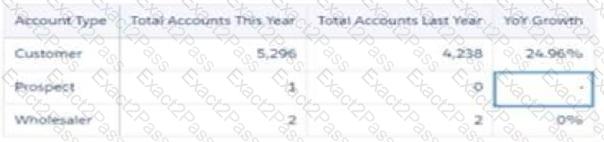
Universal Containers has a dashboard for sales managers to visualize the Year Over Year (YoY) growth of their customers. The formula used is:
YoY = [(This Year — Last Year) / Last Year] %
Based on the graphic, when there is not an account in the Last Year column, the YoY Growth shows null results. The sales managers want to replace it with 100% value.
What is the correct function to use?
Universal Containers plans to upload target data from an external tool to CRM Analytics so it can calculate the sales team target attainments.
The target data changes every month, so the datasets need to be updated on a monthly basis. The target data is a CSV file that contains the Salesforce ID of the sales rep, the target amount, and the month of the target. For each sales rep, the file contains a target for every month of the current year as well as all previous years.
Based on this information, which operation should a consultant use with the Analytics External Data API to upload the file?
consultant is reviewing a model that is set to maximize the daily sales quantity of consumer products in stores, and they see this recommendation.
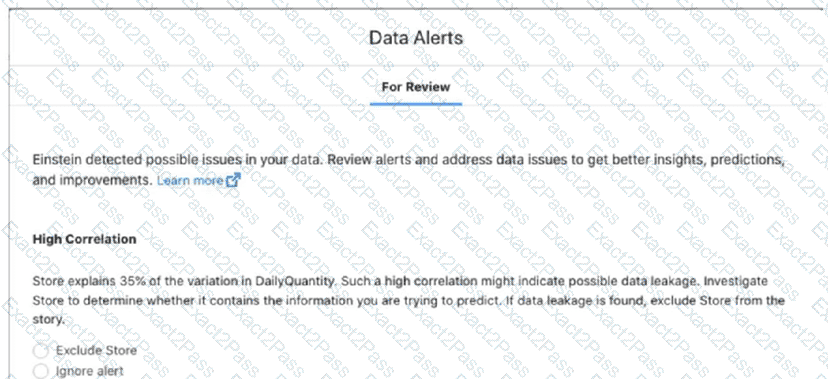
Which action should the consultant take?
Acompany wants to create a timeline chart to visualize the evolution of its Closed Won opportunities.
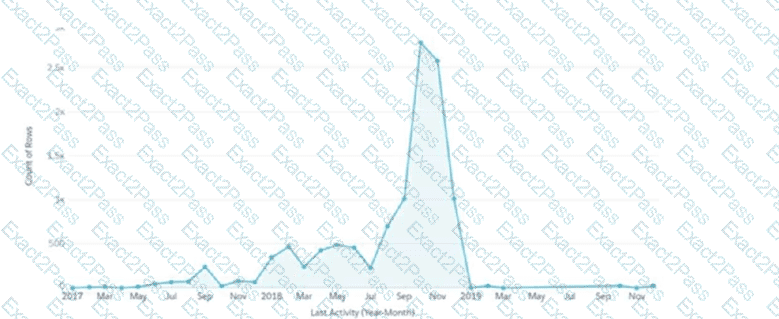
What are the required parameters to build a lens that displays output similar to the image shown?
A CRM Analytics consultant is updating an existing recipe.
They are looking to add a few additional fields onto the Account dataset. One of the fields to be added is a multi-select picklist field that needs to be shown as text on the dashboard.
What should the consultant do to accomplish this?

