Exact2Pass

Last Update 7 hours ago Total Questions : 89
The Oracle Inventory Cloud 2025 Implementation Professional content is now fully updated, with all current exam questions added 7 hours ago. Deciding to include 1z0-1073-25 practice exam questions in your study plan goes far beyond basic test preparation.
You'll find that our 1z0-1073-25 exam questions frequently feature detailed scenarios and practical problem-solving exercises that directly mirror industry challenges. Engaging with these 1z0-1073-25 sample sets allows you to effectively manage your time and pace yourself, giving you the ability to finish any Oracle Inventory Cloud 2025 Implementation Professional practice test comfortably within the allotted time.
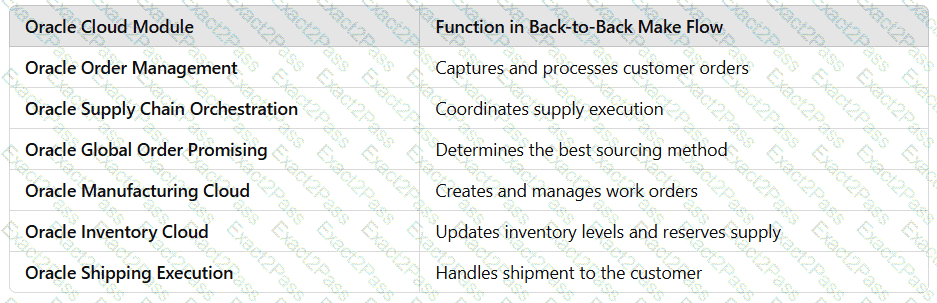
Back-to-Back Supply Creation Make Flow
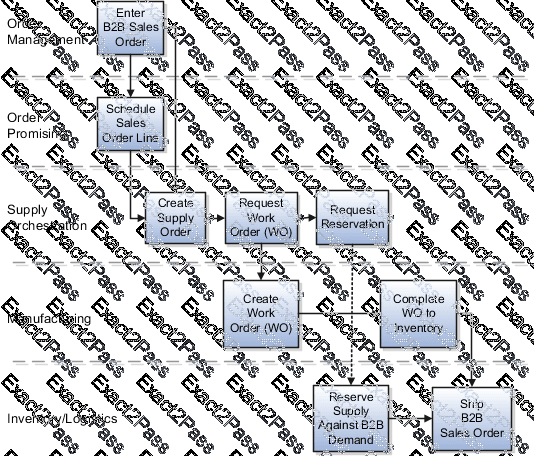
The supply document for a back-to-back make flow is a work order. As soon as the work order is created in Oracle Fusion Cloud Manufacturing, it ' s tied to the back-to-back sales order in the form of a reservation in inventory. The work order goes through the regular production process and the work order completion transaction issues finished goods to inventory.
Note: Back-to-back flow is currently supported for only discrete manufacturing.
The following figure shows the back-to-back supply creation make flow.
Back-to-Back Supply Creation Transfer Flow
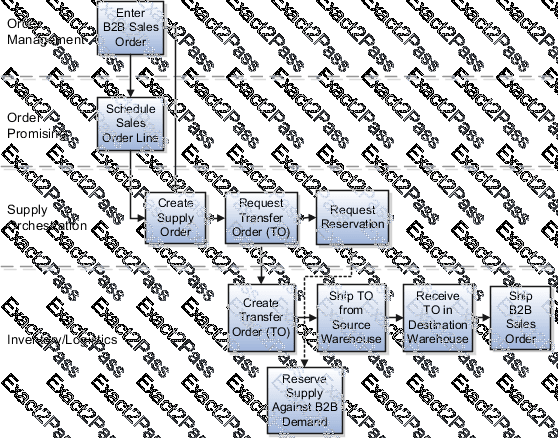
The supply document for a back-to-back transfer flow is a transfer order. The transfer order is created in inventory and reserved against the back-to-back sales order. When the transfer order is ready to be fulfilled, an interorganization shipment moves goods from the source organization to the destination organization. An interorganization receipt in the destination organization (which is also the fulfillment warehouse on the back-to-back sales order) creates on hand to fulfill the sales order.
The following figure shows the back-to-back supply creation transfer flow.
Set Up Back-to-Back Transfer Flow
The topic explains what you need to do for setting up back-to-back transfer flow.
In the Oracle Product Information Management, ensure that the Item is Back-to-Back enabled.
In Oracle Global Order Promising:
1. Set up a global sourcing rule with Type as Transfer from. Set the organization as the organization requesting the transfer (example, Warehouse 1).
2. Set up a local sourcing rule for the organization (in this example, Warehouse 1) Type as Transfer from, from the organization that has the stock from which the transfer will take place (example, Warehouse 2).
3. Set up an ATP rule with the Promising Mode as Supply chain availability search.
4. Ensure that the Supply chain availability search attributes are enabled according to your requirements. For example, you might want the application to search components and resources to include on-hand or in-transit Supply Types or fulfillment lines Demand Types.
5. Set the ATP Rule Assignment as required.
6. Set the sourcing assignments for the sourcing rules that you defined in steps 1 and 2.
7. Ensure that the assignment level used for the global sourcing rule doesn ' t include any Organization.
8. Refresh and restart the Order Promising Server for ATP Rules and Sourcing.
With this setup:
• The global rule is used to source the item from Warehouse 1 if there is stock available to reserve.
• If there ' s no stock on hand, Global Order Promising uses the local rule to transfer the item from Warehouse 2 to Warehouse 1.
You have created a new material status Transfit allowing Miscellaneous and Purchase Order Receipt transactions.
How can you assign Transfit as a default lot status?
Back to Back fulfillment
Overview of Back-to-Back Fulfillment
The back-to-back fulfillment process is one in which specific sales order demand triggers supply creation, and a link is established between the sales order and the supply.
Note: Back-to-back flow is currently supported only for discrete manufacturing.
The following figure provides a high-level flow diagram showing the back-to-back supply creation and fulfillment process flow.
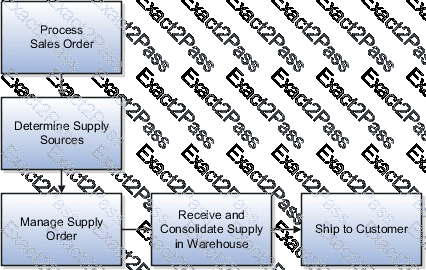
Back-to-back fulfillment is where supply is procured and then received at a warehouse only after an order is placed.
The supply is reserved against a sales order until shipping.
This process provides support to create and link supply after a sales order is entered and scheduled, allowing you to reduce your inventory while maintaining the ability to respond to customer demands.
You create supply for a back-to-back order using one or more of the following back-to-back flows:
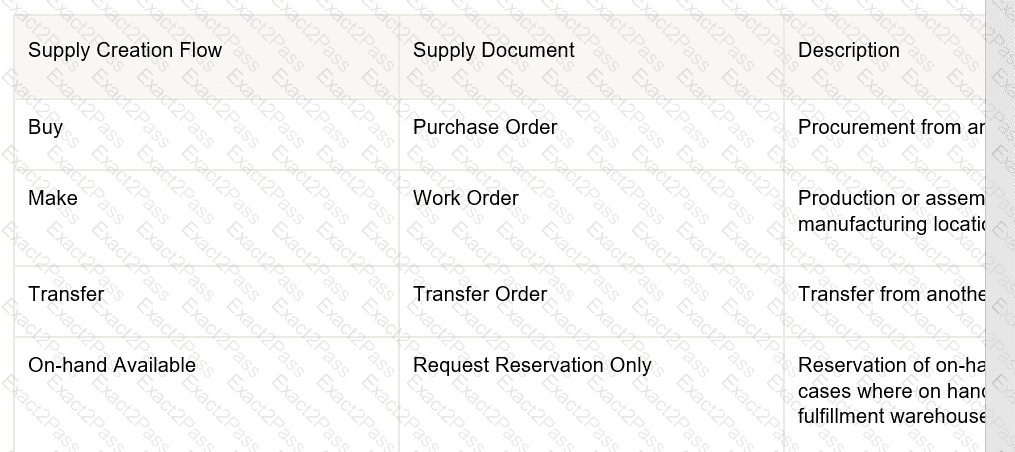
• Buy: Procurement from an external supplier.
• Make: Production in an internal manufacturing facility (includes in-house manufacturing and contract manufacturing).
• Transfer: Transfer from another warehouse.
• On hand: Reservation of on-hand supply in the fulfillment organization.
Note: For information about back-to-back flows for contract manufacturing, see the Implementing Contract Manufacturing chapter in this guide.
After the supply is received into the fulfillment warehouse, the back-to-back order is ready for shipment to the customer.
What are the inventory reservation levels available for an item?
How Back-to-Back Fulfillment Works
The back-to-back process flow is one in which specific sales order demand triggers supply creation and a link is established between the sales order and the supply.
An organization procures goods from an internal or external supplier or source to a specific warehouse from where you can combine those goods with others to create a single shipment to the customer.
Back-to-back supply processes are similar to regular supply processes that deliver supply to a warehouse except for one difference; the back-to-back supply is always reserved to an order management fulfillment line.
At a high level, you can think of back-to-back fulfillment as a three-step process:
1. Creation of a customer sales order (source of demand).
2. Creation and fulfillment of supply document (source of supply) to the fulfillment warehouse.
3. Shipment of sales order from the fulfillment warehouse to the customer.
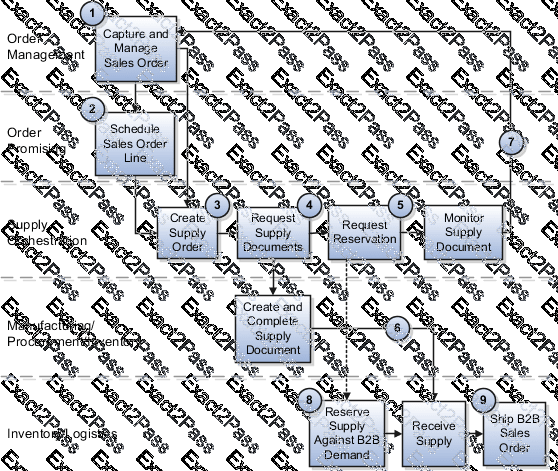
However, the back-to-back flow is truly a highly integrated process flow involving several Oracle Fusion Cloud applications. The following figure shows the back-to-back process flow in detail. An explanation for each number follows the figure.
What can your supplier invoices, created through spreadsheet upload for consigned inventory, be matched against?
You are planning to create a new transaction type, Audit Movement, to track all inventory movements planned for periodical audit in your warehouse.Which statement is true about the Audit Movement transaction type?
Which three statements are true regarding material status control?
You can change the material status at the time the items are received. (*)
Back-to-Back Supply Creation Flows
You can set up Oracle Fusion Cloud applications that support back-to-back fulfillment to trigger supply creations flows (buy, make, transfer, and on hand) after a sales order is entered and scheduled.
Each variant of the back-to-back flow differs in the supply document that ' s created and the supply execution application in which the document is created. Depending on the source of the item, supply is provided from manufacturing, procurement, or inventory. Then, after the supply is received into the fulfillment warehouse, the back-to-back order is ready for shipment to your customer.
The following table describes the supply creation flows and associated supply document supported for each flow when using back-to-back fulfillment.
Back-to-Back Supply Creation Buy Flow
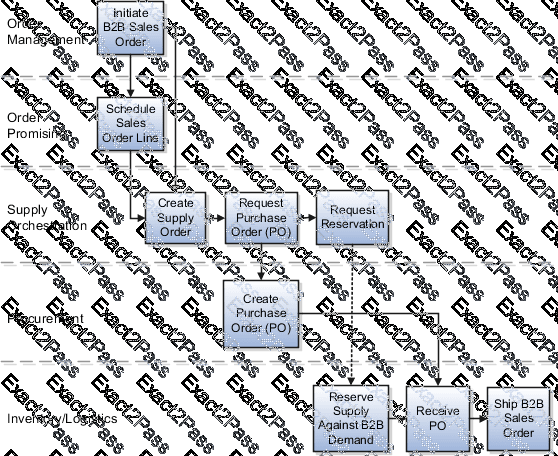
The supply document for a back-to-back buy flow is a purchase order. Based on supply recommendations from Oracle Global Order Promising, a purchase order is created and reserved against the sales order. When the purchase order is received by the supplier, on hand is created to ship out the back-to-back sales order.
The following figure shows the back-to-back supply creation buy flow.


 A screenshot of a computer
AI-generated content may be incorrect.
A screenshot of a computer
AI-generated content may be incorrect.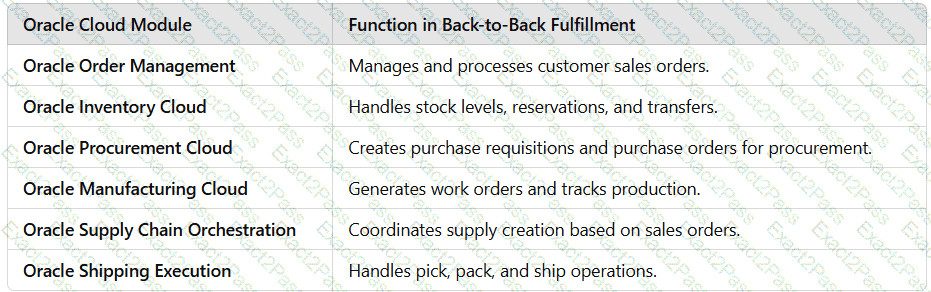 A screenshot of a computer
AI-generated content may be incorrect.
A screenshot of a computer
AI-generated content may be incorrect.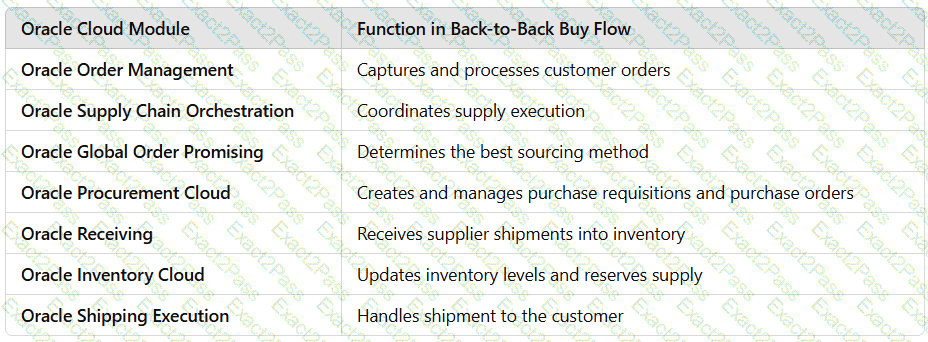 A screenshot of a computer
AI-generated content may be incorrect.
A screenshot of a computer
AI-generated content may be incorrect.