Exact2Pass

Last Update 14 hours ago Total Questions : 93
The VCE Vblock System Deployment and Implementation – Virtualization content is now fully updated, with all current exam questions added 14 hours ago. Deciding to include 210-015 practice exam questions in your study plan goes far beyond basic test preparation.
You'll find that our 210-015 exam questions frequently feature detailed scenarios and practical problem-solving exercises that directly mirror industry challenges. Engaging with these 210-015 sample sets allows you to effectively manage your time and pace yourself, giving you the ability to finish any VCE Vblock System Deployment and Implementation – Virtualization practice test comfortably within the allotted time.
In which document would you find information regarding issues encountered with software revisions?
During the deployment of a Vblock System 320, the customer stresses the importance of network security and states that they would like to have a VM scan and capture all packets on the virtual switch to which it is connected.
Which security policy should you set?
You upgrade an ESXi 4.x host to an ESXi 5.x host using VMware Update Manager. It appears to complete the installation, but the system does not boot. You decide to roll back the host to the previous build. After using the Shift-R option on boot up, you receive the error “No alternative hypervisor to roll back to”.
What is causing this error?
Click the Exhibit button.
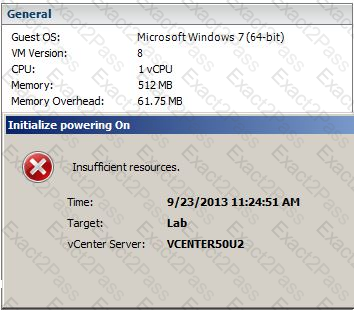
Referring to the exhibit, which two actions would allow powering on the virtual machine? (Choose two.)
A virtual machine appears as orphaned in the virtual infrastructure client but is online and functioning normally over the network.
Which procedure would be used to recover the VM with no down time?
When cloning or creating a virtual machine, storage DRS generates the fault Operation not allowed in the current state.
What will resolve this problem?
While using the vSphere Client, you are experiencing high latency between issuing a search and obtaining a response from one of the four vCenter servers configured for LinkedMode. When using the vSphere Web Client, the inventory tree does not load properly and often shows objects out of date.
How would you improve the troubleshooting process

