Exact2Pass

Last Update 12 hours ago Total Questions : 88
The Red Hat Certified Engineer – RHCE (v6+v7) content is now fully updated, with all current exam questions added 12 hours ago. Deciding to include EX300 practice exam questions in your study plan goes far beyond basic test preparation.
You'll find that our EX300 exam questions frequently feature detailed scenarios and practical problem-solving exercises that directly mirror industry challenges. Engaging with these EX300 sample sets allows you to effectively manage your time and pace yourself, giving you the ability to finish any Red Hat Certified Engineer – RHCE (v6+v7) practice test comfortably within the allotted time.
There were two systems:
system1, main system on which most of the configuration take place
system2, some configuration here
Secured webserver.
Configure the website https://serverX.example.com with TLS
SSLCertificate file http://classroom.example.com/pub/rhce/tls/certs/system1.networkX.crt
SSLCertificatekeyfile http://classroom.example.com/pub/rhce/tls/private/system1.networkX.key
SSL CA certificate file http://classroom.example.com/pub/example-ca.crt
There were two systems:
system1, main system on which most of the configuration take place
system2, some configuration here
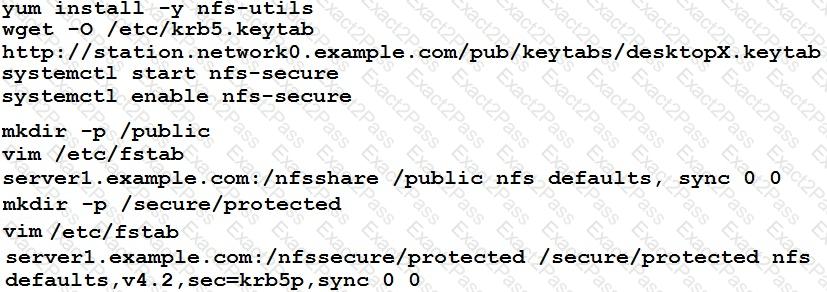
Configure NFS mount.
Mount /nfsshare directory on desktopX under /public directory persistently at system boot time.
Mount /nfssecure/protected with krb5p secured share on desktopX beneath /secure/protected provided with keytab station.network0.example.com/pub/keytabs/desktopX.keytab " > http://station.network0.example.com/pub/keytabs/desktopX.keytab
The user harry is able to write files on /secure directory
There were two systems:
system1, main system on which most of the configuration take place
system2, some configuration here
Configure port forwarding.
Configure server X to forward traffic incoming on port 80/tcp from source network 172.25.X.0/255.255.255.0 to port on 5243/tcp.
RHCE Test Configuration Instructions
Information for the two systems you will use in test is the following:
system1.group3.example.com: is one of the main sever. system2.group3.example.com: mainly used as a client.
Password for both of the two systems is atenorth
System’s IP is provided by DHCP, you can regard it as normal, or you can reset to Static IP in accordance with the following requirements:
system1.group3.example.com: 172.24.3.5
system2.group3.example.com: 172.24.3.10
The subnet mask is 255.255.255.0
Your system is a member of DNS domain group3.example.com. All systems in DNS domain group3.example.com are all in subnet 172.24.3.0/255.255.255.0, the same all systems in this subnet are also in group3.example.com, unless specialized, all network services required to be configured can be accessed by systems of domain group3.
host.group3.example.com provides a centralized authentication service domain
GROUP3.EXAMPLE.COM, both system1 and system2 have already been pre-configured to be the client for this domain, this domain provides the following user account:
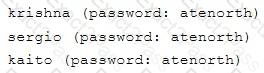
Firewall is enabled by default, you can turn it off when deemed appropriate, other settings about firewall may be in separate requirements.
Your system will be restarted before scoring, so please ensure that all modifications and service configurations you made still can be operated after the restart without manual intervention, virtual machine instances of all examinations must be able to enter the correct multi-user level after restart without manual assistance, it will be scored zero if the test using virtual machine system cannot be restarted or be properly restarted.
Corresponding distribution packages for the testing using operating system Red Hat Enterprise Linux version can be found in the following link:
http://server1.group3.example.com/rhel
Part of the requirements include host security, ensure your host security limit does not prevent the request to allow the host and network, although you correctly configured the network service but would have to allow the host or network is blocked, this also does not score.
You will notice that some requirements which clearly do not allow services be accessed by service domain my133t.org, systems of this domain are in subnet 172.25.1.0/252.255.255.0, and systems of these subnets also belong to my 133t.org domain.
PS: Notice that some test questions may depend on other exam questions, for example, you might be asked to perform a series of restrictions on a user, but this user creation may be required in other questions. For convenient identification, each exam question has some radio buttons to help you identify which questions you have already completed or not completed. Certainly, you do not need to care these buttons if you don’t need them.
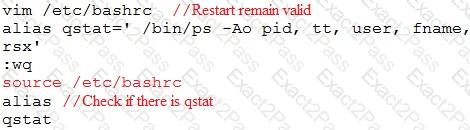
Customize the User Environment
Create a custom command on system1 and system2 named as qstat, and this custom command will execute the following command:
/bin/ps - Ao pid,tt,user,fname,rsz
This command is valid for all users in the system.
RHCE Test Configuration Instructions
Information for the two systems you will use in test is the following:
system1.group3.example.com: is one of the main sever. system2.group3.example.com: mainly used as a client.
Password for both of the two systems is atenorth
System’s IP is provided by DHCP, you can regard it as normal, or you can reset to Static IP in accordance with the following requirements:
system1.group3.example.com: 172.24.3.5
system2.group3.example.com: 172.24.3.10
The subnet mask is 255.255.255.0
Your system is a member of DNS domain group3.example.com. All systems in DNS domain group3.example.com are all in subnet 172.24.3.0/255.255.255.0, the same all systems in this subnet are also in group3.example.com, unless specialized, all network services required to be configured can be accessed by systems of domain group3.
host.group3.example.com provides a centralized authentication service domain
GROUP3.EXAMPLE.COM, both system1 and system2 have already been pre-configured to be the client for this domain, this domain provides the following user account:

Firewall is enabled by default, you can turn it off when deemed appropriate, other settings about firewall may be in separate requirements.
Your system will be restarted before scoring, so please ensure that all modifications and service configurations you made still can be operated after the restart without manual intervention, virtual machine instances of all examinations must be able to enter the correct multi-user level after restart without manual assistance, it will be scored zero if the test using virtual machine system cannot be restarted or be properly restarted.
Corresponding distribution packages for the testing using operating system Red Hat Enterprise Linux version can be found in the following link:
http://server1.group3.example.com/rhel
Part of the requirements include host security, ensure your host security limit does not prevent the request to allow the host and network, although you correctly configured the network service but would have to allow the host or network is blocked, this also does not score.
You will notice that some requirements which clearly do not allow services be accessed by service domain my133t.org, systems of this domain are in subnet 172.25.1.0/252.255.255.0, and systems of these subnets also belong to my 133t.org domain.
PS: Notice that some test questions may depend on other exam questions, for example, you might be asked to perform a series of restrictions on a user, but this user creation may be required in other questions. For convenient identification, each exam question has some radio buttons to help you identify which questions you have already completed or not completed. Certainly, you do not need to care these buttons if you don’t need them.
Configure the SSH Access as required:
Users can visit your two virtual machine systems via clients of domain group3.example.com through SSH remote.
RHCE Test Configuration Instructions
Information for the two systems you will use in test is the following:
system1.group3.example.com: is one of the main sever. system2.group3.example.com: mainly used as a client.
Password for both of the two systems is atenorth
System’s IP is provided by DHCP, you can regard it as normal, or you can reset to Static IP in accordance with the following requirements:
system1.group3.example.com: 172.24.3.5
system2.group3.example.com: 172.24.3.10
The subnet mask is 255.255.255.0
Your system is a member of DNS domain group3.example.com. All systems in DNS domain group3.example.com are all in subnet 172.24.3.0/255.255.255.0, the same all systems in this subnet are also in group3.example.com, unless specialized, all network services required to be configured can be accessed by systems of domain group3.
host.group3.example.com provides a centralized authentication service domain
GROUP3.EXAMPLE.COM, both system1 and system2 have already been pre-configured to be the client for this domain, this domain provides the following user account:
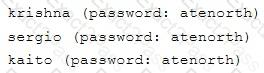
Firewall is enabled by default, you can turn it off when deemed appropriate, other settings about firewall may be in separate requirements.
Your system will be restarted before scoring, so please ensure that all modifications and service configurations you made still can be operated after the restart without manual intervention, virtual machine instances of all examinations must be able to enter the correct multi-user level after restart without manual assistance, it will be scored zero if the test using virtual machine system cannot be restarted or be properly restarted.
Corresponding distribution packages for the testing using operating system Red Hat Enterprise Linux version can be found in the following link:
http://server1.group3.example.com/rhel
Part of the requirements include host security, ensure your host security limit does not prevent the request to allow the host and network, although you correctly configured the network service but would have to allow the host or network is blocked, this also does not score.
You will notice that some requirements which clearly do not allow services be accessed by service domain my133t.org, systems of this domain are in subnet 172.25.1.0/252.255.255.0, and systems of these subnets also belong to my 133t.org domain.
PS: Notice that some test questions may depend on other exam questions, for example, you might be asked to perform a series of restrictions on a user, but this user creation may be required in other questions. For convenient identification, each exam question has some radio buttons to help you identify which questions you have already completed or not completed. Certainly, you do not need to care these buttons if you don’t need them.
Configure a Database
Create a Maria DB database named Contacts on system1 and meet the following requirements at the same time:
The database should contain the contents of the database replication, URL for copying files is:
http://rhgls.domain11.example.com/materials/users.mdb
Database just can be accessed by localhost
In addition to the root user, this database only can be searched by user Luigi, user’s password is redhat
The password for root user is redhat, does not allow empty password