Exact2Pass

Last Update 11 hours ago Total Questions : 88
The Red Hat Certified Engineer – RHCE (v6+v7) content is now fully updated, with all current exam questions added 11 hours ago. Deciding to include EX300 practice exam questions in your study plan goes far beyond basic test preparation.
You'll find that our EX300 exam questions frequently feature detailed scenarios and practical problem-solving exercises that directly mirror industry challenges. Engaging with these EX300 sample sets allows you to effectively manage your time and pace yourself, giving you the ability to finish any Red Hat Certified Engineer – RHCE (v6+v7) practice test comfortably within the allotted time.
Make Secondary belongs the jeff and marion users on sysusers group. But harold user should not belongs to sysusers group.
RHCE Test Configuration Instructions
Information for the two systems you will use in test is the following:
system1.group3.example.com: is one of the main sever. system2.group3.example.com: mainly used as a client.
Password for both of the two systems is atenorth
System’s IP is provided by DHCP, you can regard it as normal, or you can reset to Static IP in accordance with the following requirements:
system1.group3.example.com: 172.24.3.5
system2.group3.example.com: 172.24.3.10
The subnet mask is 255.255.255.0
Your system is a member of DNS domain group3.example.com. All systems in DNS domain group3.example.com are all in subnet 172.24.3.0/255.255.255.0, the same all systems in this subnet are also in group3.example.com, unless specialized, all network services required to be configured can be accessed by systems of domain group3.
host.group3.example.com provides a centralized authentication service domain
GROUP3.EXAMPLE.COM, both system1 and system2 have already been pre-configured to be the client for this domain, this domain provides the following user account:
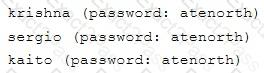
Firewall is enabled by default, you can turn it off when deemed appropriate, other settings about firewall may be in separate requirements.
Your system will be restarted before scoring, so please ensure that all modifications and service configurations you made still can be operated after the restart without manual intervention, virtual machine instances of all examinations must be able to enter the correct multi-user level after restart without manual assistance, it will be scored zero if the test using virtual machine system cannot be restarted or be properly restarted.
Corresponding distribution packages for the testing using operating system Red Hat Enterprise Linux version can be found in the following link:
http://server1.group3.example.com/rhel
Part of the requirements include host security, ensure your host security limit does not prevent the request to allow the host and network, although you correctly configured the network service but would have to allow the host or network is blocked, this also does not score.
You will notice that some requirements which clearly do not allow services be accessed by service domain my133t.org, systems of this domain are in subnet 172.25.1.0/252.255.255.0, and systems of these subnets also belong to my 133t.org domain.
PS: Notice that some test questions may depend on other exam questions, for example, you might be asked to perform a series of restrictions on a user, but this user creation may be required in other questions. For convenient identification, each exam question has some radio buttons to help you identify which questions you have already completed or not completed. Certainly, you do not need to care these buttons if you don’t need them.
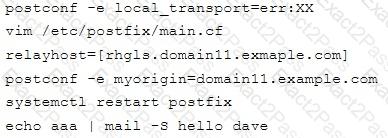
Configure the Local Mail Service
Configure the mail service on system1 and system2, as required:
1. These systems do not accept external sending mails
2. Any mails sent locally are automatically routed to rhgls.domain11.example.com
3. Mails sent from these systems will be displayed from rhgls.domain11.example.com
4. You can send mail to local user ‘arthur’ to test your configuration system rhgls.domain11.example.com
5. You have already configured this user’s mail to the following URL rhgls.domain11.example.com/received_mail/11
RHCE Test Configuration Instructions
Information for the two systems you will use in test is the following:
system1.group3.example.com: is one of the main sever. system2.group3.example.com: mainly used as a client.
Password for both of the two systems is atenorth
System’s IP is provided by DHCP, you can regard it as normal, or you can reset to Static IP in accordance with the following requirements:
system1.group3.example.com: 172.24.3.5
system2.group3.example.com: 172.24.3.10
The subnet mask is 255.255.255.0
Your system is a member of DNS domain group3.example.com. All systems in DNS domain group3.example.com are all in subnet 172.24.3.0/255.255.255.0, the same all systems in this subnet are also in group3.example.com, unless specialized, all network services required to be configured can be accessed by systems of domain group3.
host.group3.example.com provides a centralized authentication service domain
GROUP3.EXAMPLE.COM, both system1 and system2 have already been pre-configured to be the client for this domain, this domain provides the following user account:
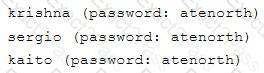
Firewall is enabled by default, you can turn it off when deemed appropriate, other settings about firewall may be in separate requirements.
Your system will be restarted before scoring, so please ensure that all modifications and service configurations you made still can be operated after the restart without manual intervention, virtual machine instances of all examinations must be able to enter the correct multi-user level after restart without manual assistance, it will be scored zero if the test using virtual machine system cannot be restarted or be properly restarted.
Corresponding distribution packages for the testing using operating system Red Hat Enterprise Linux version can be found in the following link:
http://server1.group3.example.com/rhel
Part of the requirements include host security, ensure your host security limit does not prevent the request to allow the host and network, although you correctly configured the network service but would have to allow the host or network is blocked, this also does not score.
You will notice that some requirements which clearly do not allow services be accessed by service domain my133t.org, systems of this domain are in subnet 172.25.1.0/252.255.255.0, and systems of these subnets also belong to my 133t.org domain.
PS: Notice that some test questions may depend on other exam questions, for example, you might be asked to perform a series of restrictions on a user, but this user creation may be required in other questions. For convenient identification, each exam question has some radio buttons to help you identify which questions you have already completed or not completed. Certainly, you do not need to care these buttons if you don’t need them.
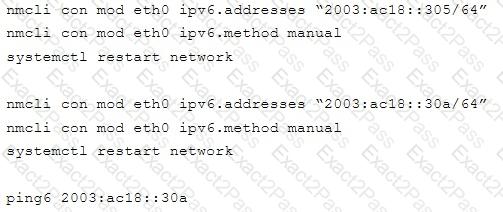
Configure IPV6 Address
Configure interface eth0 on your test system, using the following IPV6 addresses:
1) The address of system1 should be 2003:ac18::305/64
(2) The address of system2 should be 2003:ac18::30a/64
(3) Both two systems must be able to communicate with systems in network 2003:ac18/64
(4) The address must still take effect after restart
(5) Both two systems must maintain the current Ipv4 address and can communicate
RHCE Test Configuration Instructions
Information for the two systems you will use in test is the following:
system1.group3.example.com: is one of the main sever. system2.group3.example.com: mainly used as a client.
Password for both of the two systems is atenorth
System’s IP is provided by DHCP, you can regard it as normal, or you can reset to Static IP in accordance with the following requirements:
system1.group3.example.com: 172.24.3.5
system2.group3.example.com: 172.24.3.10
The subnet mask is 255.255.255.0
Your system is a member of DNS domain group3.example.com. All systems in DNS domain group3.example.com are all in subnet 172.24.3.0/255.255.255.0, the same all systems in this subnet are also in group3.example.com, unless specialized, all network services required to be configured can be accessed by systems of domain group3.
host.group3.example.com provides a centralized authentication service domain
GROUP3.EXAMPLE.COM, both system1 and system2 have already been pre-configured to be the client for this domain, this domain provides the following user account:
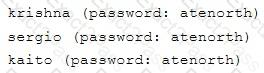
Firewall is enabled by default, you can turn it off when deemed appropriate, other settings about firewall may be in separate requirements.
Your system will be restarted before scoring, so please ensure that all modifications and service configurations you made still can be operated after the restart without manual intervention, virtual machine instances of all examinations must be able to enter the correct multi-user level after restart without manual assistance, it will be scored zero if the test using virtual machine system cannot be restarted or be properly restarted.
Corresponding distribution packages for the testing using operating system Red Hat Enterprise Linux version can be found in the following link:
http://server1.group3.example.com/rhel
Part of the requirements include host security, ensure your host security limit does not prevent the request to allow the host and network, although you correctly configured the network service but would have to allow the host or network is blocked, this also does not score.
You will notice that some requirements which clearly do not allow services be accessed by service domain my133t.org, systems of this domain are in subnet 172.25.1.0/252.255.255.0, and systems of these subnets also belong to my 133t.org domain.
PS: Notice that some test questions may depend on other exam questions, for example, you might be asked to perform a series of restrictions on a user, but this user creation may be required in other questions. For convenient identification, each exam question has some radio buttons to help you identify which questions you have already completed or not completed. Certainly, you do not need to care these buttons if you don’t need them.
Configure the Access to the Web Content
Create a directory private under the directory DocumentRoot in the web server on the system1, requirements are the following:
Download a file copy to this directory from http://rhgls.domain11.example.com/materials/private.html and rename it as index.html.
Don’t make any changes to this file content
Any users from the system1 can browse the content of the private, but cannot access this directory content through other systems
RHCE Test Configuration Instructions
Information for the two systems you will use in test is the following:
system1.group3.example.com: is one of the main sever. system2.group3.example.com: mainly used as a client.
Password for both of the two systems is atenorth
System’s IP is provided by DHCP, you can regard it as normal, or you can reset to Static IP in accordance with the following requirements:
system1.group3.example.com: 172.24.3.5
system2.group3.example.com: 172.24.3.10
The subnet mask is 255.255.255.0
Your system is a member of DNS domain group3.example.com. All systems in DNS domain group3.example.com are all in subnet 172.24.3.0/255.255.255.0, the same all systems in this subnet are also in group3.example.com, unless specialized, all network services required to be configured can be accessed by systems of domain group3.
host.group3.example.com provides a centralized authentication service domain
GROUP3.EXAMPLE.COM, both system1 and system2 have already been pre-configured to be the client for this domain, this domain provides the following user account:
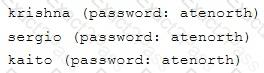
Firewall is enabled by default, you can turn it off when deemed appropriate, other settings about firewall may be in separate requirements.
Your system will be restarted before scoring, so please ensure that all modifications and service configurations you made still can be operated after the restart without manual intervention, virtual machine instances of all examinations must be able to enter the correct multi-user level after restart without manual assistance, it will be scored zero if the test using virtual machine system cannot be restarted or be properly restarted.
Corresponding distribution packages for the testing using operating system Red Hat Enterprise Linux version can be found in the following link:
http://server1.group3.example.com/rhel
Part of the requirements include host security, ensure your host security limit does not prevent the request to allow the host and network, although you correctly configured the network service but would have to allow the host or network is blocked, this also does not score.
You will notice that some requirements which clearly do not allow services be accessed by service domain my133t.org, systems of this domain are in subnet 172.25.1.0/252.255.255.0, and systems of these subnets also belong to my 133t.org domain.
PS: Notice that some test questions may depend on other exam questions, for example, you might be asked to perform a series of restrictions on a user, but this user creation may be required in other questions. For convenient identification, each exam question has some radio buttons to help you identify which questions you have already completed or not completed. Certainly, you do not need to care these buttons if you don’t need them.
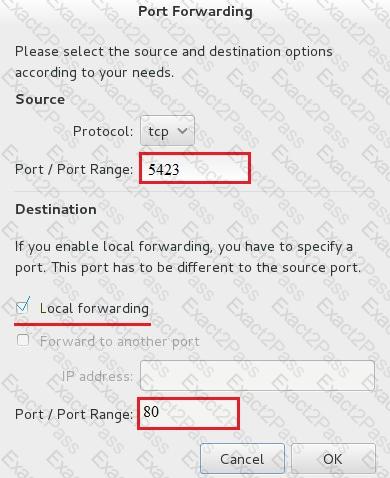
Configure port forwarding on the system1, as required:
1. The systems in the network 172.24.11.0/24, local port 5423 for accessing system1 will be forwarded to 80
(2) This setting must be permanent
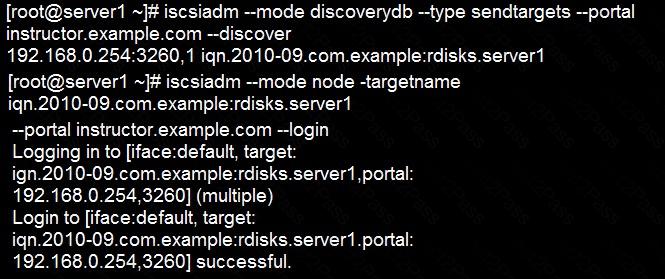
Deploying your exam system: link to the iscsi target in the instructor.example.com and distinguish it well, then format as ext3 file system. You must be able to mount the file system of the iscsi target to the /mnt/iscsi directory in your own system and make this file system can automatically mount (permanently mount) after system restart.
Download file from http://ip/dir/restircted.html, and the local user harry can access it by http://station.domain30.example.com/restircted.html, and cannot be accessed by t3gg.com.
Create a Shell script /root/program:
The shell script will come back to “user” parameter when you are entering “kernel” parameter.
The shell script will come back to “kernel” when you are entering “user” parameter.
It will output the standard error when this script “usage:/root/program kernel|user” don’t input any parameter or the parameter you inputted is entered as the requirements.
Prevent Mary from performing user configuration tasks in your system.
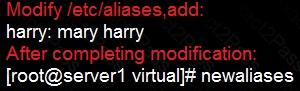
Configure a mail alias to your MTA, for example, send emails to harry but mary actually is receiving emails.