Spring Sale Special Limited Time 70% Discount Offer - Ends in 0d 00h 00m 00s - Coupon code: buysanta

Exact2Pass Menu

Magento Front End Developer Certification Exam

Last Update 13 hours ago Total Questions : 107

The Magento Front End Developer Certification Exam content is now fully updated, with all current exam questions added 13 hours ago. Deciding to include M70-301 practice exam questions in your study plan goes far beyond basic test preparation.

You'll find that our M70-301 exam questions frequently feature detailed scenarios and practical problem-solving exercises that directly mirror industry challenges. Engaging with these M70-301 sample sets allows you to effectively manage your time and pace yourself, giving you the ability to finish any Magento Front End Developer Certification Exam practice test comfortably within the allotted time.

Question # 21

Within a Magento instance configured to use the package name “my_package” and the theme name “my_theme”, which file would override the default catalog search template?

A.

app/frontend/base/my_package/my_theme/template/catalogsearch/form.mini.phtml

B.

app/design/frontend/base/default/template/customsearch/form.mini.phtml

C.

app/design/frontend/my_theme/my_package/template/catalogsearch/custom.form.mini.phtml

D.

app/design/frontend/my_package/my_theme/template/catalogsearch/form.mini.phtml

E.

app/frontend/default/my_theme/customsearch/form.mini.phtml

Question # 22

If you want to provide an existing custom theme for a mobile device browser, you ' ll only have to _____________.

A.

Create a new store for that theme

B.

Configure the setting in main menu " Mobile "

C.

Create an exception under System- > Design for an appropriate UserAgent

D.

Create an exception under the System- > Configuration " Design " tab for an appropriate UserAgent

Question # 23

Which file contains the code that renders the grid of products for a page of the catalog?

A.

catalog/product/list.phtml

B.

catalog/product/grid.phtml

C.

catalog/category/list.phtml

D.

catalog/category/grid.phtml

Question # 24

Which layout handle can be used to assign a customized template file to the filter navigation block in the left column?

A.

default

B.

catalog_category_view

C.

catalog_category_layered

D.

page_two_columns_left

Question # 25

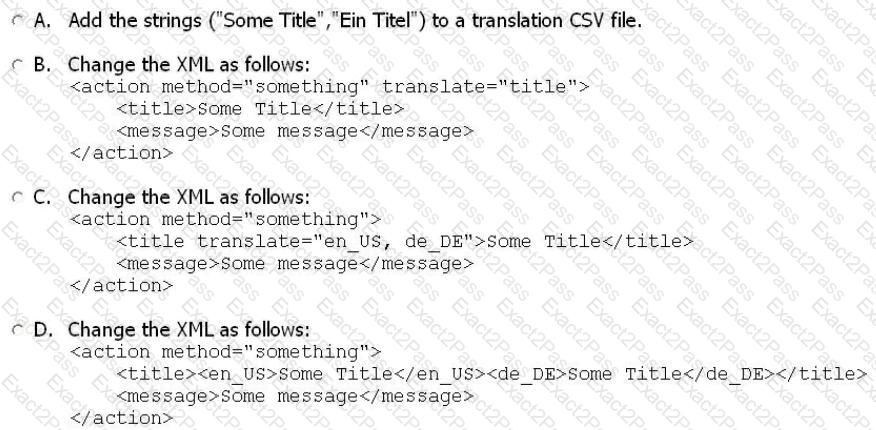
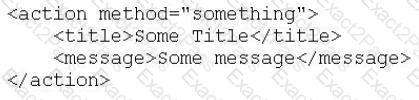
Given the layout XML example below, which one of the following actions will cause the title, “Some Title,” to be translated by Magento?

EXAMPLE:
A.

Option A

B.

Option B

C.

Option C

D.

Option D

Question # 26

Using prototype.js, which selector would be used to target a group of list items with the class of item?

A.

$(‘ul’).children(‘li.item’)

B.

$(‘item’)

C.

$$(‘li.item’)

D.

$$(‘ul > li#item’)

Question # 27

Which element in layout XML specifies a method to be called on a referenced or newly defined block?

A.

< action >

B.

< call >

C.

< change >

D.

< method >

E.

< update >

Question # 28

You want to override the lcolumn.phtml file. Which two of the following methods could you use? (Choose TWO.)

A.

Rename the file in base/default to enable overriding.

B.

Rename the root template configuration in the admin.

C.

Create a file with same file name in the same directory structure as your theme.

D.

Create a file exception in System - > Design, clear cache, and rebuild indexes.

E.

Create a file with different file name and different directory structure; then change the template with the setTemplate method.

Question # 29

You want to add a block to the content of the product detail page, without having to modify a template.

Which three container blocks are rendered regardless of product type and configuration? (Choose THREE.)

A.

alert.urls

B.

product.info.extrahint

C.

product.info.options.wrapper

D.

product.info.options .wrapper.bottom

E.

product.info.additional

F.

product.info.container1

G.

product.info.container2

Question # 30

How can you override a native template file in an activated custom theme, using the design fallback?


A.

Copy the file to the appropriate folder.

B.

Copy the file to the appropriate folder and specify the path to it in the admin panel.

C.

Copy the file to the appropriate folder and specify the path to it in the database.

D.

Copy the file to the appropriate folder and rename it by adding the suffix “as”.

Go to page: