Exact2Pass

Last Update 54 minutes ago Total Questions : 348
The UiPath Advanced RPA Developer v1.0 Exam (UiARD) content is now fully updated, with all current exam questions added 54 minutes ago. Deciding to include UiPath-ARDv1 practice exam questions in your study plan goes far beyond basic test preparation.
You'll find that our UiPath-ARDv1 exam questions frequently feature detailed scenarios and practical problem-solving exercises that directly mirror industry challenges. Engaging with these UiPath-ARDv1 sample sets allows you to effectively manage your time and pace yourself, giving you the ability to finish any UiPath Advanced RPA Developer v1.0 Exam (UiARD) practice test comfortably within the allotted time.
A developer created the following sequence:
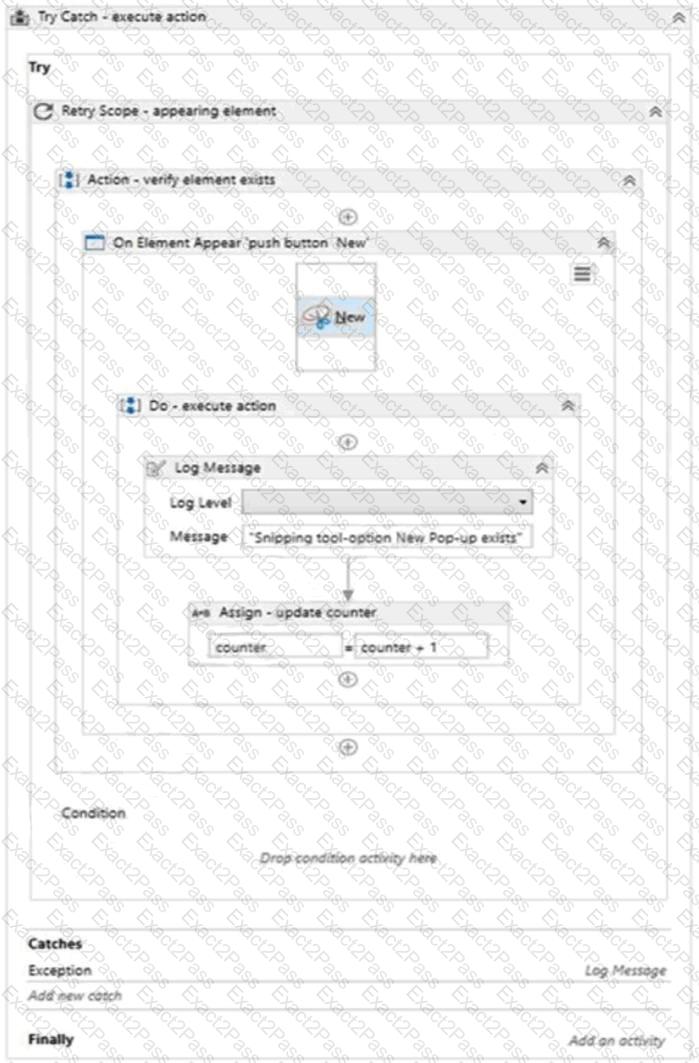
The following reflects the Catches block for the Try Catch activity:
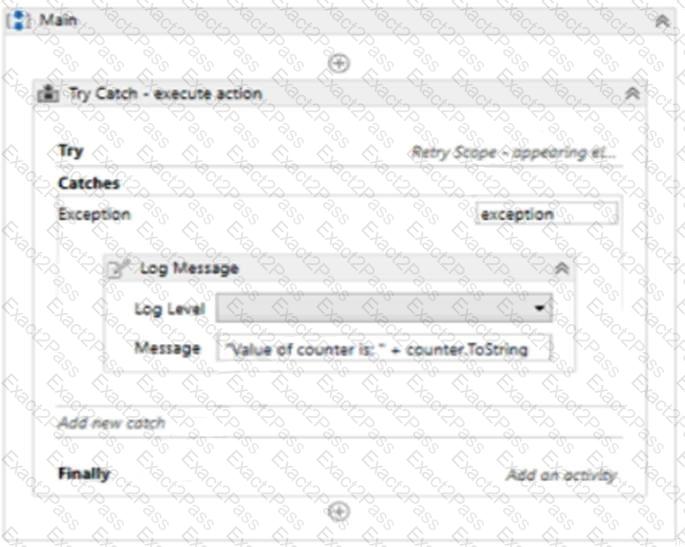
The Variable tab appears below:

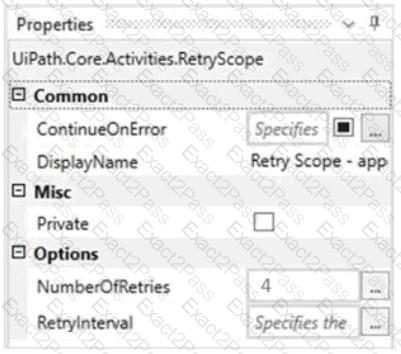
The Properties for the Retry Scope activity are shown below:
The Properties for the On Element Appear activity are as follows:
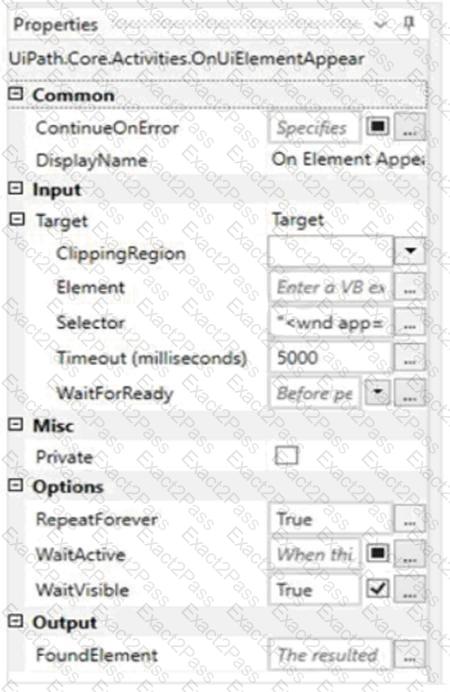
Based on the configurations shown in the exhibits, which output is displayed in the Output panel when the target exists at runtime and it is not visible on the screen?
What is the relation between environments and provisioned robots?
Options are :
What are the differences between a partial selector and a full selector?
In a UiPath Studio project, the property ValidateUnconnectedNodes is set to True on a flowchart. A Log Message activity on this flowchart is not connected to any othe r node. What is the behavior of this setting at design time?
In this exercise, you will create a UiPath automation that performs the steps below.
To achieve this, you will use the REFrameWork as the starting template and follow the UiPath development best practices.
The solution has to be scalable, so create two separate projects (sub-processes):
- One for the Dispatcher (add to queue);
- Another one for the Performer (consume queue).
Make sure you use a connection to an UiPath Orchestrator for testing.
Here are the steps performed by the Robot in the Dispatcher:
1.Login to https:/Nvww.acme-test.com.
2. On the landing page, Dashboard, click or hover over the Invoices menu item and then click on Search for Invoice. Click on Display All Invoices.
3. Scrape the data from the whole table displayed.
4. For each row in the datatable, Add a queue item containing the Invoice Number, Vendor TaxID and Date.
5. Close ACME System 1.
Here are the steps performed by the Robot in the Performer:
1.Login to https:/Nvww.acme-test.com.
2. For each Queue Item:
- Click or hover over the Invoices menu item and then click on Search for Invoice;
- Type the Invoice Number retrieved from the queue item into the Invoice Number field field;
- Click on Search;
- Extract the values for the Vendor TaxID and Date and compare them with the values from the queue item (check for EXACT match for all fields!);
- If the values are not matching, this should be categorized as a Business Rule Exception, and the queue em should have the status set accordingly;
- If the values match, the transaction is successful.
Note: Navigation can be achieved in multiple ways by the robot - choose whichever you find best.
Constraints to follow in the development, using the REFrameWork:
1. TransactionItem datatype should be a QueueItem. The process should recover and retry 2 times in case of errors in navigation between the Invoice Search and Invoices - Search Results pages. One transaction is the action of navigating to the Invoices Search page, searching for the Invoice Number and scraping the values from the resulting one row table.
2. Create a separate workflow file for the Login to ACME. File input arguments: URL; Username ; Password .
3. Create a separate workflow file for closing ACME.
4. Add the ACME_URL and ACME_Credential to the Excel Config file.
5. Populate lnitAllApplications.xaml from the Framework folder with Invoking the Login to ACt...1E and navigation to the Work Items.
6. Populate CloseAllApplications.xaml from the Framework folder with Invoking the Close ACtv1E.
7.Populate KillAllProcesses xaml from the Framework folder with killing the process used.
8. Populate the Process.xaml file with the following actions:Navigation, Searching for Invoice Number, Scraping, Checking if the values match, Handling the Business Rule Exception.
Important Note: Don ' t use external file references outside of the project folder (including Orchestrator Assets). Place all the used files within the project folder, zip that folder and upload it to the UiPath Certification Platform.
Zip Al the used workflow files AND the output Excel fife. Then upload the.zip file to the UiPath Certification Platform.
Good luck!
ALL THE BEST!
Which activity is used to call another piece of automation?
Options are :
How can you find all anchor elements in a web page?
Options are :
What status does a job have when a schedule is triggered in
Orchestrator, but there are no available robots to execute it?
Options are :
What is the best practice to stop an ongoing job in Orchestrator?
Options are :
What kind of workflow should you create to define business rules?
Options are :

