Spring Sale Special Limited Time 70% Discount Offer - Ends in 0d 00h 00m 00s - Coupon code: buysanta

Exact2Pass Menu

Google Developers Certification - Associate Android Developer (Kotlin and Java Exam)

Last Update 10 hours ago Total Questions : 128

The Google Developers Certification - Associate Android Developer (Kotlin and Java Exam) content is now fully updated, with all current exam questions added 10 hours ago. Deciding to include Associate-Android-Developer practice exam questions in your study plan goes far beyond basic test preparation.

You'll find that our Associate-Android-Developer exam questions frequently feature detailed scenarios and practical problem-solving exercises that directly mirror industry challenges. Engaging with these Associate-Android-Developer sample sets allows you to effectively manage your time and pace yourself, giving you the ability to finish any Google Developers Certification - Associate Android Developer (Kotlin and Java Exam) practice test comfortably within the allotted time.

Question # 31

Once your test has obtained a UiObject object, you can call the methods in the UiObject class to perform user interactions on the UI component represented by that object. You can specify such actions as: (Choose four.)

A.

click() : Clicks the center of the visible bounds of the UI element.

B.

touch() : Touch the center of the visible bounds of the UI element.

C.

dragTo() : Drags this object to arbitrary coordinates.

D.

moveTo() : Move this object to arbitrary coordinates.

E.

setText() : Sets the text in an editable field, after clearing the field ' s content. Conversely, the

clearTextField() method clears the existing text in an editable field.

F.

swipeUp() : Performs the swipe up action on the UiObject. Similarly, the swipeDown(), swipeLeft(), and swipeRight() methods perform corresponding actions.

Question # 32

Interface for a callback to be invoked when a shared preference is changed. Interface is named:

A.

android.content.SyncStatusObserver

B.

android.content.SharedPreferences.Editor

C.

android.content.SharedPreferences.OnSharedPreferenceChangeListener

D.

android.content.SharedPreferences

Question # 33

When your code execution reaches the breakpoint, Android Studio pauses execution of your app. You can then use the tools in the Debugger tab to identify the state of the app. With Step Into you can

A.

examine the object tree for a variable, expand it in the Variables view. If the Variables view is not visible

B.

evaluate an expression at the current execution point

C.

advance to the next line in the code (without entering a method)

D.

advance to the first line inside a method call

E.

advance to the next line outside the current method

F.

continue running the app normally

Question # 34

What is a correct part of an Implicit Intent for sharing data implementation?

A.

val sendIntent = Intent(this, UploadService::class.java).apply { putExtra(Intent.EXTRA_TEXT, textMessage)

...

B.

val sendIntent = Intent().apply { type = Intent.ACTION_SEND;

...

C.

val sendIntent = Intent(this, UploadService::class.java).apply { data = Uri.parse(fileUrl)

...

D.

val sendIntent = Intent().apply { action = Intent.ACTION_SEND

...

Question # 35

As an example. Our MutableLiveData < Long > object, named mLapseTime, is not connected to a Room database, etc. How can we change the value in mLapseTime?

A.

mLapseTime.postValue(“new String”)

B.

mLapseTime.setValue(1000l)

C.

mLapseTime.changeValue(1000l)

Question # 36

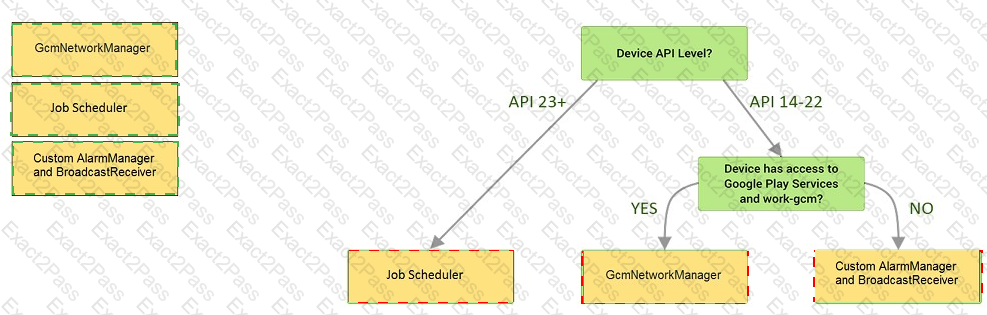
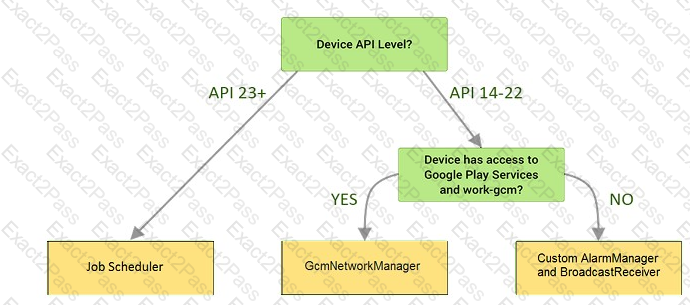
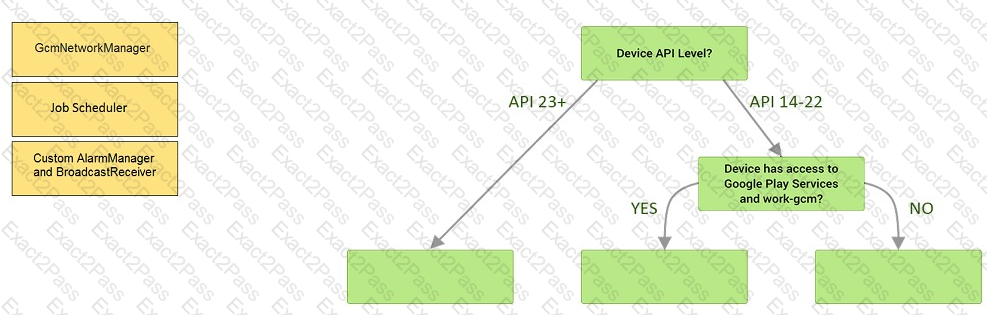
Under the hood WorkManager uses an underlying job dispatching service based on the following criteria. You need to move services to the correct places.
Question # 37

An overridden method onCreateOptionsMenu in an Activity returns boolean value. What does this value mean?

A.

You must return true for the menu to be displayed; if you return false it will not be shown.

B.

You must return false for the menu to be displayed; if you return true it will not be shown.

C.

You can return any value: the menu will be displayed anyway.

Question # 38

If you are working with a Builder that creates a PeriodicWorkRequest to run periodically once within the flex period of every interval period. What statement is correct?


A.

The repeat interval must be greater than PeriodicWorkRequest.MIN_PERIODIC_INTERVAL_MILLIS and the flex interval must be greater than PeriodicWorkRequest.MIN_PERIODIC_FLEX_MILLIS.

B.

The repeat interval must be lower than or equal to PeriodicWorkRequest.MIN_PERIODIC_INTERVAL_MILLIS and the flex interval must be lower than or equal to PeriodicWorkRequest.MIN_PERIODIC_FLEX_MILLIS.

C.

The repeat interval must be greater than or equal to PeriodicWorkRequest.MIN_PERIODIC_INTERVAL_MILLIS and the flex interval can be anything in relation to PeriodicWorkRequest.MIN_PERIODIC_FLEX_MILLIS.

D.

The repeat interval must be greater than or equal to PeriodicWorkRequest.MIN_PERIODIC_INTERVAL_MILLIS and the flex interval must be greater than or equal to PeriodicWorkRequest.MIN_PERIODIC_FLEX_MILLIS.

Go to page: