Exact2Pass

Last Update 16 hours ago Total Questions : 107
The Nutanix Certified Master - Multicloud Infrastructure (NCM-MCI) 5.15 content is now fully updated, with all current exam questions added 16 hours ago. Deciding to include NCM-MCI-5.15 practice exam questions in your study plan goes far beyond basic test preparation.
You'll find that our NCM-MCI-5.15 exam questions frequently feature detailed scenarios and practical problem-solving exercises that directly mirror industry challenges. Engaging with these NCM-MCI-5.15 sample sets allows you to effectively manage your time and pace yourself, giving you the ability to finish any Nutanix Certified Master - Multicloud Infrastructure (NCM-MCI) 5.15 practice test comfortably within the allotted time.
An administrator manages the following two Nutanix AOS 5.15 cluster environment:
• Corp-cluster-01
• Corp-cluster-02
The VM images must be available only on Corp-cluster-01, but cannot be checked out to cluster Corp-cluster-02. The images also cannot be checked out to any other clusters that are registered with Prism Central in the future.
Which two configuration settings must the administrator choose when creating the image placement policy that satisfies the stated requirements? (Choose two.)
Refer to the exhibit. 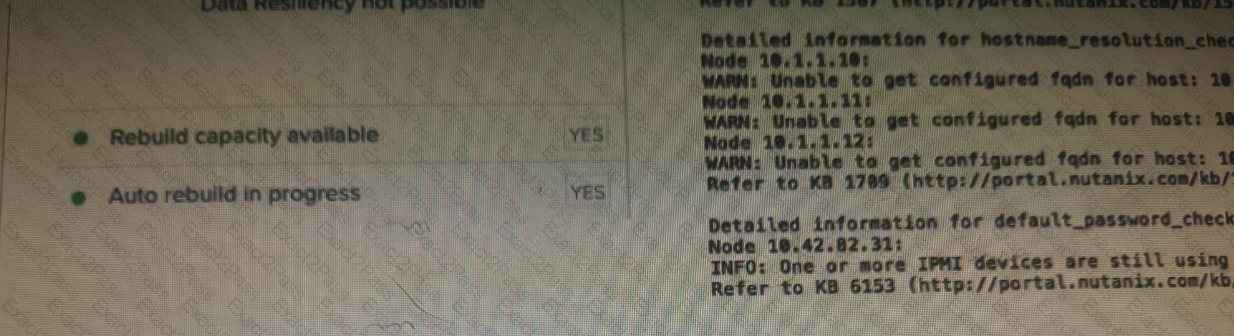
An administrator logged into Prism Element, notices the following in the home dashboard, and showing the exhibit.
Which action should the administrator take next?
A Nutanix cluster is deployed with the following configuration:
• Three four-node blocks (A, B, and C)
• All Flash Redundancy Factor 2
What is the effect of simultaneous disk failures on two nodes located in block A?
A customer has the following requirement for a Nutanix cluster:
Must support high-performance Nutanix Volumes iSCSI workloads
Must utilize AHV nodes
Must use 10 GbE interface
How should the customer optimize networking?
An administrator needs to initiate a new VDI project within a couple of months. Prism Central reports there are no storage resources to accommodate such workloads.
The administrator sees many powered-off VMs and has the authority to delete test VMs powered off at least for 30 days. Test VMs belong to the Test category.
Using Prism Central, which steps are required to identify the correct VMs to be deleted?
Microsegmentation was recently enabled in a Nutanix environment. The administrator wants to leverage Prism Central to create a policy that will block all traffic, regardless of direction, between two groups of VMs identified by their category.
Which policy should be used to meet this requirement?
An administrator needs to create and start five new VMs for a Data Analytics Project (OLAP). The VM Profile is as follows:
• vCPU:4
• vRAM: 64 GB
• vDisk: 1.5 TB
Each of the four nodes of the Nutanix cluster has the following:
• 24 vCPU. 20% overall usage
• 192 GB RAM, 60% overall usage
• 2xl920GBSSD
• 4x 2 TB HDD
At cluster level, there is a single RF2 container that is 30% utilized and has an extent store capacity of 13.5 TB.
Which component requires administrator attention?
An administrator configures authentication in Prism Central (PC) for the NTNX-Admins group. Users report that they are unable to log in. The administrator confirms that the Active Directory (AD) settings in PC are correct.
Which condition could result in this behavior?
An administrator has a custom backup application that requires a 2TB disk and runs in Windows. Throughput is considerably lower than expected.
The application was installed on a VM with the following configuration:
• Four vCPUs with one core/vCPU
• 4GB of Memory
• One 50GB vDisk for the Windows installation
• One 2TB vDisk for the application
What is the recommended configuration change to improve throughput?
An administrator receives reports that VDI desktop performance in an 8-node Nutanix VDI environment is poor. Opening applications takes between 1 and 2 minutes.
When investigating the issue, the following conditions are found:
• Cluster memory utilization: 80%
• Cluster SSD utilization: 70%
• Average VM CPU Wait Time: 11%
• CVM CPU utilization: 75%
Which action should be taken to improve VDI performance?