Exact2Pass

Last Update 9 hours ago Total Questions : 75
The Nutanix Certified Professional - Artificial Intelligence NCP-AI 6.10 content is now fully updated, with all current exam questions added 9 hours ago. Deciding to include NCP-AI practice exam questions in your study plan goes far beyond basic test preparation.
You'll find that our NCP-AI exam questions frequently feature detailed scenarios and practical problem-solving exercises that directly mirror industry challenges. Engaging with these NCP-AI sample sets allows you to effectively manage your time and pace yourself, giving you the ability to finish any Nutanix Certified Professional - Artificial Intelligence NCP-AI 6.10 practice test comfortably within the allotted time.
An administrator needs to troubleshoot an import failure from a AI/ML user and does not have the admin right to try to do a manual upload of LLM.
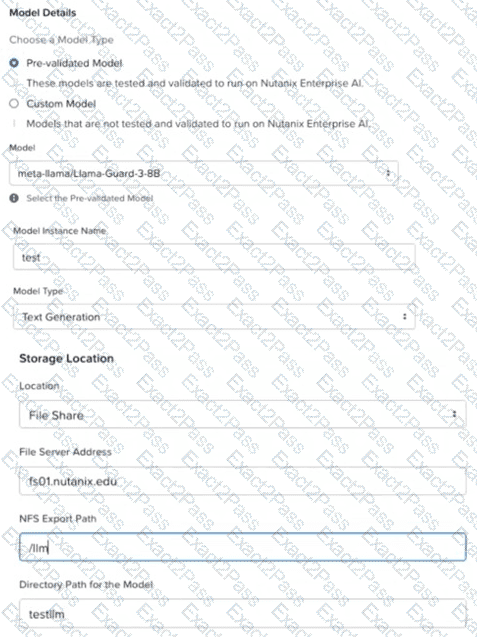
What is the cause of the import failure?
Which endpoint attribute displays the number and name of the GPUs per instance?
During NAI installation, a Docker Account is required.
Where should an administrator generate the access token?
An AI/ML administrator is monitoring a Nutanix Enterprise AI cluster and receives an alert that the cluster's health status is Critical.
The administrator logs into the NAI Dashboard and gathers the following information:
The Infrastructure Summary component is marked as Critical (red status).
A system message indicates that their newly added Custom Chatbot service is waiting for available resources to start.
A resource usage summary shows that CPU usage is at or near 100%.
Other services are running but are responding more slowly than usual.
The cluster is currently not configured to automatically add more resources when needed.
Based on the information that the administrator gathered, what is the most appropriate action that the administrator should take to remediate the issue?
When licensing Nutanix Enterprise AI, which license is required to create an inference endpoint?
An administrator has installed and deployed NAI, but the UI is not launching.
Which command should the administrator use to ensure that all pods are successfully deployed?
What happens to the resources created by the user when the user is deactivated?
The administrator observes a "Pod Network Unreachable" health check failure in the NAI, specifically affecting several application pods on a newly added worker node. Existing pods on other nodes are functioning normally.
Upon initial investigation, kubectl get pods -o wide shows the affected pods stuck in ContainerCreating or Pending status, and kubectl describe pod < pod-name > events include messages, such as: "FailedCreatePodSandBox: failed to create sandbox: rpc error: code = Unknown desc = failed to set up network for sandbox..." or "network is not ready".
What is the reason for this error and the appropriate next step that the administrator should take?
Which deployment type of Nutanix Enterprise AI is supported in Amazon EKS?
An administrator is setting up Nutanix Enterprise AI with a custom domain (ai.company.com) and must comply with security policies requiring a valid TLS certificate from the corporate certificate authority (CA).
Which two steps are necessary to complete this configuration successfully? (Choose two.)

