Exact2Pass

Last Update 11 hours ago Total Questions : 101
The Certified Pega Robotics System Architect 22 content is now fully updated, with all current exam questions added 11 hours ago. Deciding to include PEGACPRSA22V1 practice exam questions in your study plan goes far beyond basic test preparation.
You'll find that our PEGACPRSA22V1 exam questions frequently feature detailed scenarios and practical problem-solving exercises that directly mirror industry challenges. Engaging with these PEGACPRSA22V1 sample sets allows you to effectively manage your time and pace yourself, giving you the ability to finish any Certified Pega Robotics System Architect 22 practice test comfortably within the allotted time.
Runtime produces an error when debugging a solution. The error message references that a control does not have the necessary value to complete an activity. The control depends upon the completion of a second activity in another project to provide its value.
Which two debugging options provide a benefit when referencing threads for issue resolution? (Choose two.)
An application includes Assisted Sign-On by default with Pega Robot Studio ?
Which two of the following statements describe robotic automation assets? (Choose Two)
A solution design document outlines several projects for the solution. You are assigned to the Loan Servicing project (LoanSvcPrj). The project uses the Interaction Framework function to communicate with the other projects.
Which three toolbox project items do you add to LoanSvcPrj? (Choose three.)
While setting up Start My Day , the user makes some changes in the Manage Applications window to prioritize and manage the applications that are configured to launch using the Start My Day functionality.
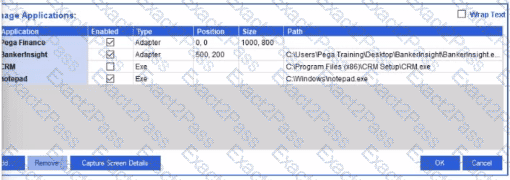
Which of the following applications does the user see on the desktop after using the Start My Day functionality?
While preparing for packaging and deployment, you decide to remove all remaining breakpoints from the automations in each project.
Which two ways can you delete automation breakpoints? (Choose Two)
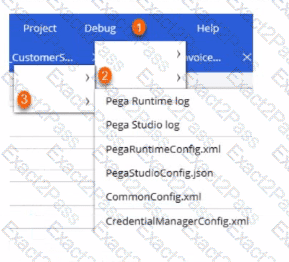
Before deploying your robotic project, you realize that the connection parameters (or Pega Robot Manager, the Pega Robot Runtime settings, and the application login credentials for Assisted Sign-On need updating to reflect the production environment.
Arrange the three steps, as shown in the following figure. that you click in the correct order to access the necessary configuration files. (Choose Three).

The variable varInput is a String that holds the value What is the output?
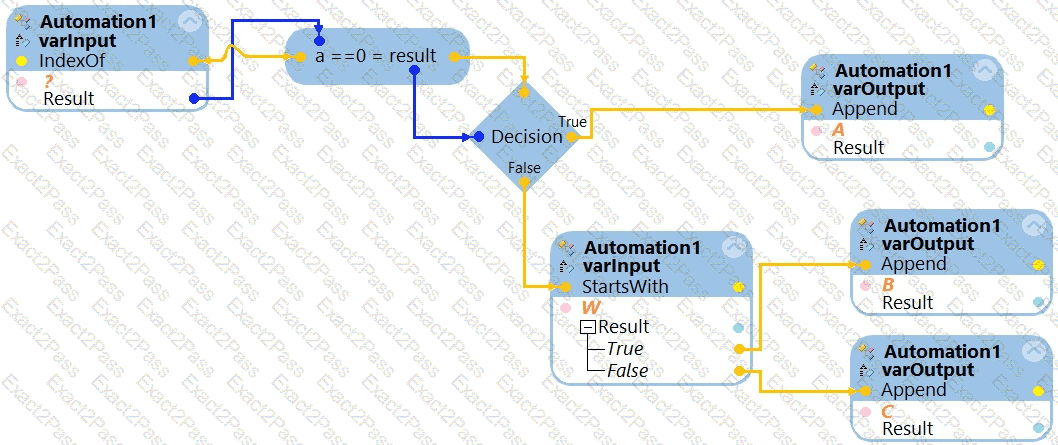
What is the outcome of the above automation?
You have completed your development for the DisputeTransaction.pega project. The enterprise installs the Pega Robot Runtime software on the agent’s desktop.
The enterprise is ready to unit test your solution but wants the Runtime executable to automatically launch the new project.
What do you configure to fulfill this request?
Which three statements describe the characteristics of unattended automations ? (Choose Three)


