Summer Sale Special Limited Time 70% Discount Offer - Ends in 0d 00h 00m 00s - Coupon code: buysanta

Exact2Pass Menu

UiPath Automation Developer Professional Exam (2024.10) (ADPv1)

Last Update 1 day ago Total Questions : 205

The UiPath Automation Developer Professional Exam (2024.10) (ADPv1) content is now fully updated, with all current exam questions added 1 day ago. Deciding to include UiPath-ADPv1 practice exam questions in your study plan goes far beyond basic test preparation.

You'll find that our UiPath-ADPv1 exam questions frequently feature detailed scenarios and practical problem-solving exercises that directly mirror industry challenges. Engaging with these UiPath-ADPv1 sample sets allows you to effectively manage your time and pace yourself, giving you the ability to finish any UiPath Automation Developer Professional Exam (2024.10) (ADPv1) practice test comfortably within the allotted time.

Question # 21

Which are the actions that can be done in Test Explorer?

A.

Export test data, group tests together, analyze activity coverage.

B.

Perform debugging, analyze activity coverage, group tests together.

C.

Export test results, group tests together, analyze activity coverage.

D.

Export test data, perform debugging, analyze activity coverage.

Question # 22

You need to create a process where multiple events happen at the same time, and triggers must handle these events simultaneously in an attended automation.

How can you set up this parallel execution of triggers?

A.

Use the Enable Local Trigger activity to run all triggers at the same time once they are enabled.

B.

Use the Trigger Scope activity to handle all events in a sequential manner rather than parallel.

C.

Rely on the Form Builder to set up multiple events and manage their execution based on user input.

D.

Use the Run Local Triggers activity to manage the simultaneous execution of multiple triggers within the project.

Question # 23

When should a developer log a coherent message with the Logging Level set as " Info " while building an automation project?

A.

Every time data is read from external sources.

B.

Every time an exception is caught in a Catch block

C.

Every time a variable or argument value is used.

D.

Every time the robot encounters an error processing a Queue Item.

Question # 24

What is the default priority value for the Job Priority field in UiPath Orchestrator when starting a job manually?

A.

Inherited

B.

Medium

C.

High

D.

Low

Question # 25

When developing a new project using REf ramework. logging in to multiple applications Is required. What is the recommended location to accomplish this task?

A.

InitAIIApplicatlons.xaml

B.

InitAIISettings.xaml

C.

Process.xaml

D.

FirstRun.xaml

Question # 26

A developer is using a Type into activity with the Input Method set to Simulate Which property needs to Be enabled for the activity to execute even it the target Ul element is deactivated or read-only?

A.

Deselect at end.

B.

Alter disabled element.

C.

Activate.

D.

Click before typing.

Question # 27

A developer implemented a process using the REFramework and an Orchestrator queue. The " OrchestratorQueueFolder " was defined in the " Config.xlsx " file, but the folder does not exist in Orchestrator

What is the behavior at runtime?

A.

A warning message stating that the queue folder is missing is logged, and then the process continues.

B.

The process throws an exception in the " Get Transaction Data " state because the queue folder is not found, and then the process is stopped.

C.

No exception is thrown and neither will a message be logged and the process continues.

D.

The process throws an exception in the " Process Transaction” state because the queue folder is not found, and then the process is stopped.

Question # 28

A developer is using the REFramework template to automate a process. In " SetTransactionStatus " file, there is the following sequence of activities, where the last Log

Message activity was added by the developer:
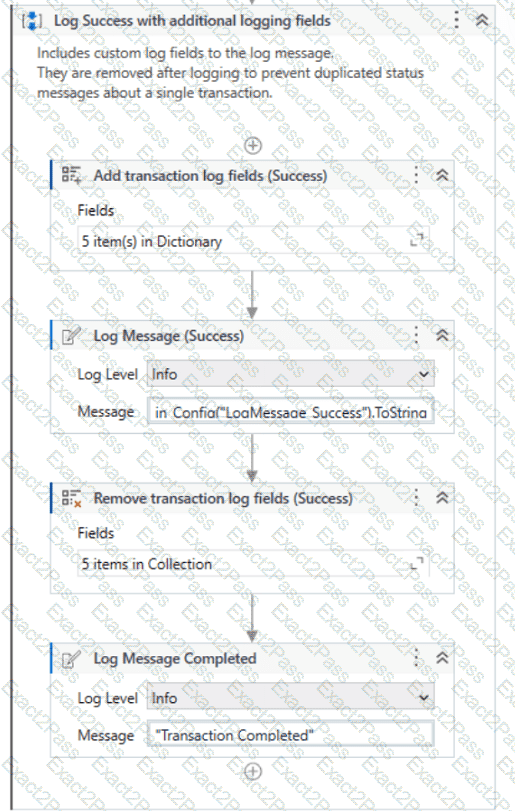
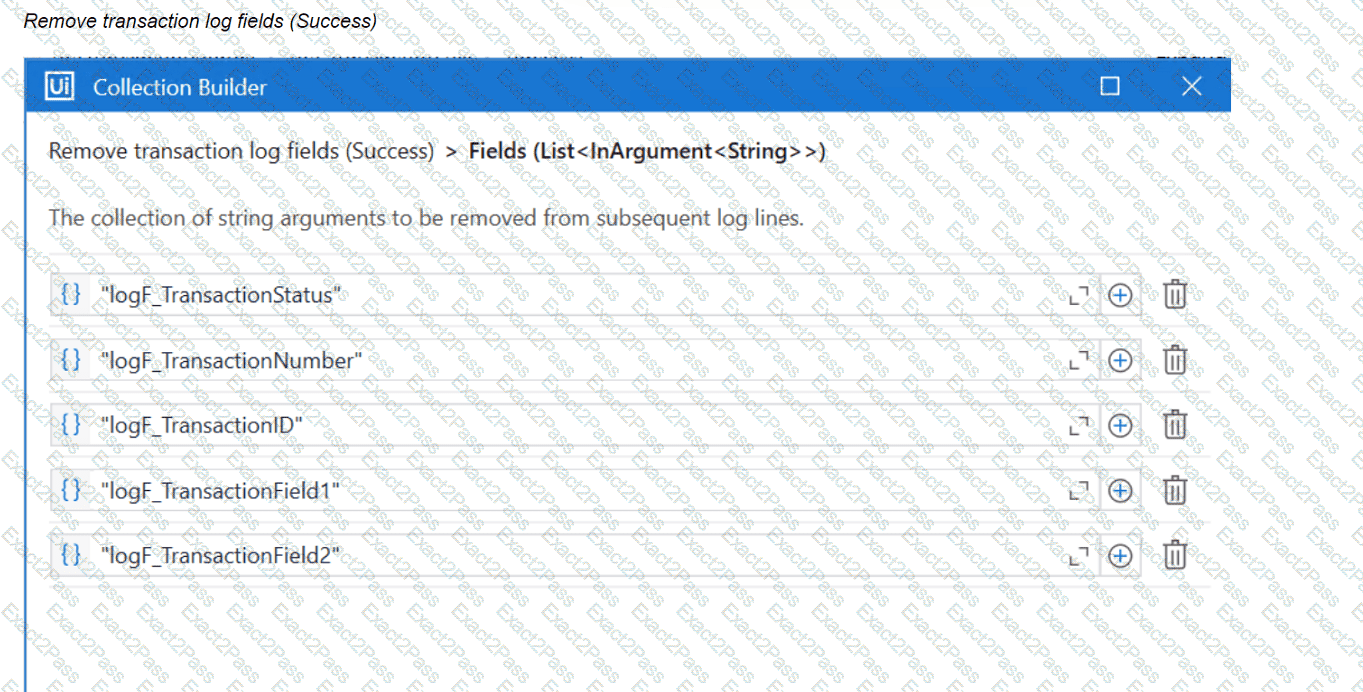
The configuration for Add Log Fields and Remove Log Fields activities are shown below:

Add transaction log fields (Success)
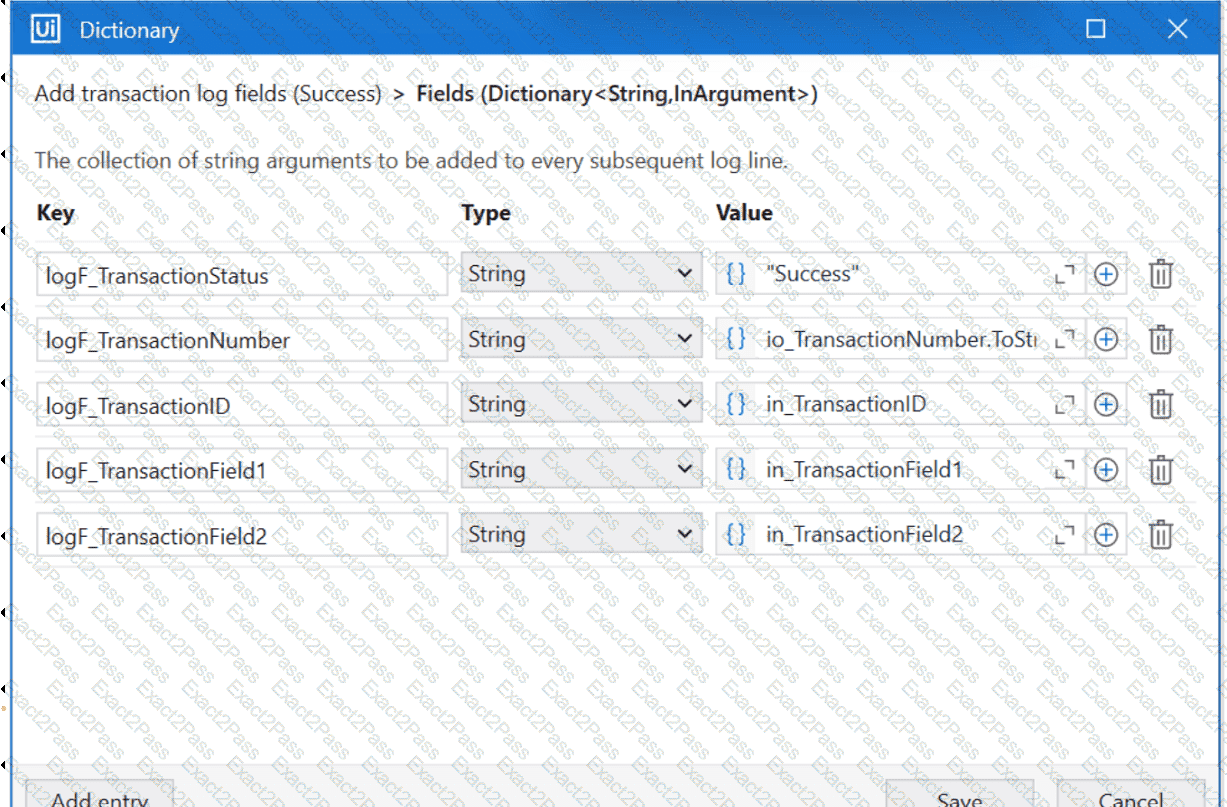
The developer runs the process and notices the argument values for the first transaction are:

in_TransactionID = " 07/18/2023 10:27:29 "

io_TransactionNumber = 1

in_TransactionField1 = " UI235-80 "

in_TransactionField2 = " Update Request "

Which of the following Log Message Details will be displayed when executing the activity Log Message Completed for the first transaction, considering it is successful?

A.

{ " message " : " Transaction Completed " , " level " : " Information " , " logType " : " User " , " timeStamp " : " 10:30:19 " , " fileName " : " SetTransactionStatus " , " processVersion " : " 1.0.0 " , " jobId " : " cb865477-35f8-4c0a-93e9-e4f4246223f2 " , " robotName " : " test.robot " , " machineId " : 0, " logF_TransactionField2 " : " Update Request " , " logF_TransactionID " : " 07/18/2023 10:27:29 " , " logF_BusinessProces

B.

{ " message " : " Transaction Completed " , " level " : " Information " , " logType " : " User " , " timeStamp " : " 10:30:19 " , " fileName " : " SetTransactionStatus " , " processVersion " : " 1.0.0 " , " jobId " : " 59325301-680a-4d55-a81b-56ca1f369c12 " , " robotName " : " test.robot " , " machineId " : 0, " logF_TransactionField2 " : " " , " logF_TransactionStatus " : " " , " logF_TransactionID " : " logF_BusinessProcessName

C.

{ " message " : " Transaction Completed " , " level " : " Information " , " logType " : " User " , " timeStamp " : " 10:30:19 " , " fileName " : " SetTransactionStatus " , " processVersion " : " 1.0.0 " , " jobId " : " 59325301-680a-4d55-a81b-56ca1f369c12 " , " robotName " : " test.robot " , " machineId " : 0, " logF_TransactionField2 " : empty, " logF_TransactionStatus " : empty, " logF_TransactionID " : empty, " logF_BusinessProce

D.

{ " message " : " Transaction Completed " , " level " : " Information " , " logType " : " User " , " timeStamp " : " 10:30:19 " , " fileName " : " SetTransactionStatus " , " processVersion " : " 1.0.0 " , " jobId " : " f8a36a46-8ebc-40df-8f71-26b39087ebee " , " robotName " : " test.robot " , " machineId " : 0, " logF_BusinessProcessName " : " Framework " }

Question # 29

Where in the REFramework template project is the " SetTransactionStatus.xaml " invoked?

A.

In the Finally section of the Try Catch activity in the End Process state.

B.

In the Try section of the Try Catch activity in the End Process state.

C.

In the Try and Catches sections of the Try Catch activity in the Process Transaction state.

D.

In the Try section of the Try Catch activity in the Process Transaction state.

Question # 30

A developer needs to create a repetitive process in the REFramework. Following the best practices, which action(s) should be performed to defend against potential robot crashes such as " out of memory " ?


A.

Build a script that compares current CPU usage values to a threshold and clears data as needed.

B.

After every transaction, clear the transaction data, close the applications, and re-open the applications.

C.

Add a " Clear Collection " activity at the beginning of the Process.xaml workflow.

D.

All " Invoke Workflow File " activities from the Main.xaml file should be marked with the Isolated option.

Go to page: