
Summer Sale Special Limited Time 70% Discount Offer - Ends in 0d 00h 00m 00s - Coupon code: buysanta

Exact2Pass Menu

UiPath Automation Developer Professional Exam (2024.10) (ADPv1)

Last Update 23 hours ago Total Questions : 205

The UiPath Automation Developer Professional Exam (2024.10) (ADPv1) content is now fully updated, with all current exam questions added 23 hours ago. Deciding to include UiPath-ADPv1 practice exam questions in your study plan goes far beyond basic test preparation.

You'll find that our UiPath-ADPv1 exam questions frequently feature detailed scenarios and practical problem-solving exercises that directly mirror industry challenges. Engaging with these UiPath-ADPv1 sample sets allows you to effectively manage your time and pace yourself, giving you the ability to finish any UiPath Automation Developer Professional Exam (2024.10) (ADPv1) practice test comfortably within the allotted time.

Question # 31

A developer has created a variable of type String called " MyNumbers " and assigned to it the following value: " 1. 2, 3.4, 5. 6 " . What is the resulting data type for the expression MyNumbers.Split( " . " c)(1)?

A.

Array of String

B.

String

C.

Double

D.

lnt32

Question # 32

A developer needs to design a process using the REFramework. but without Orchestrator Queues. Which Is the correct order of actions the developer needs to do in the Get Transaction Data state in this case?

A.

1. Remove the Get Transaction Item activity from GetTransactionData workflow.2. Add a Read Range activity in GetTransactionData workflow to read the data from a local Excel file.3. Add the logic required to read the data source only one time.4 Add the logic required to retrieve only one row fromread data each time5. Add the logic required to check if all rows/transaction items from the read data have been processed.

B.

1. Remove the Get Transaction Item activity from GetTransactionData workflow2. Add a Read Range activity in GetTransactionData workflow to read the data from a local Excel file.3. Add the logic required to read the data source only one time.4. Add the logic required to retrieve only one row from read data each time.

C.

1. Remove the Get Transaction Item activity from GetTransactionData workflow.2. Add a Read Row activity in GetTransactionData workflow to read the data from a local Excel file.3. Add the logic required to read the data source only one time.4. Add the logic required to retrieve only one row from read data each time.5. Add the logic required to check if all rows/transaction items from the read data have been processed.

D.

1. Remove the Get Transaction Item activity from GetTransactionData workflow.2. Add a Read Row activity in GetTransactionData workflow to read the data from a local Excel file.3. Add the logic required to read the data source only one time.4. Add the logic required to check if all rows/transaction items from the read data have been processed

Question # 33

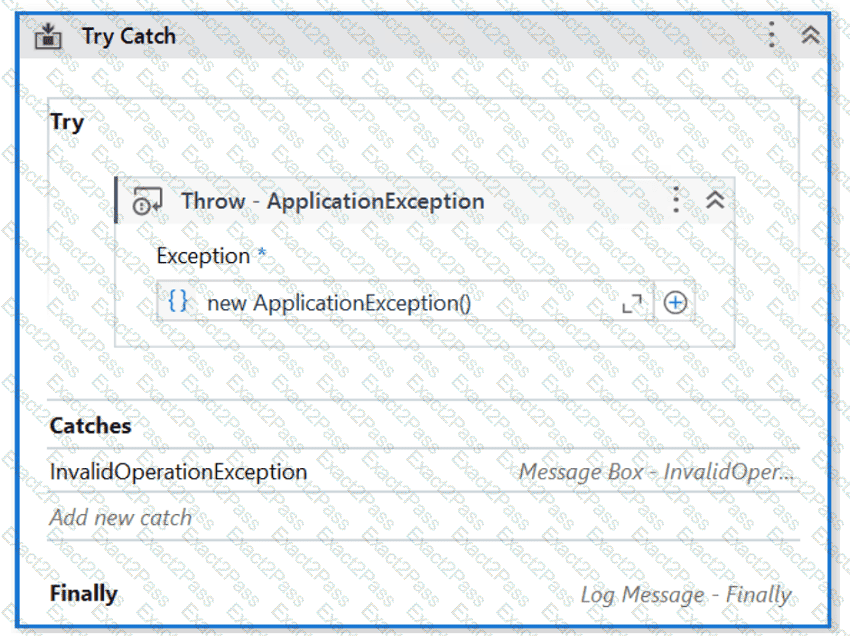
When encountering an ApplicationException, what occurs if the developer chooses InvalidOperationException as the exception handler within the Catches section of the Try Catch activity?
A.

The Finally block is executed and the Catches section catches the exception.

B.

No exception is thrown and the Finally block executes.

C.

A runtime error occurs and the Finally block is not executed.

D.

No exceptions are happening and the workflow continues to execute.

Question # 34

A developer is working on an automation using the REFramework. Each transaction item represents a piece of client information. For each customer, the automated procedure must click the " Generate Shipment Details " button. This generates a table of shipment records for each customer.

What type of exception occurs when the data is not accessible, the created table displays only the header row, and processing for that client must be halted?

A.

BusinessRuleException

B.

NullReferenceException

C.

ApplicationException

D.

SystemException

Question # 35

When building automation projects, which statement is true regarding Perform Remote Debugging?

A.

Perform Remote Debugging is only possible when the automation project does not involve Orchestrator queues and assets.

B.

Perform Remote Debugging enables developers to design new III elements for the automation project.

C.

Perform Remote Debugging refers to the process of testing and debugging an automation project on the same machine where UiPath Studio is installed.

D.

Perform Remote Debugging allows developers to debug a project on a different machine using a web-based interface.

Question # 36

How can UlPath Orchestrator help address potential Issues before they become critical problems?

A.

By sending customer feedback to UiPath developers.

B.

Through proactive monitoring and alerting of detected issues

C.

With immediate technical support for any detected Issue.

D.

By automatically updating background processes.

Question # 37

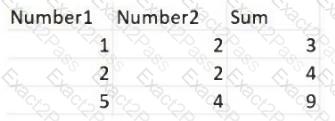
Consider testing a workflow that computes the sum of two numbers having the data driven test data from the Excel file below:
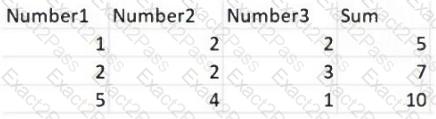
Expanding the functionality of the workflow to compute the sum of three numbers, the data needs to be updated as well to accommodate the new scenario:
What are steps to do that?

A.

Click Right on the Test Case and select Update Test Data

B.

Click Right on the Test Case and select Add Test Data.

C.

Click Right on the Test Case and select Refresh Test Data

D.

Click Right on the Test Case and select Remove Test Data.

Question # 38

A developer is using the REFramework template to automate a process. In SetTransactionStatus file, the developer decides to remove the Remove Log Fields activity and to add an additional Log Message activity, as shown below:
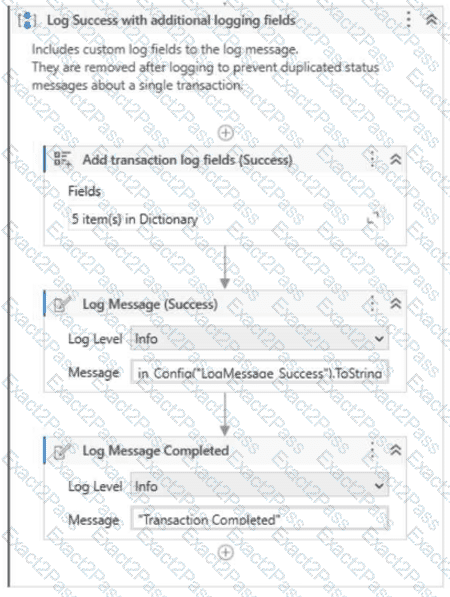
The configuration for Add transaction log fields (Success) activity is shown below:
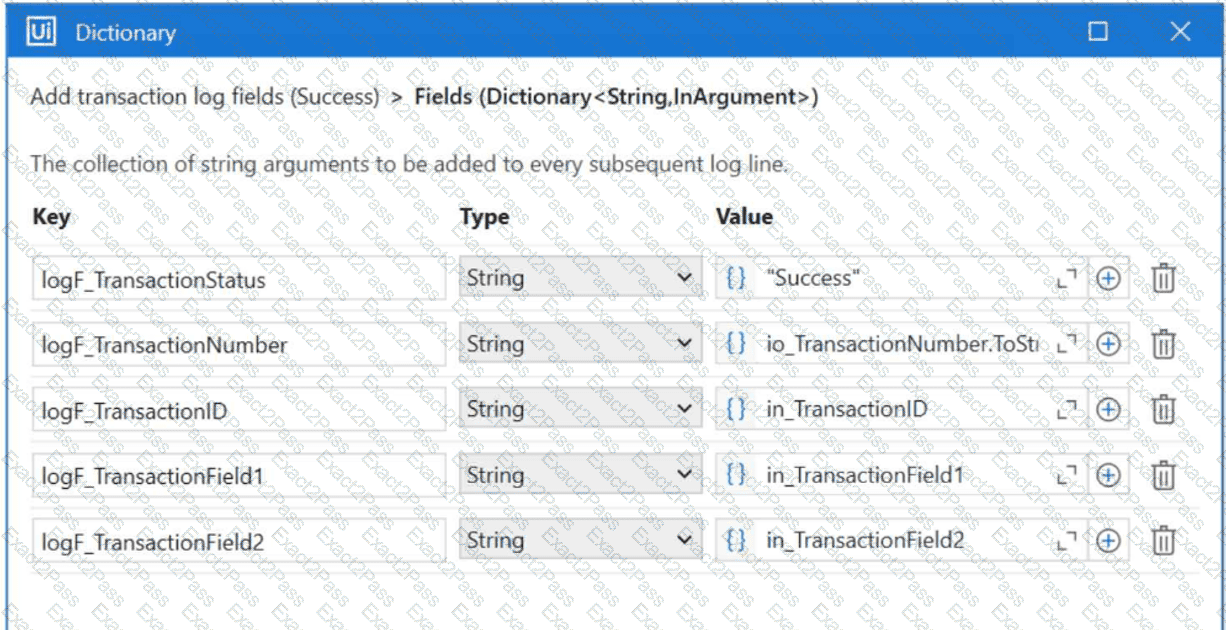
Add transaction log fields (Success) > Fields (Dictionary <</b> String, InArgument > )

The developer runs the process and notices that the argument values for the first transaction are the following:

in_TransactionID = " 07/18/2023 10:27:29 "

io_TransactionNumber = 1

in_TransactionField1 = " UI235-80 "

in_TransactionField2 = " Update Request "

Which of the following Log Message Details will be displayed when executing the activity Log Message Completed for the first transaction, considering it is successful?

A.

{

" message " : " Transaction Completed " ,

" level " : " Information " ,

" logType " : " User " ,

" timeStamp " : " 10:27:29 " ,

" fileName " : " SetTransactionStatus " ,

" processVersion " : " 1.0.0 " ,

" jobId " : " cb865477-35f8-4c0a-93e9-e4f4246223f2 " ,

" robotName " : " test.robot " ,

" machineId " : 0,

" logF_TransactionField2 " : " Update Request " ,

B.

{

" message " : " Transaction Completed " ,

" level " : " Information " ,

" logType " : " User " ,

" timeStamp " : " 10:27:29 " ,

" fileName " : " SetTransactionStatus " ,

" processVersion " : " 1.0.0 " ,

" jobId " : " f8a36a46-8ebc-40df-8f71-26b39087ebee " ,

" robotName " : " test.robot " ,

" machineId " : 0,

" logF_BusinessProcessName " : " Framework "

}

C.

{

" message " : " Transaction Completed " ,

" level " : " Information " ,

" logType " : " User " ,

" timeStamp " : " 10:27:29 " ,

" fileName " : " SetTransactionStatus " ,

" processVersion " : " 1.0.0 " ,

" jobId " : " 59325301-680a-4d55-a81b-56ca1f369c12 " ,

" robotName " : " test.robot " ,

" machineId " : 0,

" logF_TransactionField2 " : empty,

" logF_Transact

D.

{

" message " : " Transaction Completed " ,

" level " : " Information " ,

" logType " : " User " ,

" timeStamp " : " 10:27:29 " ,

" fileName " : " SetTransactionStatus " ,

" processVersion " : " 1.0.0 " ,

" jobId " : " 59325301-680a-4d55-a81b-56ca1f369c12 " ,

" robotName " : " test.robot " ,

" machineId " : 0,

" logF_TransactionField2 " : " " ,

" logF_Transact

Question # 39

What status needs to be selected in the Set Transaction Status activity in UiPath Studio so that the respective Queue Item will be retried?

A.

Retried

B.

Failed

C.

Abandoned

D.

Postponed

Question # 40

How can a process be converted from a toreground process to a background process?

A.

A process may be turned into a Background Process by adding a " Background " tag to the process name as long as it does/does not contain Ul interaction. You need to go to the Project Settings and modify the name of the process.

B.

A process may be turned into a Background Process as long as it does not contain persistence activities. You need to go to the Project Settings window and set the Supports Persistence toggle to No.

C.

A process may be turned into a Background Process by just deleting the UiAutomation package dependency as long as it does/does not contain Ul interaction

D.

A process may be turned into a Background Process as long as it does not contain activities with Ul interaction You need to go to the Project Settings window and set the Starts in Background toggle to Yes.

Go to page:
