
Spring Sale Special Limited Time 70% Discount Offer - Ends in 0d 00h 00m 00s - Coupon code: buysanta

Exact2Pass Menu

OS X Support Essentials 10.10

Last Update 17 hours ago Total Questions : 82

The OS X Support Essentials 10.10 content is now fully updated, with all current exam questions added 17 hours ago. Deciding to include 9L0-422 practice exam questions in your study plan goes far beyond basic test preparation.

You'll find that our 9L0-422 exam questions frequently feature detailed scenarios and practical problem-solving exercises that directly mirror industry challenges. Engaging with these 9L0-422 sample sets allows you to effectively manage your time and pace yourself, giving you the ability to finish any OS X Support Essentials 10.10 practice test comfortably within the allotted time.

Question # 11

Migration Assistant is open on a Mac with OS X. Which of these is NOT a source that user files can be migrated from?

A.

Another volume on the same computer

B.

A Windows 8 computer

C.

An archive stored on iCloud

D.

A Time Machine backup on an external hard drive connected via USB

Question # 12

When a user creates archive files from the Finder, which archive format does OS X use by default?

A.

ZIP

B.

GZIP

C.

SITX

D.

DMG

Question # 13

Which statement is true of ALL THREE buses: USB, FireWire, and Thunderbolt?

A.

The bus can host at least 64 peripherals.

B.

The bus can operate at speeds of at least 4 Gbps.

C.

An Intel-based Mac can use the bus to start up in target disk mode.

D.

An Intel-based Mac can use the bus to start up from a disk.

Question # 14

Review the screenshot from FileVault preferences, then answer the question below.
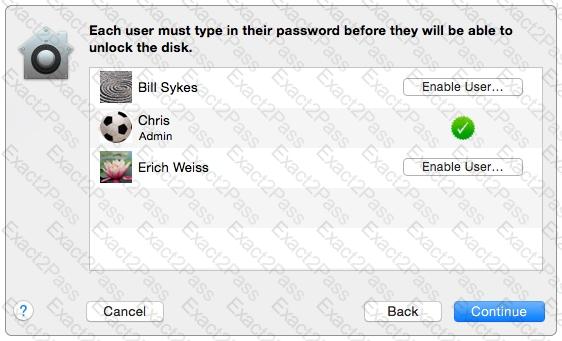
You click the Enable User button for the Bill Sykes account. What happens next?

A.

An alert message appears that says Bill Sykes will be prompted to enter the Recovery Key at next login.

B.

An alert message appears that says FileVault is now enabled for the Bill

Sykes account.

C.

You ' re prompted to enter an administrator password to enable FileVault on the Bill Sykes account.

D.

You ' re prompted to enter the Bill Sykes login password to enable FileVault on the Bill Sykes account.

Question # 15

In the Finder, which statement is true of file and folder permissions?

A.

A user with Write-only permissions for a folder can delete any file in that folder.

B.

A user with Write-only permissions for a folder can rename any file in that folder.

C.

A user with Read-only permissions for a folder can ' t view any files in that folder.

D.

A user with Read-only permissions for a folder can ' t rename any files in that folder.

Question # 16

How do you reset the printing system in OS X?

A.

Navigate to /Library/Printers/ in the Finder, select all items, and move them to the Trash.

B.

Open Printer Setup Utility and choose " Reset printing system " from the Printer Setup Utility menu.

C.

Open the Printers & Scanners pane of System Preferences, Control-click the Printers list, and choose " Reset printing system " from the shortcut menu.

D.

Open the Printers & Scanners pane of System Preferences, select all the printers in the Printers list, and click Delete (–).

Question # 17

Which IP address could a Mac assign to its Ethernet interface if no DHCP services were available on the network?

A.

10.0.0.100

B.

169.254.100.100

C.

172.16.100.100

D.

192.168.100.100

Question # 18

In OS X, you must authenticate as an administrator before you can install apps from the Mac App Store.

A.

True

B.

False

Question # 19

Which statements are true about Guest accounts in Mac OS X? (Select TWO.)

A.

Guest accounts are disabled by default in OS X.

B.

By default, a Guest user needs a password to log in to the Mac.

C.

If you disable Find My Mac, the Guest account for local login is disabled as well.

D.

If you enable Find My Mac, the Guest account for local login is enabled as well.

E.

Users can log in to the Guest account remotely.

Question # 20

How do you start up an OS X computer in single-user mode?

A.

Start up from the Recovery system partition and enter the command reboot -single in Terminal.

B.

Hold down Command-S while the computer starts up.

C.

Hold down Shift-Option while the computer starts up.

D.

Select Single-User Mode in the Startup Disk pane of System Preferences, then restart the computer.

Go to page:
