
Spring Sale Special Limited Time 70% Discount Offer - Ends in 0d 00h 00m 00s - Coupon code: buysanta

Exact2Pass Menu

OS X Support Essentials 10.10

Last Update 19 hours ago Total Questions : 82

The OS X Support Essentials 10.10 content is now fully updated, with all current exam questions added 19 hours ago. Deciding to include 9L0-422 practice exam questions in your study plan goes far beyond basic test preparation.

You'll find that our 9L0-422 exam questions frequently feature detailed scenarios and practical problem-solving exercises that directly mirror industry challenges. Engaging with these 9L0-422 sample sets allows you to effectively manage your time and pace yourself, giving you the ability to finish any OS X Support Essentials 10.10 practice test comfortably within the allotted time.

Question # 21

Review the screenshot, then answer the question below.
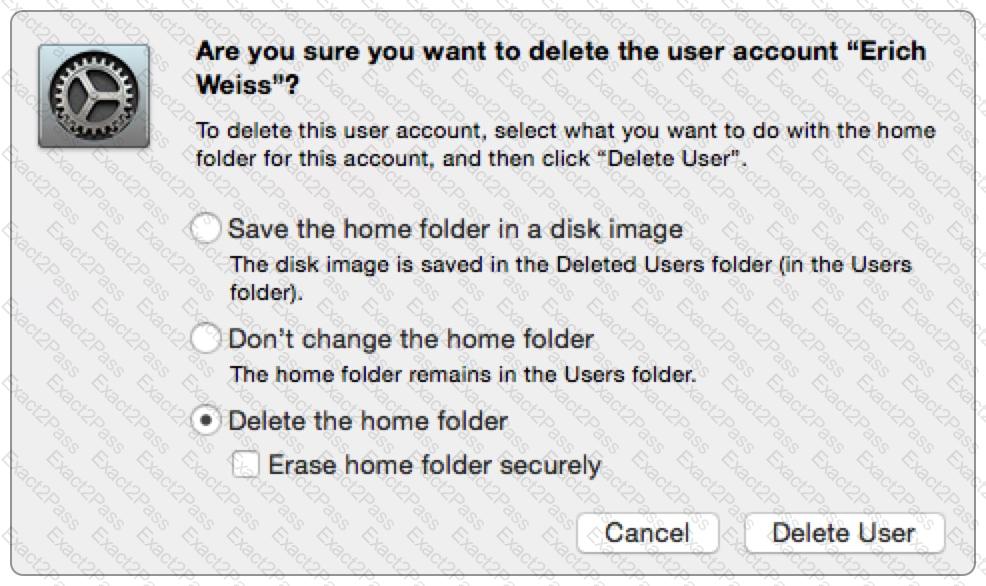
If you click Delete User in the dialog shown above, what will happen to Erich ' s home folder?

A.

It will be renamed Deleted compressed and encrypted, and archived in Time Machine.

B.

It will be moved to the Trash.

C.

It will be deleted immediately, without being moved to the Trash.

D.

It will be renamed Deleted, and the folder ' s permissions will be changed to allow administrator user access only.

Question # 22

When you ' re starting up a Mac, which keyboard shortcut can you use to display detailed information about the startup process?

A.

Shift

B.

Command-V

C.

Command-S

D.

Option

Question # 23

You ' re logged in on an OS X computer that has multiple user accounts. The Public folder for another user has default permissions. How can you access that folder?

A.

You can see its contents, and you can add files to its Drop Box folder.

B.

You can see its contents, but you can ' t add files to its Drop Box folder.

C.

You can see its contents and you can add files to it.

D.

You can ' t see its contents, but you can add files to its Drop Box folder.

Question # 24

Review the screenshot, then answer the question below.
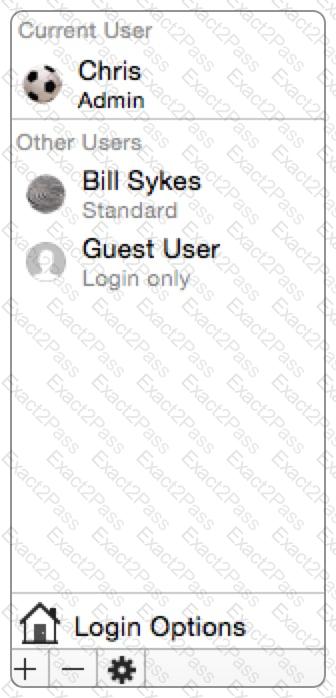
An OS X Mac has the local users configured as shown above. Chris has lost the password to his account. Which procedure will let you reset his password?


A.

Log in as Chris using the root password, open Users & Groups preferences, then reset his password.

B.

Log in as Bill Sykes, open Reset Password from the Utilities folder, then reset Chris ' s password.

C.

Restart the Mac from the OS X Recovery partition, open Terminal from the

Utilities menu, type reset password and press Return to open the Reset Password utility, then reset his password.

D.

Log in as Bill Sykes, open Directory preferences and enable the root user, authenticate as the root user in Users & Groups preferences, then reset Chris ' s password.

Go to page: