Exact2Pass

Last Update 18 hours ago Total Questions : 313
The Configuring and Operating Microsoft Azure Virtual Desktop content is now fully updated, with all current exam questions added 18 hours ago. Deciding to include AZ-140 practice exam questions in your study plan goes far beyond basic test preparation.
You'll find that our AZ-140 exam questions frequently feature detailed scenarios and practical problem-solving exercises that directly mirror industry challenges. Engaging with these AZ-140 sample sets allows you to effectively manage your time and pace yourself, giving you the ability to finish any Configuring and Operating Microsoft Azure Virtual Desktop practice test comfortably within the allotted time.
You have an Azure Virtual Desktop deployment that contains a host pool named Pool1.
Pool1 contains a session host named Host1 that is Azure AD-joined.
You need to verify whether a Windows license is assigned to Host1.
What should you do?
Note: This question is part of a series of questions that present the same scenario. Each question in the series contains a unique solution that might meet the stated goals. Some question sets might have more than one correct solution, while others might not have a correct solution.
After you answer a question in this section, you will NOT be able to return to it. As a result, these questions will not appear in the review screen.
You have the following:
A Microsoft 365 E5 tenant
An on-premises Active Directory domain
A hybrid Azure Active Directory (Azure AD) tenant
An Azure Active Directory Domain Services (Azure AD DS) managed domain
An Azure Virtual Desktop deployment
The Azure Virtual Desktop deployment contains personal desktops that are hybrid joined to the on-premises domain and enrolled in Microsoft Intune.
You need to configure the security settings for the Microsoft Edge browsers on the personal desktops.
Solution: You configure a configuration profile in Intune.
Does this meet the goal?
You have a hybrid Azure Active Directory (Azure AD) tenant.
You plan to deploy an Azure Virtual Desktop personal host pool. The host pool will contain 15 virtual machines that run Windows 10 Enterprise. The virtual machines will be joined to the on-premises Active Directory domain and used by the members of a domain group named Department1.
You need to ensure that each user is added automatically to the local Administrators group on the virtual machine to which the user signs in.
What should you configure?
You have an Azure Virtual Desktop host pool named Pool1 that contains three session hosts. The session hosts are configured to use FSLogix profiles.
On a management computer, you create an Application Masking rule and assignment files.
You need to apply Application Masking to the session hosts in Pool1.
What should you do?
Your network contains an on-premises Active Directory domain named contoso.com that syncs to an Azure Active Directory (Azure AD) tenant.
You have an Azure Virtual Desktop host pool named Pool1 that has the following settings:
Host pool name: Pool1
Host pool type: Personal
Load balancing algorithm: Breadth-first
Number of VMs: 3
The session hosts have the following configurations:
Image used to create the virtual machines: Windows 10 Enterprise
Virtual machines domain-joined to: On-premises contoso.com domain
You need to ensure that you can use Microsoft EndPoint Manager to manage security update on the session hosts.
What should you do?
You have an Azure subscription that contains an Azure Virtual Desktop deployment and the storage accounts shown in the following table.
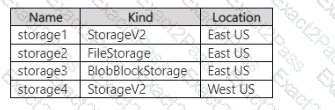
You plan to deploy a host pool named Poo 11 to the East US Azure region. Poo 11 will use FSLogix Profile Containers and Office Containers.
Which storage accounts can Pool! use?
You have an Azure subscription that contains an Azure Virtual Desktop host pool named Pool1 All the session hosts in Pool! are Microsoft Entra joined.
Users connect to Pool1 by using macOS devices.
You need to ensure that remote users can authenticate to RemoteApp sessions by using their Microsoft Entra credentials.
Which RDP property should you configure?
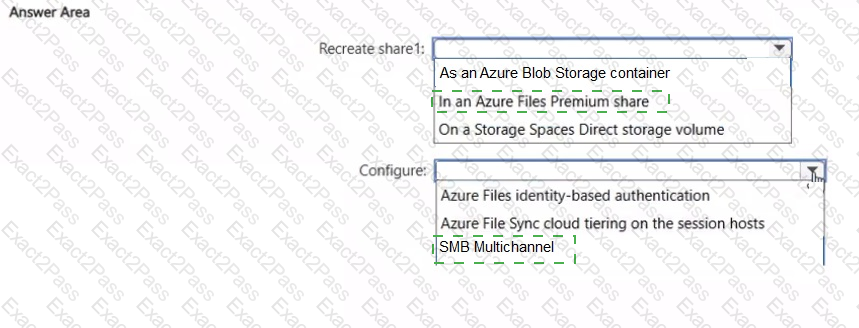
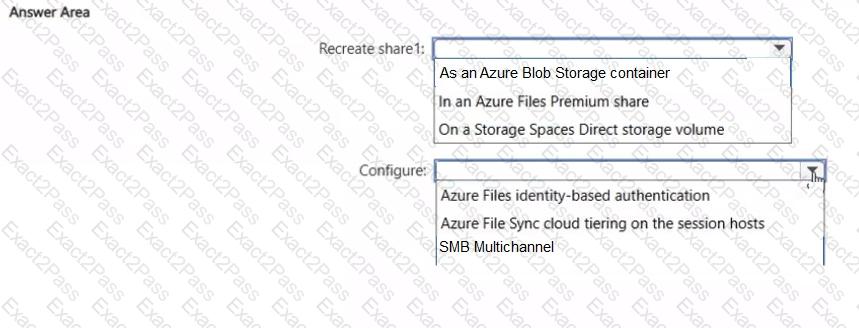
You have an Azure subscription that contains an Azure Virtual Desktop host pool named Pool1 and a standard storage account named account1. Pool1 contains two session hosts and uses FSLogix profile containers, account1 contains an Azure Files share named share1 that stores the profile containers.
Users report that signing in to the session hosts is slow.
You need to reduce how long it takes to sign in to the session hosts. The solution must minimize administrative effort.
What should you do? To answer, select the appropriate options in the answer area.
NOTE: Each correct selection is worth one point.
You have an Azure Virtual Desktop host pool.
You add a French language pack to each session host in the host pool.
Several days later, users report that English displays when they connect to Azure Virtual Desktop.
After an investigation, you discover that the French language pack was removed, and the session hosts reverted to English.
You need to ensure that the French language pack is always available on the session hosts.
What should you do?
Your on-premises network contains 20 Windows 10 devices.
You have an Azure Virtual Desktop deployment.
You need to deploy the Microsoft Remote Desktop client (MSRDC) to the devices. The MSRDC must be available to everyone who sign in to the devices.
What should you do?