Exact2Pass

Last Update 23 hours ago Total Questions : 584
The Administering Windows Server content is now fully updated, with all current exam questions added 23 hours ago. Deciding to include AZ-802 practice exam questions in your study plan goes far beyond basic test preparation.
You'll find that our AZ-802 exam questions frequently feature detailed scenarios and practical problem-solving exercises that directly mirror industry challenges. Engaging with these AZ-802 sample sets allows you to effectively manage your time and pace yourself, giving you the ability to finish any Administering Windows Server practice test comfortably within the allotted time.
Your network contains an on-premises Active Directory Domain Services (AD DS) domain named contoso.com. The domain contains three file servers named Server1, Server2, and Server3.
You have a domain-based Distributed File System (DFS) share named \\contoso.com\shares\Projects. Projects has folder targets on each file server. DFS Replication replicates Projects between the servers.
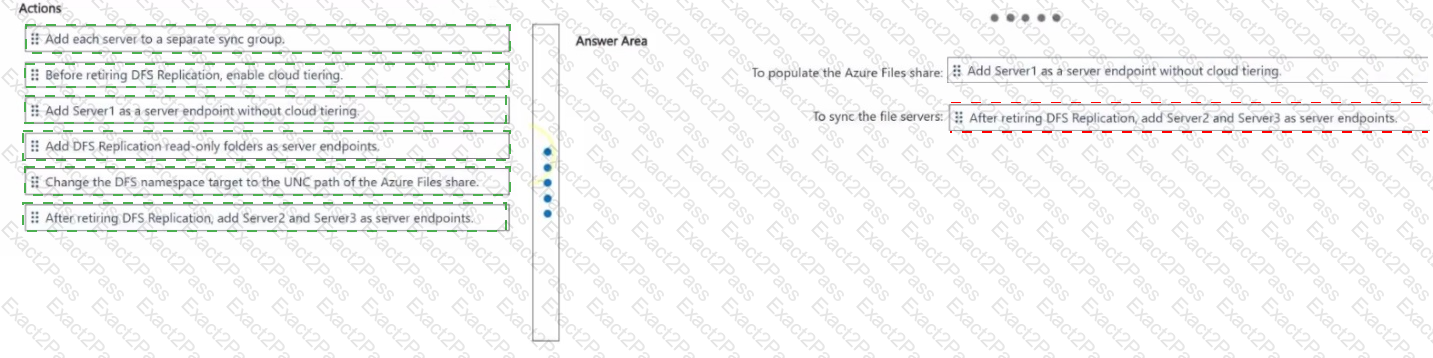
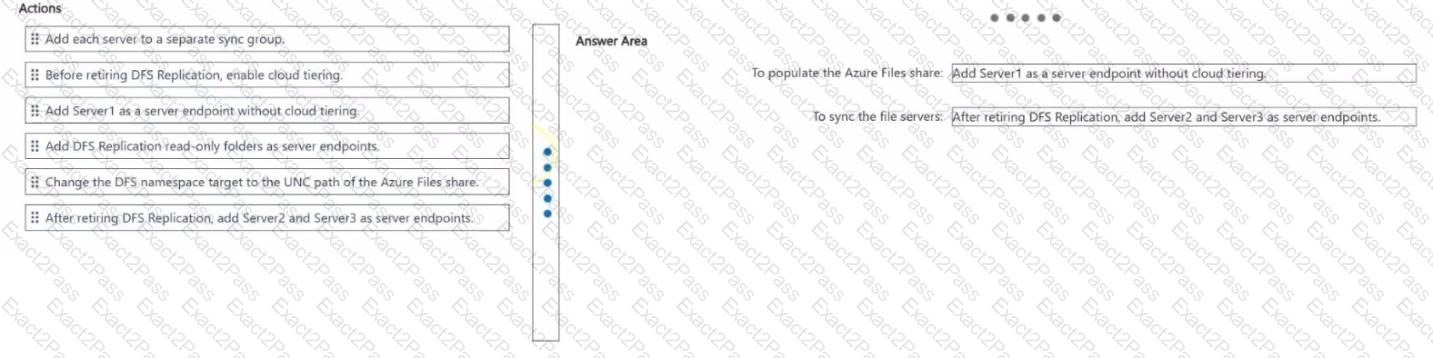
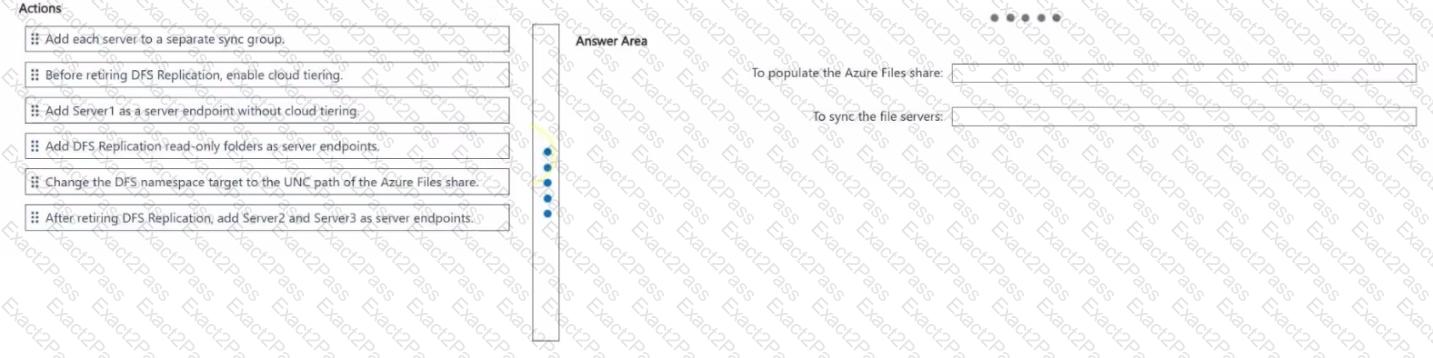
You need to migrate the replication for Projects from DFS Replication to Azure File Sync by using an existing Azure Files share. The solution must meet the following requirements:
• Preserve the current domain UNC path.
• After the migration, sync the changes from all the servers by using Azure File Sync.
• Ensure that the Azure Files share contains the Projects data before DFS Replication is retired.
What should you do? To answer, drag the appropriate actions to the correct requirements. Each action may be used once, more than once, or not at all. You may need to drag the split bar between panes or scroll to view content.
NOTE: Each correct selection is worth one point.
You have two Azure virtual networks named Vnet1 and Vnet2. You have a Windows 10 device named Client1 that connects to Vnet1 by using a Point-to-Site (P2S) IKEv2 VPN. You implement virtual network peering between Vnet1 and Vnet2. Vnet1 allows gateway transit; Vnet2 uses the remote gateway. You discover that Client1 cannot communicate with Vnet2. You need to ensure that Client1 can communicate with Vnet2. Solution: You download and reinstall the VPN client configuration. Does this meet the goal?
Your network contains an Active Directory Domain Services (AD DS) domain. The domain contains the servers shown in the following table: Server1 (Has Windows Admin Center installed), Server2 (Has the DHCP Server role installed). You need to ensure that from Server1, you can use Windows Admin Center to manage the DHCP Server role on Server2. What should you do first?

Server role table
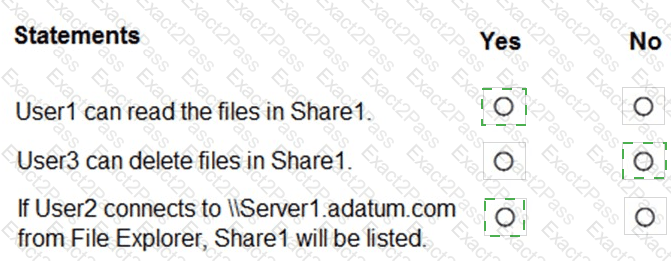
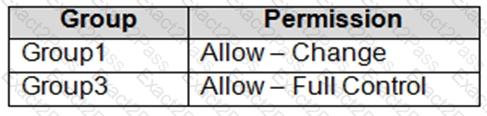
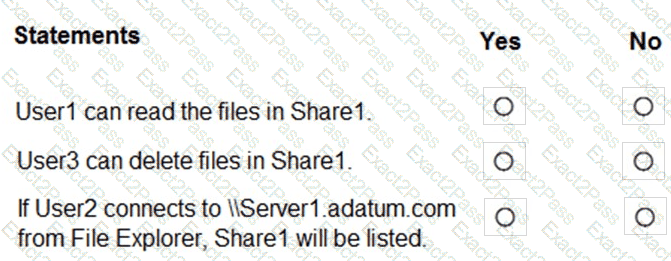
Your network contains an Active Directory Domain Services (AD DS) domain named adatum.com. The domain contains a server named Server1 and the users shown in the following exhibit (User1: member of Group1; User2: member of Group2; User3: member of Group3). Server1 contains a folder named D:\Folder1. The advanced security (NTFS) permissions for Folder1 are: Administrators (SERVER1\Administrators) - Full control; Group1 (ADATUM\Group1) - Read; Group2 (ADATUM\Group2) - Write. Folder1 is shared as Share1 (FolderEnumerationMode: Unrestricted). The share permissions for Share1 are: Group1 - Allow Change; Group3 - Allow Full Control. For each of the following statements, select Yes if the statement is true. Otherwise, select No. NOTE: Each correct selection is worth one point.
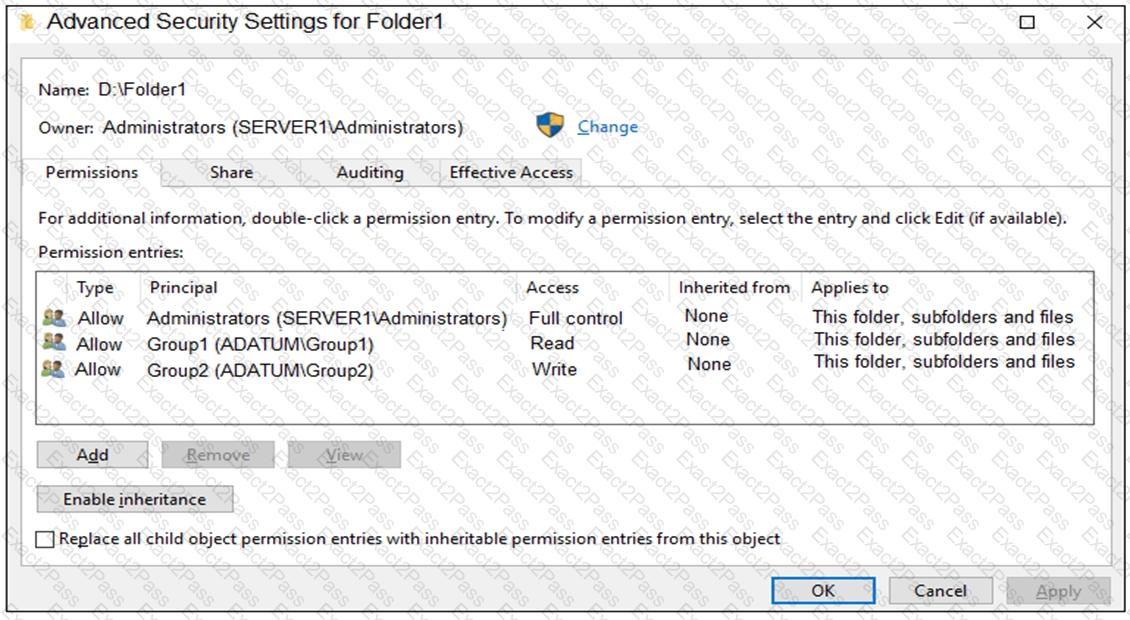
D:\Folder1 NTFS permissions: Administrators=Full control, Group1(ADATUM)=Read, Group2(ADATUM)=Write.
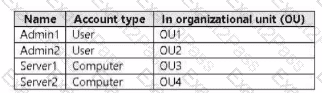
Your network contains an on-premises Active Directory Domain Services (AD DS) domain named contos.com. The domain contains the accounts shown in the following table.
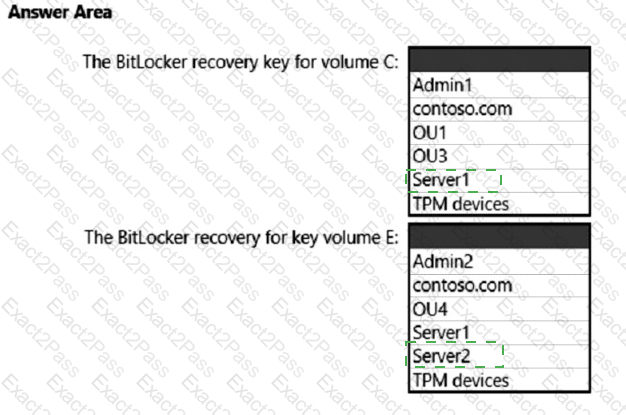
The domain is configured to store BitLocker recovery keys in Active Directory.
* Admin1 turns on BitLocker Drive Encryption (BitLocker) for volume C on Server1.
* Admin1 moves Server1 to OU1.
* Admin2 turns on BitLocker for removable volume E on Server2.
* Admin2 moves removable volume E from Server2 to Server1 and unlocks the volume.
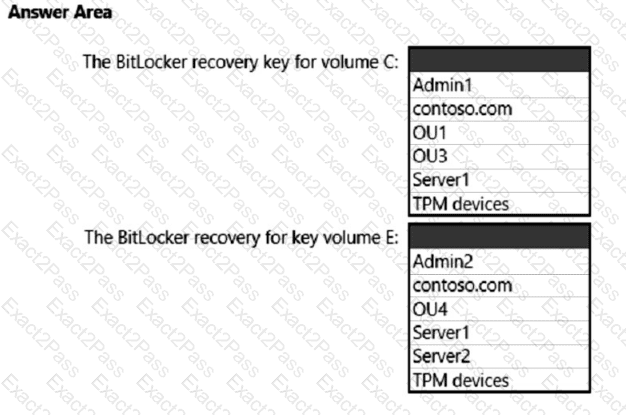
On which Active Directory object can you each BitLocker recovery key? To answer, select the appropriate options in the answer area.
NOTE: Each correct selection is worth on point.
Your network contains an Active Directory Domain Services (AD DS) domain. You have a Group Policy Object (GPO) named GPO1 that contains Group Policy preferences. You plan to link GPO1 to the domain. You need to ensure that the preferences in GPO1 apply only to domain member servers and NOT to domain controllers or client computers. All the other Group Policy settings in GPO1 must apply to all the computers. The solution must minimize administrative effort. Which type of item-level targeting should you use?
You have 50 on-premises servers that run Windows Server.
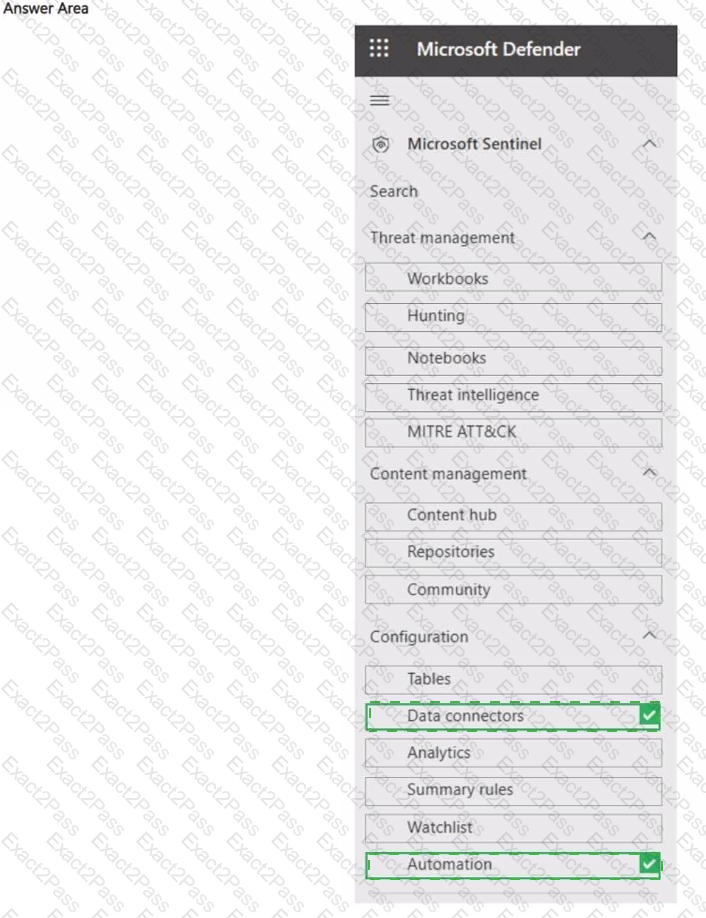
You have an Azure subscription that contains a Microsoft Sentinel workspace.
You plan to monitor the servers by using Microsoft Sentinel.
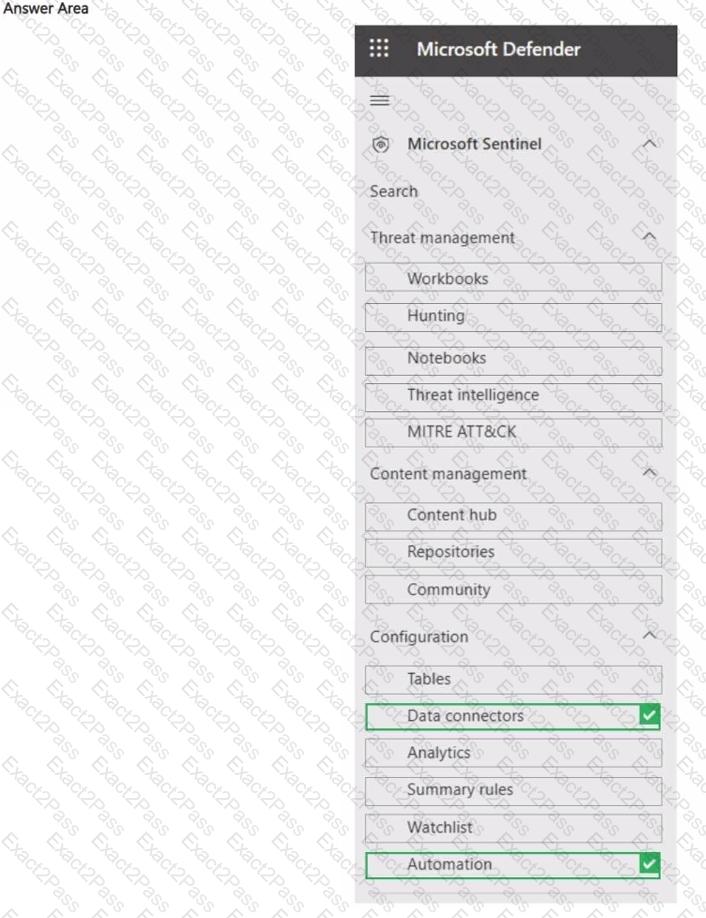
You need to perform the following actions in Microsoft Sentinel;
• Add the Windows Forwarded Events data connector.
• Create a playbook that has an incident trigger.
Which two settings should you use? To answer, select the appropriate settings in the answer area.
NOTE: Each correct selection is worth one point.
Exhibit
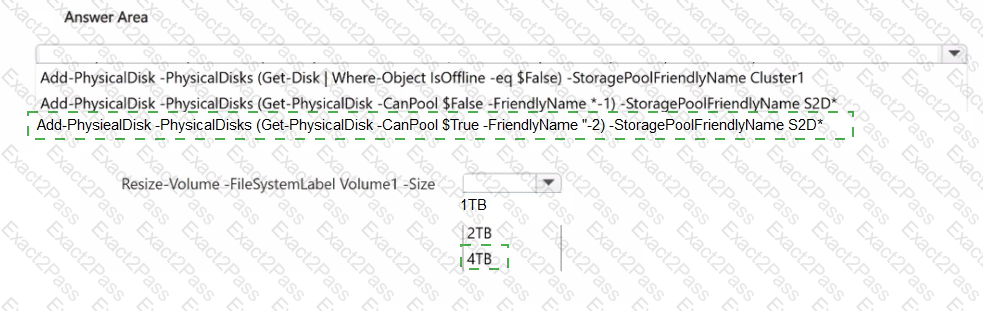
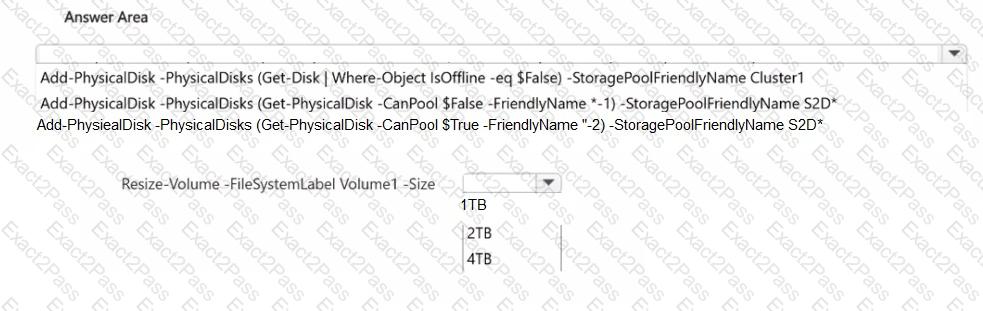
You have a cluster named Cluster! that contains two servers named Server! and Server2. Cluster1 has Storage Spaces Direct enabled. Cluster1 contains a virtual disk named Volume1 that is a 2-TB three-way mirror.
You discover that Volume! is full.
You connect a new 2-TB physical disk to each node of Cluster1.
You need to increase the size of Volume1. The solution must maintain resiliency.
How should you complete the script? To answer, select the appropriate options in the answer area.
NOTE: Each correct selection is worth one point.
You have an on-premises server that runs Windows Server and contains the folders shown in the following table. You have an Azure subscription. You plan to implement Azure File Sync. Which folders can be added as Azure File Sync server endpoints?
You have two servers named Host1 and Host2 that run Windows Server and have the Hyper-V server role installed. Host2 is configured as a replica server. Host1 contains a virtual machine named VM1. You plan to use Hyper-V Replica to replicate VM1 to Host2. You need to ensure that you can restore a replica of VM1 to a specific state from the past eight hours. What should you do?