Spring Sale Special Limited Time 70% Discount Offer - Ends in 0d 00h 00m 00s - Coupon code: buysanta

Exact2Pass Menu

FCSS - SD-WAN 7.4 Architect

Last Update 3 hours ago Total Questions : 68

The FCSS - SD-WAN 7.4 Architect content is now fully updated, with all current exam questions added 3 hours ago. Deciding to include FCSS_SDW_AR-7.4 practice exam questions in your study plan goes far beyond basic test preparation.

You'll find that our FCSS_SDW_AR-7.4 exam questions frequently feature detailed scenarios and practical problem-solving exercises that directly mirror industry challenges. Engaging with these FCSS_SDW_AR-7.4 sample sets allows you to effectively manage your time and pace yourself, giving you the ability to finish any FCSS - SD-WAN 7.4 Architect practice test comfortably within the allotted time.

Question # 11

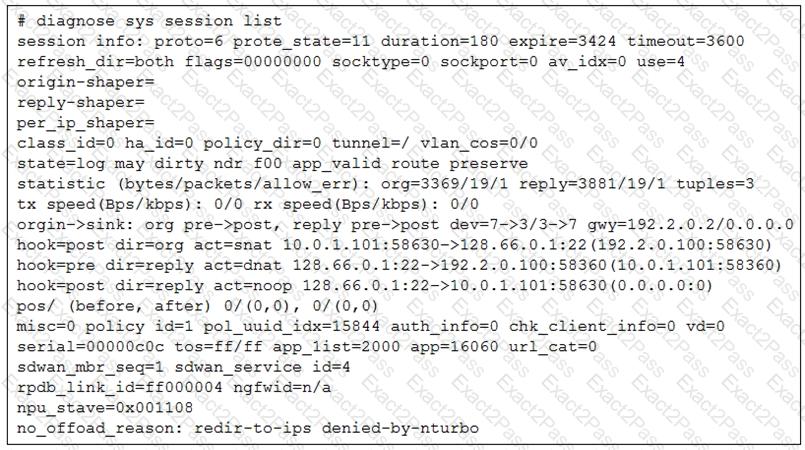
Refer to the exhibit.

The administrator configured the SD-WAN rule ID 4 with two members (port1 and port2) and strategy lowest cost (SLA).

What are the two characteristics of the session shown in the exhibit? (Choose two.)

A.

FortiGate steered this flow according to an SD-WAN rule.

B.

FortiGate will never re-evaluate this session.

C.

FortiGate steered this flow according to the application detected and the outgoing interface is port3.

D.

FortiGate will re-evaluate this session if the outgoing interface goes down.

Question # 12

Within the context of SD-WAN, what does SIA correspond to?

A.

Remote Breakout

B.

Local Breakout

C.

Software Internet Access

D.

Secure Internet Authorization

Question # 13

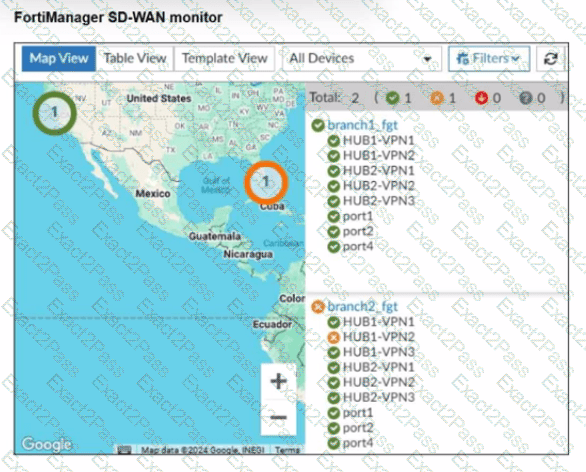
Refer to the exhibit.

An administrator checks the status of an SD-WAN topology using the FortiManager SD-WAN monitor menus. All members are configured with one or two SLAs.

Which two conclusions can you draw from the output shown? (Choose two.)

A.

The template view should be used to see the hub devices.

B.

One member of branch2_fgt is missing the SLAs.

C.

branch2_fgt establishes six tunnels to the hubs and they are all up.

D.

This SD-WAN topology contains only two branch devices.

Question # 14

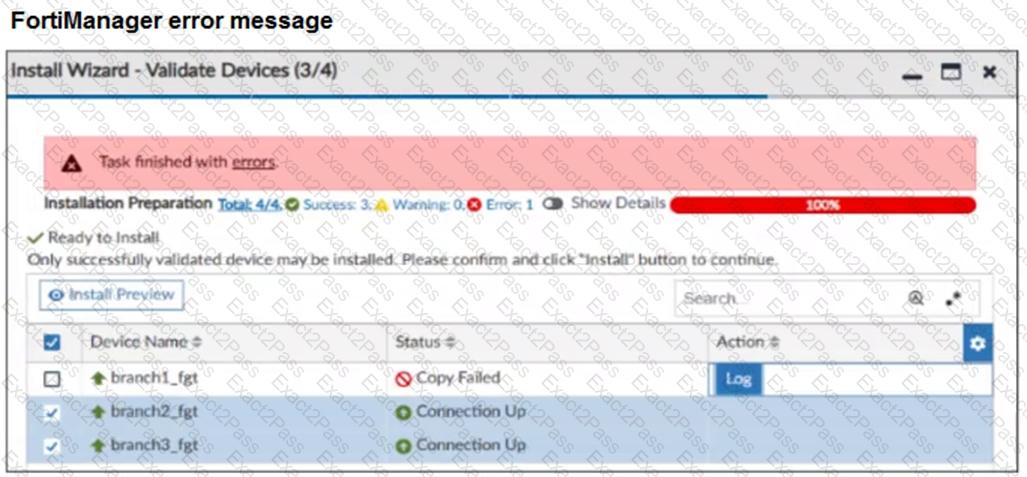
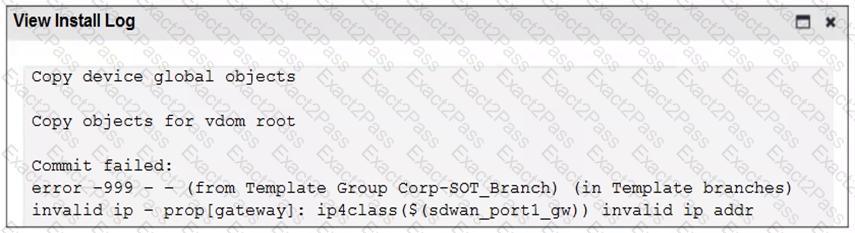
Refer to the exhibits.

You use FortiManager to configure SD-WAN on three branch devices.
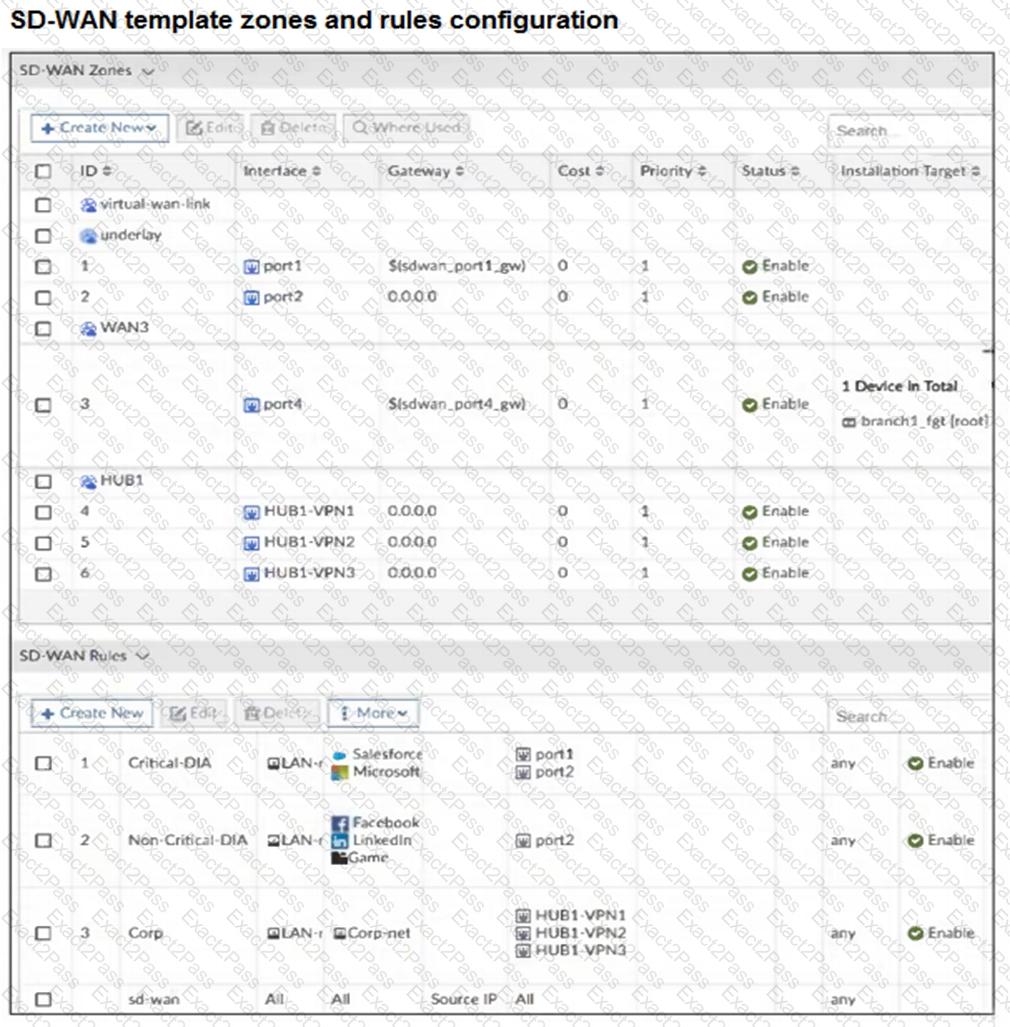
When you install the device settings, FortiManager prompts you with the error “Copy Failed” for the device branch1_fgt. When you click the log button, FortiManager displays the message shown in the exhibit.

There are two different ways to resolve this issue. Based on the exhibits, which methods could you use? (Choose two.)

A.

Update the management IP address of branch1_fgt.

B.

Specify the gateway of the SD-WAN member port1 with an IP address or use the default value.

C.

Do not define installation targets for SD-WAN members.

D.

Review the per-device mapping configuration for metadata variables

Question # 15

When you use the command diagnose sys session list, how do you identify the sessions that correspond to traffic steered according to SD-WAN rules?

A.

You identify sessions steered according to SD-WAN rules with the flag vwl.

B.

You cannot identify SD-WAN sessions. You must use the sdwar. session filter.

C.

You identify sessions steered according to SD-WAN rules with the data vwl_mbr_seq.

D.

You identify sessions steered according to SD-WAN rules with the data 3dwan_service_id.

Question # 16

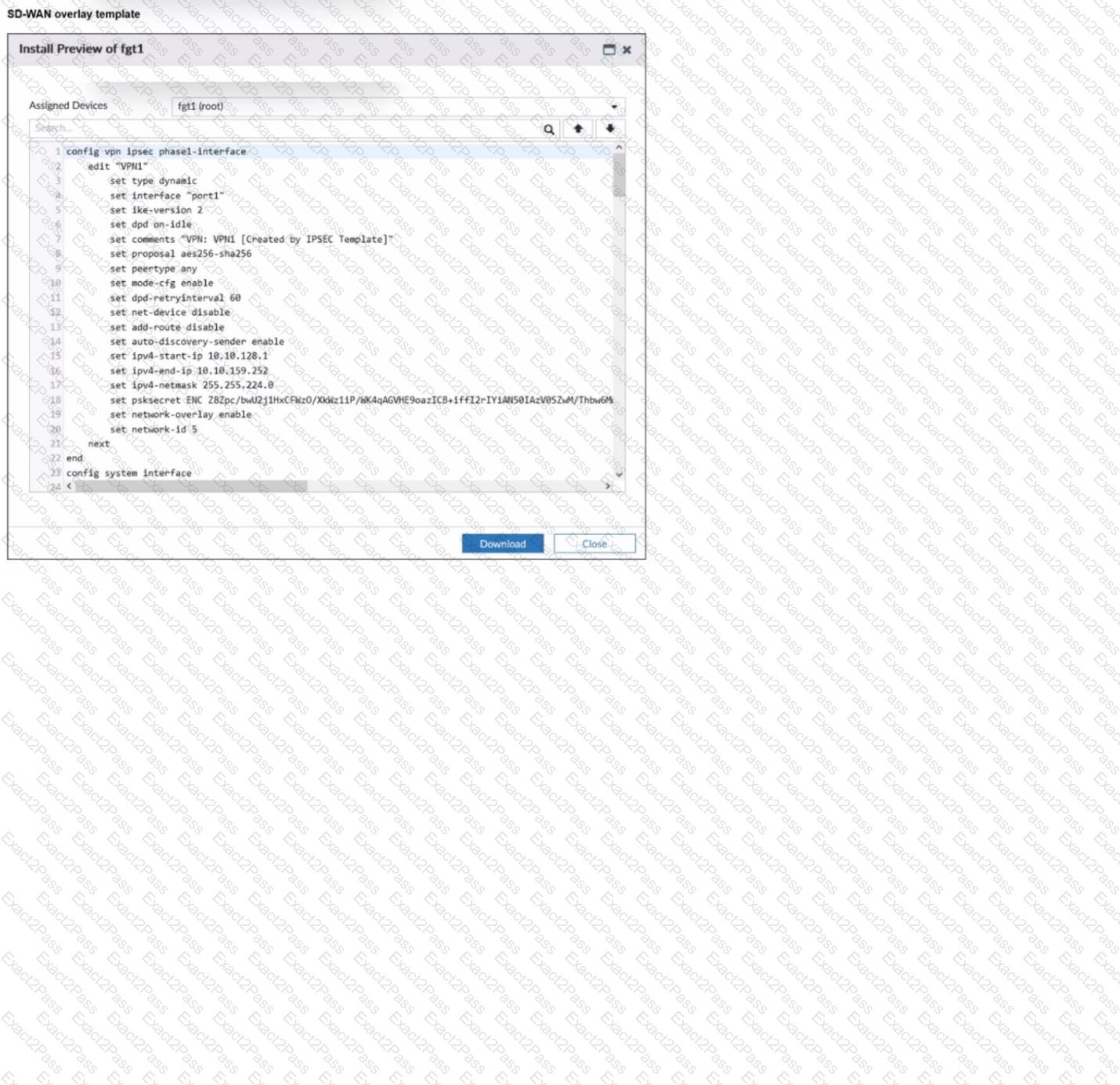
Refer to the exhibit.

The administrator used the SD-WAN overlay template to prepare an IPsec tunnels configuration for a hub-and-spoke SD-WAN topology. The exhibit shows the FortiManager installation preview for one FortiGate device.

Based on the exhibit, which statement best describes the configuration applied to the FortiGate device?

A.

It is a spoke device that establishes dynamic IPsec tunnels to the hub. The local subnet range is 10.10.128.0/23.

B.

It is a hub device. It can send ADVPN shortcut offers.

C.

It is a hub device. It will automatically discover the spoke devices and add them to the SD-WAN topology.

D.

It is a spoke device that establishes dynamic IPsec tunnels to the hub It can send ADVPN shortcut requests.

Question # 17

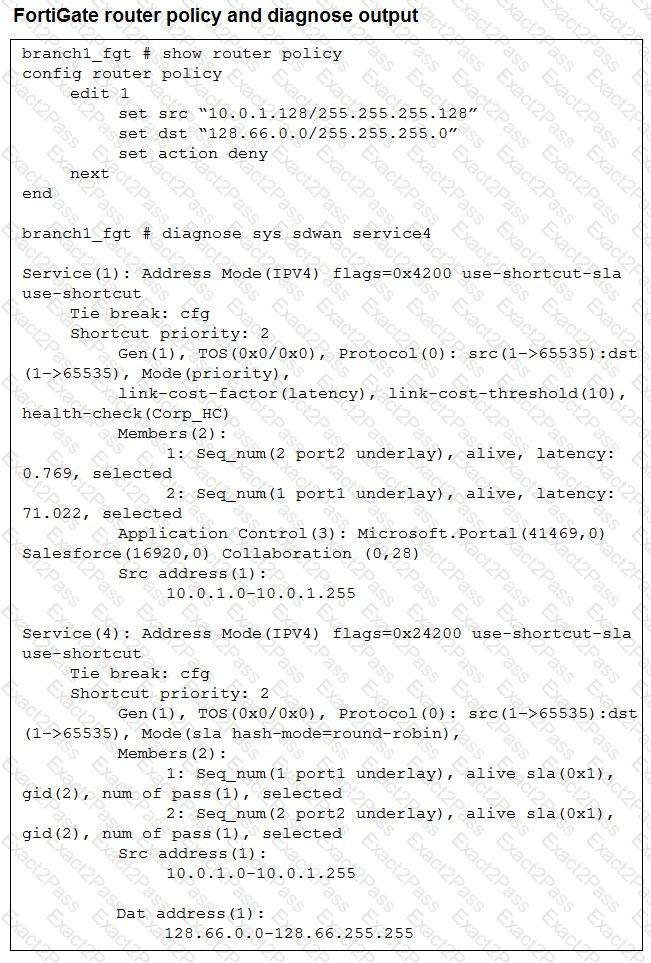
Refer to the exhibit.

How does FortiGate handle the traffic with the source IP 10.0.1.130 and the destination IP 128.66.0 125?

A.

FortiGate routes the traffic flow according to the FIB.

B.

FortiGate load balances the traffic flow through port1 and port2.

C.

FortiGate drops the traffic flow.

D.

FortiGate steers the traffic flow through port2.

Question # 18

Exhibit.

For your ZTP deployment, you review the CSV file shown in exhibit and note that it is missing important information. Which two elements must you change before you can import it into FortiManager? (Choose two.)

A.

You must associate a device blueprint with each device

B.

You must define a name for each device

C.

You must define a value for each device and each metadata variable that defines an IP address.

D.

You must define a value for each device and each user-defined metadata variable.

Question # 19

Which statement describes FortiGate behavior when you reference a zone in a static route?

A.

FoftiGate installs ECMP static routes for the first two members of the zone.

B.

FortiGate ignores the static routes defined through members referenced in the zone.

C.

FortiGate routes the traffic through the best performing member of the zone.

D.

FortiGate installs a static route for each member in the zone.

Question # 20

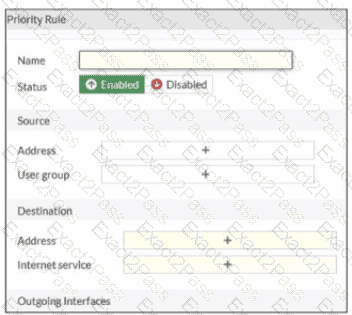
Refer to the exhibit.

An administrator configures SD-WAN rules for a DIA setup using the FortiGate GUI. The page to configure the source and destination part of the rule looks as shown in the exhibit. The GUI page shows no option to configure an application as the destination of the SD-WAN rule Why?


A.

You cannot use applications as the destination when FortiGate is used for a DIA setup.

B.

FortiGate allows the configuration of applications as the destination of SD-WAN rules only on the CLI.

C.

You must enable the feature on the CLI.

D.

You must enable the feature first using the GUI menu System > Feature Visibility.

Go to page: