Summer Sale Special Limited Time 70% Discount Offer - Ends in 0d 00h 00m 00s - Coupon code: buysanta

Exact2Pass Menu

Fortinet NSE 6 - FortiManager 7.6 Administrator

Last Update 8 hours ago Total Questions : 65

The Fortinet NSE 6 - FortiManager 7.6 Administrator content is now fully updated, with all current exam questions added 8 hours ago. Deciding to include NSE6_FMG_AD-7.6 practice exam questions in your study plan goes far beyond basic test preparation.

You'll find that our NSE6_FMG_AD-7.6 exam questions frequently feature detailed scenarios and practical problem-solving exercises that directly mirror industry challenges. Engaging with these NSE6_FMG_AD-7.6 sample sets allows you to effectively manage your time and pace yourself, giving you the ability to finish any Fortinet NSE 6 - FortiManager 7.6 Administrator practice test comfortably within the allotted time.

Question # 1

A FortiManager administrator opens the revision history and choose to revert to a previous version.

What will this action do to the current device configuration?

A.

It will trigger an unknown device-level database status, and the administrator will have to import a policy package to sync.

B.

It will trigger a conflict status if it is using any provisioning template, and the administrator will have to install changes.

C.

It will revert both configurations: device-level database and policy layer database.

D.

It will modify the device-level database.

Question # 2

Refer to the exhibits.

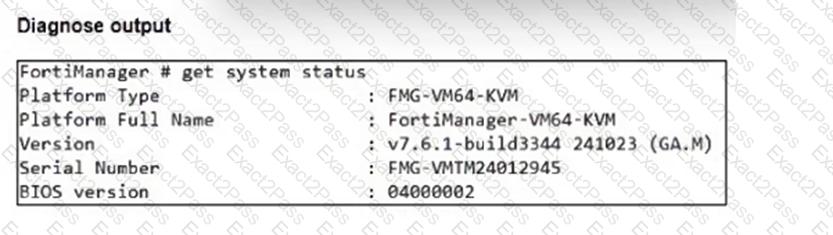
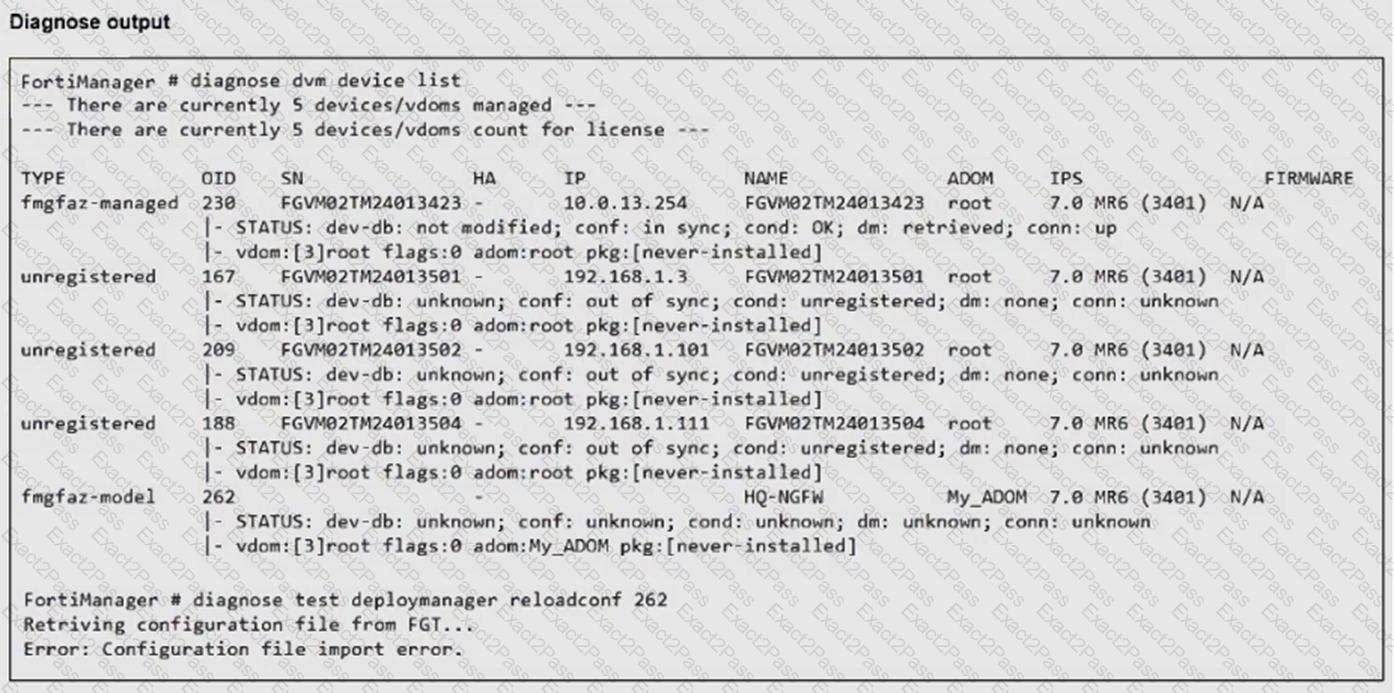
An administrator runs the reload failure command diagnose test deploymanager reloadconf 262 on FortiManager.

Why does the administrator receive an error message?

A.

The administrator must use the FortiGate name instead of the ID number.

B.

The administrator just recently added FortiGate HQ-NGFW as a model device.

C.

FortiManager requires the FortiGate serial number instead of the ID number.

D.

FortiManager does not support FortiOS version 7.0.

Question # 3

Refer to the exhibits.

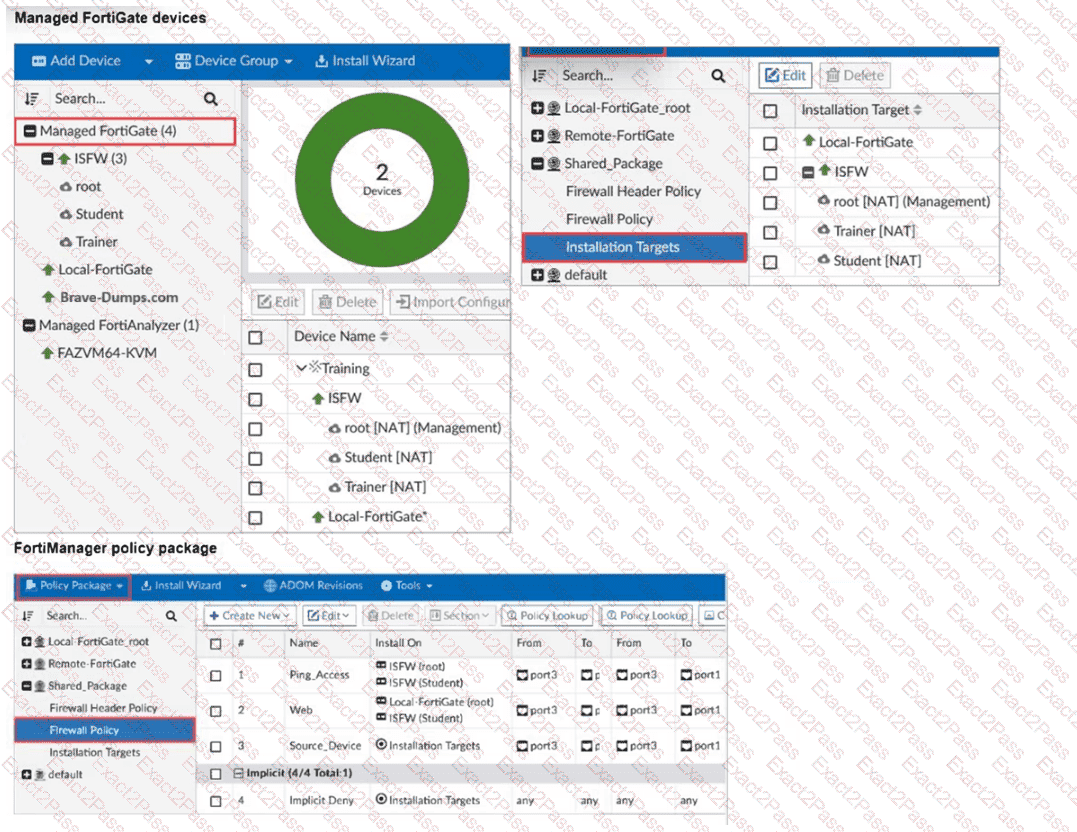
What can you conclude, based on the configuration shown in the exhibit? Choose one answer

A.

The administrator needs to retrieve the Local-FortiGate configuration to sync with the Security Fabric group, Training.

B.

Policy sequence #1 will be installed on the internal segmentation firewall ISFW device root NAT and Trainer NAT VDOMs.

C.

Policy sequence #3 must have devices or VDOMs listed in the Install On column; otherwise, it will cause errors.

D.

The global policy package will be added to the top of the ISFW policy package.

Question # 4

Which is recommended when you are managing a high volume of logs in your network?

A.

Store logs on FortiManager and use FortiView.

B.

Add and manage FortiAnalyzer from FortiManager.

C.

Enable advanced ADOM mode on FortiManager.

D.

Forward logs from FortiAnalyzer to FortiManager daily.

Question # 5

An administrator has a FortiGate-HQ device with VDOMs—root, HR and Facilities, currently managed under the FortiManager ADOM—Site1. They try to move VDOM HR to the FortiManager ADOM—Site2, but it does not work.

Why is the administrator not able to move FortiGate-HQ VDOM HR to FortiManager ADOM—Site2?

A.

The FortiGate-HQ must be managed under the FortiManager ADOM—root to allow moving its VDOMs to different ADOMs.

B.

The administrator must have full access in the device layer of FortiGate-HQ VDOM-root before they can VDOMs to different ADOMs.

C.

FortiManager must be in ADOM normal mode, which does not allow VDOMs to be managed separately.

D.

The administrator must delete the FortiGate-HQ device from FortiManager and add it again using the Add Device wizard before moving the VDOM.

Question # 6

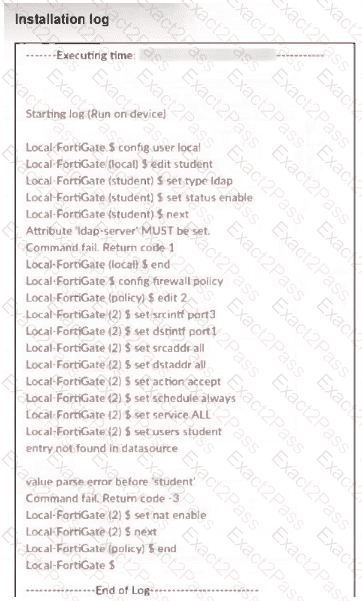
What can you conclude from the failed installation log shown in the exhibit?
A.

Policy ID 2 is installed in the disabled state.

B.

Policy ID 2 will not be installed.

C.

Policy ID 2 is installed without a source address.

D.

Policy ID 2 is installed without the remote user student.

Question # 7

Push updates are failing on a FortiGate device located behind a network address translation (NAT) device?

Which two settings should the administrator check to correct this problem? (Choose two.)

A.

Make sure the NAT device IP address and the correct ports are configured on FortiManager.

B.

Make sure FortiGuard updates and web service are enabled on the FortiGuard service interface.

C.

Make sure the virtual IP address and the correct ports are configured on the NAT device.

D.

Make sure the Bind to IP address option on the FortiGuard service interface is set to the virtual IP address from the NAT device.

Question # 8

What are two expected results when both FortiManager and FortiGate are behind network address translation NAT devices? Choose two answers

A.

FortiGate is discovered by FortiManager through the FortiGate NATed IP address.

B.

During discovery, the FortiManager NATed IP address is not set by default on FortiGate.

C.

FortiGate can announce itself to FortiManager only if the FortiManager non-NATed IP address is configured on FortiGate under central management.

D.

If the FortiGate–FortiManager communication protocol FGFM tunnel is torn down, FortiManager will try to reestablish the FGFM tunnel.

Question # 9

Company policy dictates that any time a change is made to a policy package on FortiManager an ADOM revision is created before the change installed, and that revision is held for a minimum of 90 days.

Over the past three months, each installed change has resulted in several unused policies and duplicate objects.

The FortiManager administrator plans to upgrade the FortiGate devices and then upgrade the FortiManager ADOM from version 7.4 to 7.6.

Which action can the administrator take to avoid slow ADOM upgrades?

A.

Check and repair the global configuration database before upgrading.

B.

Export firewall policies to Excel, delete them on the ADOM. then reimport them after upgrading the ADOM.

C.

Find unused firmware templates, then delete them before upgrading.

D.

Limit ADOM revisions before upgrading.

Question # 10

An administrator notices that CLI scripts are failing on some FortiGate devices because they use different FortiOS versions.

Which two actions should the administrator take to fix the failing CLI scripts? Choose two answers.


A.

Create separate ADOMs for each FortiOS version.

B.

Disable CLI scripts for devices using older firmware.

C.

Modify the CLI scripts to include conditional commands based on FortiOS version.

D.

Create version-specific CLI script groups and assign them to the appropriate devices.

Go to page: