Spring Sale Special Limited Time 70% Discount Offer - Ends in 0d 00h 00m 00s - Coupon code: buysanta

Exact2Pass Menu

CyberArk CDE Recertification

Last Update 4 hours ago Total Questions : 221

The CyberArk CDE Recertification content is now fully updated, with all current exam questions added 4 hours ago. Deciding to include PAM-CDE-RECERT practice exam questions in your study plan goes far beyond basic test preparation.

You'll find that our PAM-CDE-RECERT exam questions frequently feature detailed scenarios and practical problem-solving exercises that directly mirror industry challenges. Engaging with these PAM-CDE-RECERT sample sets allows you to effectively manage your time and pace yourself, giving you the ability to finish any CyberArk CDE Recertification practice test comfortably within the allotted time.

Question # 21

Assuming a safe has been configured to be accessible during certain hours of the day, a Vault Admin may still access that safe outside of those hours.

A.

TRUE

B.

FALSE

Question # 22

Can the 'Connect' button be used to initiate an SSH connection, as root, to a Unix system when SSH access for root is denied?

A.

Yes, when using the connect button, CyberArk uses the PMTerminal.exe process which bypasses the root SSH restriction.

B.

Yes, only if a logon account is associated with the root account and the user connects through the PSM-SSH connection component.

C.

Yes, if a logon account is associated with the root account.

D.

No, it is not possible.

Question # 23

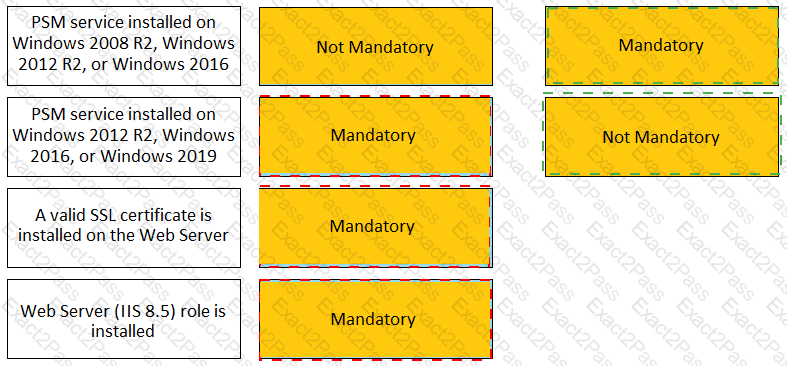
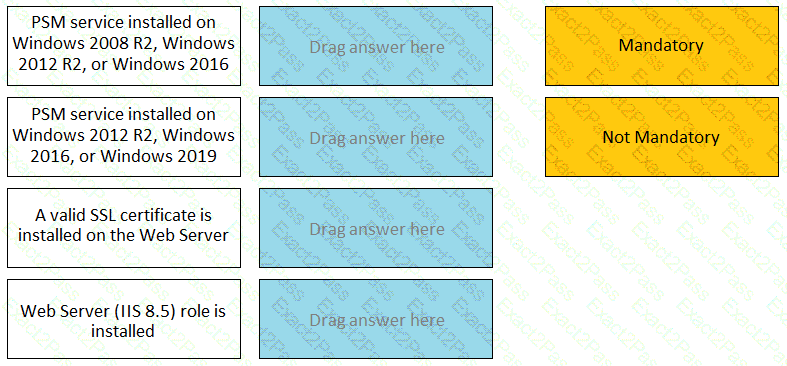
For each listed prerequisite, identify if it is mandatory or not mandatory to run the PSM Health Check.
Question # 24

A user requested access to view a password secured by dual-control and is unsure who to contact to expedite the approval process. The Vault Admin has been asked to look at the account and identify who can approve their request.

What is the correct location to identify users or groups who can approve?

A.

PVWA > Administration > Platform Configuration > Edit Platform > UI  &  Workflow > Dual Control > Approvers

B.

PVWA > Policies > Access Control (Safes) > Safe Members > Workflow > Authorize Password Requests

C.

PVWA > Account List > Edit > Show Advanced Settings > Dual Control > Direct Managers

D.

PrivateArk > Admin Tools > Users and Groups > Auditors (Group Membership)

Question # 25

Which PTA sensors are required to detect suspected credential theft?

A.

Logs, Vault Logs

B.

Logs, Network Sensor, Vault Logs

C.

Logs, PSM Logs, CPM Logs

D.

Logs, Network Sensor, EPM

Question # 26

Which is the primary purpose of exclusive accounts?

A.

Reduced risk of credential theft

B.

More frequent password changes

C.

Non-repudiation (individual accountability)

D.

To force a ‘collusion to commit’ fraud ensuring no single actor may use a password without authorization

Question # 27

Which parameter controls how often the CPM looks for accounts that need to be changed from recently completed Dual control requests.

A.

HeadStartInterval

B.

Interval

C.

ImmediateInterval

D.

The CPM does not change the password under this circumstance

Question # 28

Which built-in report from the reports page in PVWA displays the number of days until a password is due to expire?

A.

Privileged Accounts Inventory

B.

Privileged Accounts Compliance Status

C.

Activity Log

D.

Privileged Accounts CPM Status

Question # 29

Which Master Policy Setting must be active in order to have an account checked-out by one user for a pre-determined amount of time?

A.

Require dual control password access Approval

B.

Enforce check-in/check-out exclusive access

C.

Enforce one-time password access

D.

Enforce check-in/check-out exclusive access & Enforce one-time password access

Question # 30

Due to network activity, ACME Corp’s PrivateArk Server became active on the OR Vault while the Primary Vault was also running normally. All the components continued to point to the Primary Vault.

Which steps should you perform to restore DR replication to normal?

A.

Replicate data from DR Vault to Primary Vault > Shutdown PrivateArk Server on DR Vault > Start replication on DR vault

B.

Shutdown PrivateArk Server on DR Vault > Start replication on DR vault

C.

Shutdown PrivateArk Server on Primary Vault > Replicate data from DR Vault to Primary Vault > Shutdown PrivateArk Server on DR Vault > Start replication on DR vault

D.

Shutdown PrivateArk Server on DR Vault > Replicate data from DR Vault to Primary Vault > Shutdown PrivateArk Server on DR Vault > Start replication on DR vault

Go to page: