
Spring Sale Special Limited Time 70% Discount Offer - Ends in 0d 00h 00m 00s - Coupon code: buysanta

Exact2Pass Menu

Palo Alto Networks Certified Security Automation Engineer

Last Update 9 hours ago Total Questions : 156

The Palo Alto Networks Certified Security Automation Engineer content is now fully updated, with all current exam questions added 9 hours ago. Deciding to include PCSAE practice exam questions in your study plan goes far beyond basic test preparation.

You'll find that our PCSAE exam questions frequently feature detailed scenarios and practical problem-solving exercises that directly mirror industry challenges. Engaging with these PCSAE sample sets allows you to effectively manage your time and pace yourself, giving you the ability to finish any Palo Alto Networks Certified Security Automation Engineer practice test comfortably within the allotted time.

Question # 11

When is the post-processing script executed in XSOAR?

A.

Just after the incident is created

B.

Just after the pre-processing is executed

C.

Just after the playbook is executed

D.

Just after the Close Incident button is clicked

Question # 12

An administrator has noticed that an incident fetch has failed, causing several internal workflows to be backed up. The administrator would like to receive notifications the next time the incident fetch fails.

How can they achieve this?

A.

Create a custom playbook that sends an email each time the fetch fails.

B.

Create a new integration that monitors the incident fetch and sends an email if the fetch fails.

C.

Schedule a job that runs and monitors incidents in XSOAR that will send an email if there are no new incidents.

D.

Add a server config to notify when incident fetch fails.

Question # 13

Which two statements describe how timers are configured to start and stop automatically in a playbook? (Choose two.)

A.

Use a field of Number to count the number of seconds elapsed between two tasks

B.

After the playbook has run, calculate the total time taken and set the timer field with this value

C.

To begin counting time taken, add a task in the playbook with automation startTimer. To end the counting, add a task with automation stopTimer

D.

From the Timers tab of the playbook task, choose the action for the timer and the timer field to perform the action on

Question # 14

What is used to trigger playbooks automatically based on the classification of an incident?

A.

Indicator type

B.

Incoming mapper

C.

Incident types

D.

Integration configuration

Question # 15

Whar are possible war room result (entry) types?

A.

Context, file, error, image

B.

Note, indicator, error, image

C.

Video, file, error, image

D.

Note, file, error, image

Question # 16

Which playbook will a job run by default?

A.

The playbook assigned to the incident type

B.

The playbook assigned to the indicator type

C.

The playbook assigned during pre-processing

D.

The playbook assigned by the integration

Question # 17

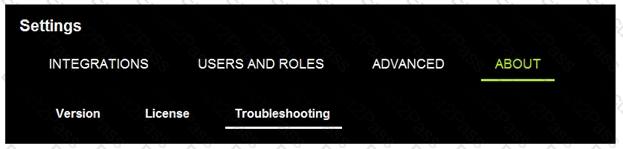
Which three actions can an engineer take on the troubleshooting page? (Choose three.)
A.

Download the debug log bundle

B.

Put the XSOAR server in maintenance mode

C.

View and modify server configuration settings

D.

Export and import custom content

E.

View a list of server administrators

Question # 18

After executing the DeleteContext automation with all=yes argument, how would the context data of an incident present?

A.

All the data, including the incident key will be deleted, and the context data will be completely empty.

B.

No difference, the automation cannot be executed manually.

C.

All context data, including custom incident fields will be deleted, system incident fields will remain.

D.

All context data, except the incident key will be deleted.

Question # 19

What are three different loop types in a playbook? (Choose three.)

A.

Automation

B.

Built-in

C.

Data collection

D.

Conditional

E.

For-each

Question # 20

Select the correct incident life cycle on XSOAR.

A.

Planning > Incident Ingestion > Incident Creation > Mapping and Classification > Pre-processing > Playbook runs > Post-processing

B.

Planning > Incident Ingestion > Pre-processing > Incident Creation > Mapping and Classification > Playbook runs > Post-processing

C.

Planning > Incident Ingestion > Pre-processing > Mapping and Classification > Incident Creation > Playbook runs > Post-processing

D.

Planning > Incident Ingestion > Mapping and Classification > Pre-processing > Incident Creation > Playbook runs > Post-processing

Go to page:
