Spring Sale Special Limited Time 70% Discount Offer - Ends in 0d 00h 00m 00s - Coupon code: buysanta

Exact2Pass Menu

UiPath Automation Developer Associate Exam (2023.10)

Last Update 22 hours ago Total Questions : 382

The UiPath Automation Developer Associate Exam (2023.10) content is now fully updated, with all current exam questions added 22 hours ago. Deciding to include UiPath-ADAv1 practice exam questions in your study plan goes far beyond basic test preparation.

You'll find that our UiPath-ADAv1 exam questions frequently feature detailed scenarios and practical problem-solving exercises that directly mirror industry challenges. Engaging with these UiPath-ADAv1 sample sets allows you to effectively manage your time and pace yourself, giving you the ability to finish any UiPath Automation Developer Associate Exam (2023.10) practice test comfortably within the allotted time.

Question # 91

Which of the following statements accurately describes the function of the If activity in a workflow?

A.

It evaluates a boolean condition and creates two separate branches for both true and false conditions, executing only one branch.

B.

It evaluates a boolean condition and runs the branch with the highest priority, regardless of the condition ' s truthiness.

C.

It evaluates a set of boolean conditions and branches the workflow execution to the first true condition encountered.

D.

It evaluates a boolean condition and creates a single branch that executes both true and false statements sequentially.

Question # 92

A developer is using the REFramework template to automate a process. In " SetTransactionStatus " file, there is the following sequence of activities, where the last Log Message activity was added by

the developer:
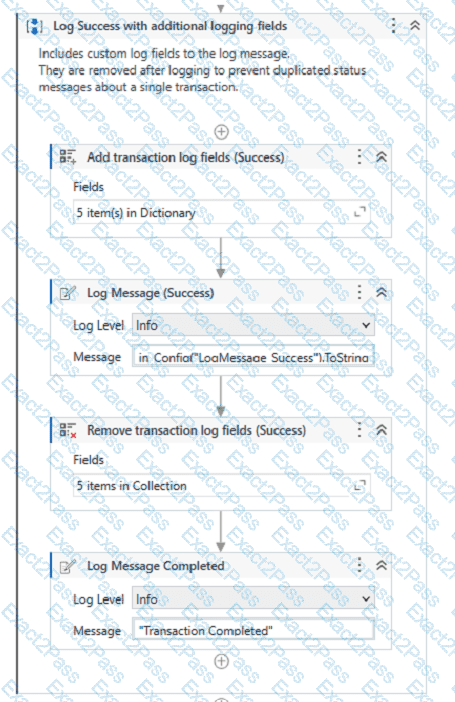
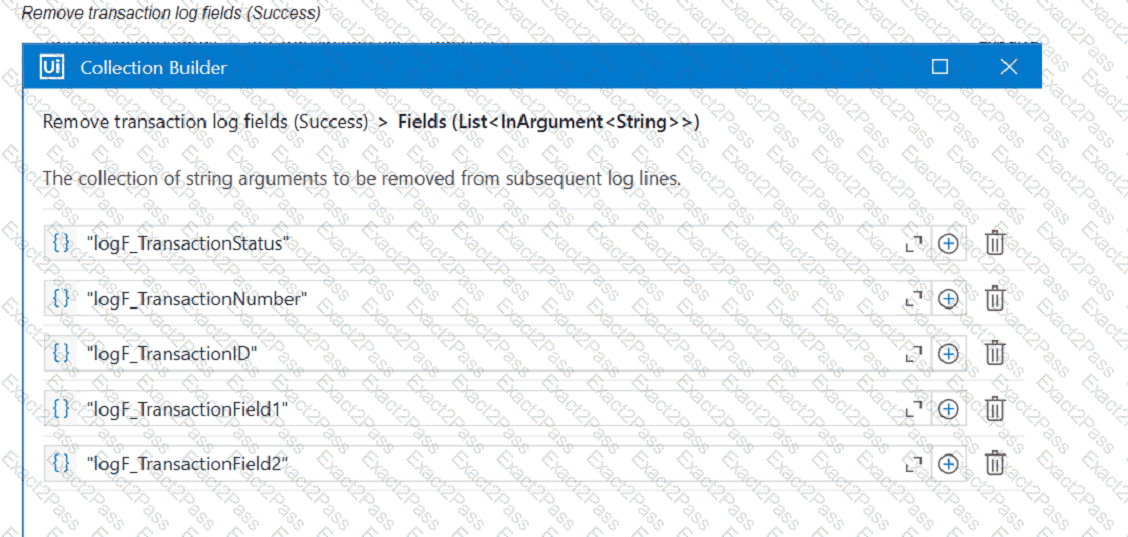
The configuration for Add Log Fields and Remove Log Fields activities are shown below:

Add transaction log fields (Success)
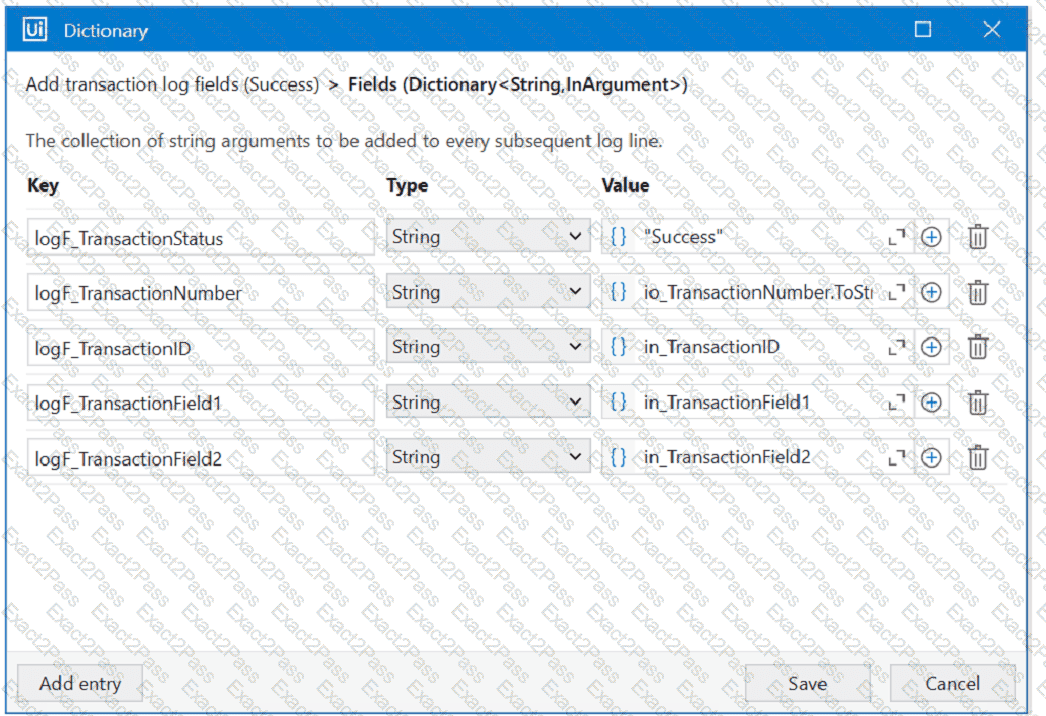
The developer runs the process and notices the argument values for the first transaction are:

in_TransactionlD = " 07/18/2023 10:27:29 "

io_TransactionNumber = 1

in_TransactionField1 = " UI235-80 "

in_TransactionField2 = " Update Request "

Which of the following Log Message Details will be displayed when executing the activity Log Message Completed for the first transaction, considering it is successful?

A.

" message " : " Transaction Completed " ,

" level " : " Information " ,

" logType " : " User " ,

" timeStamp " : " 10:30:19 " ,

" fileName " : " SetTransactionStatus " ,

" processVersion " : " 1.0.0 " ,

" jobId " : " 59325301-680a-4d55-a81b-56ca1f369c12 " ,

" robotName " : " test.robot " ,

" machineId " : 0,

" logF_TransactionField2 " : " "

" logF_TransactionStatus

B.

" message " : " Transaction Completed " ,

" level " : " Information " ,

" logType " : " User " ,

" timeStamp " : " 10:30:19 " ,

" fileName " : " SetTransactionStatus " ,

" processVersion " : " 1.0.0 " ,

" jobId " : " cb865477-35f8-4c0a-93e9-e4f4246223f2 " ,

" robotName " : " test.robot " ,

" machineId " : 0,

" logF_TransactionField2 " : " Update Request " ,

" logF_T

C.

" message " : " Transaction Completed " ,

" level " : " Information " ,

" logType " : " User " ,

" timeStamp " : " 10:30:19 " ,

" fileName " : " SetTransactionStatus " ,

" processVersion " : " 1.0.0 " ,

" jobId " : " f8a36a46-8ebc-40df-8f71-26b39087ebee " ,

" robotName " : " test.robot " ,

" machineId " : 0,

" logF_BusinessProcessName " : " Framework "

}

D.

" message " : " Transaction Completed " ,

" level " : " Information " ,

" logType " : " User " ,

" timeStamp " : " 10:30:19 " ,

" fileName " : " SetTransactionStatus " ,

" processVersion " : " 1.0.0 " ,

" jobId " : " 59325301-680a-4d55-a81b-56ca1f369c12 " ,

" robotName " : " test.robot " ,

" machineId " : 0,

" logF_TransactionField2 " : empty,

" logF_TransactionStatu

Question # 93

Starting with UiPath Studio version 2022.10, what happens to dependencies that lack Windows compatibility when they are converted in a project?

A.

They are replaced with compatible alternatives.

B.

They are removed from the project.

C.

They are marked as unresolved.

D.

They are automatically resolved.

Question # 94

Which expression correctly converts the string variable " DateString " with the value " 03/03/2023 16:23:11 " into a Date Time variable?

A.

DateTime.ParseExact(DateString, " dd/MM/yyyy hh:mm:ss " , Culturelnfo.InvariantCulture)

B.

Date Time.ParseExact(DateString, " MM/dd/yyyy hh:mm:ss " , Culturelnfo.InvariantCulture)

C.

DateTime.ParseExact(DateString, " mm/dd/yyyy HH:mm:ss " , Culturelnfo.InvariantCulture)

D.

DateTime.ParseExact(DateString, " dd/MM/yyyy HH:mm:ss " , Culturelnfo.InvariantCulture)

Question # 95

A developer created a DataTable called DT using the Build Data Table activity as shown in the exhibit.
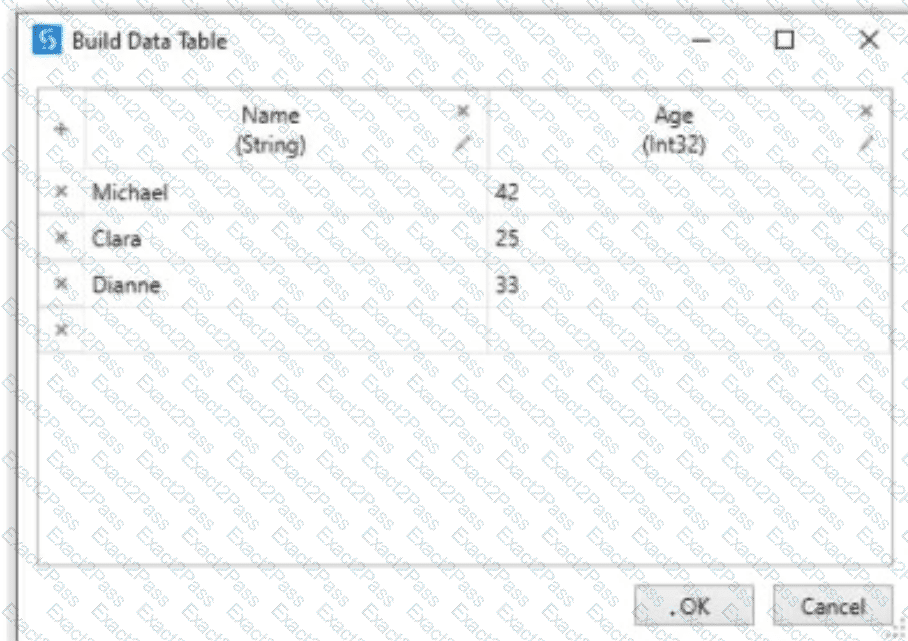
The DataTable DT contains the following data:

What is the result of the expression:

DT.Rows(0)(1).ToString + DT.Rows(1)(0).ToString

A.

MichaelClara

B.

42Clara

C.

42Michael

D.

25Clara

Question # 96

How can the value be configured for each of the three arguments (one " In " , one " Out " , and one " In/Out " ) in the Arguments window of the Invoked Workflow ?

A.

In: Variable or Hard-coded value, Out: Variable or Hard-coded value, In/Out: Hard-coded value only

B.

In: Variable or Hard-coded value, Out: Variable only, In/Out: Variable only

C.

In: Variable only, Out: Variable only, In/Out: Variable only

D.

In: Variable or Hard-coded value, Out: Hard-coded value only, In/Out: Variable only

Question # 97

In which situation will a Ul Automation activity generate a partial selector?

A.

When included after a Find Element activity

B.

When included in an Attach Browser activity

C.

When included in an Excel Application Scope activity

D.

When included in a Trigger Scope activity

Question # 98

In a UiPath REFramework project, what is the primary purpose of using Custom Log Fields?

A.

To add specific contextual information to log messages that are relevant to the automation process.

B.

To generate extra variables alongside log messages, enhancing workflow understanding.

C.

To maintain contextual insights within log messages, including secure details like credentials.

D.

To modify the representation of logged contextual data as it is displayed in the Orchestrator.

Question # 99

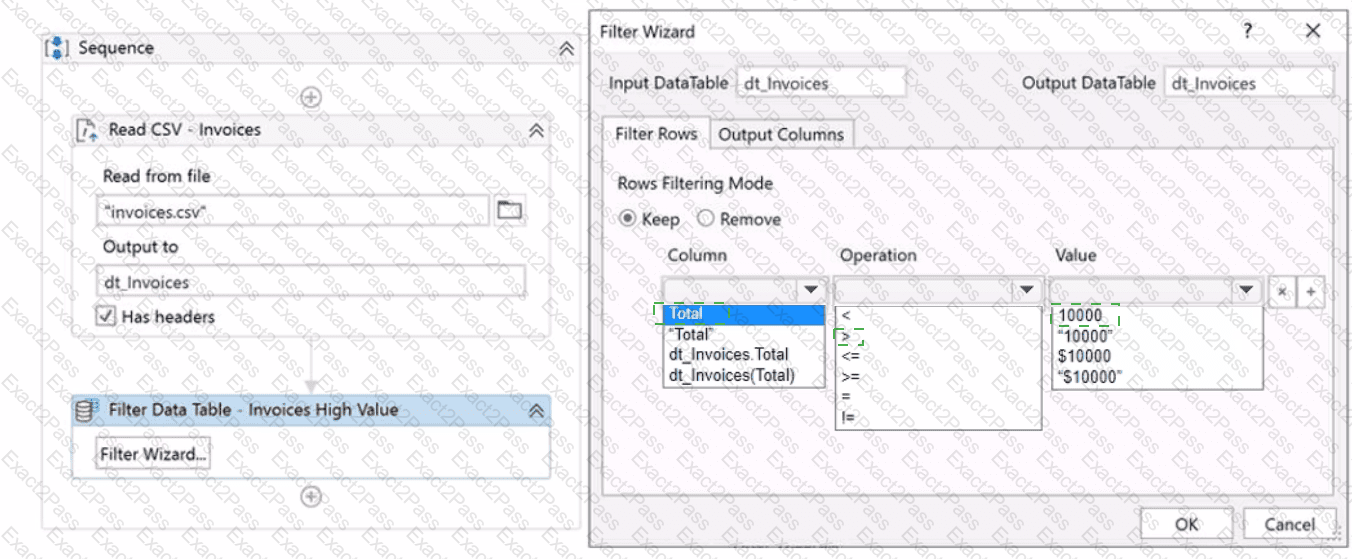
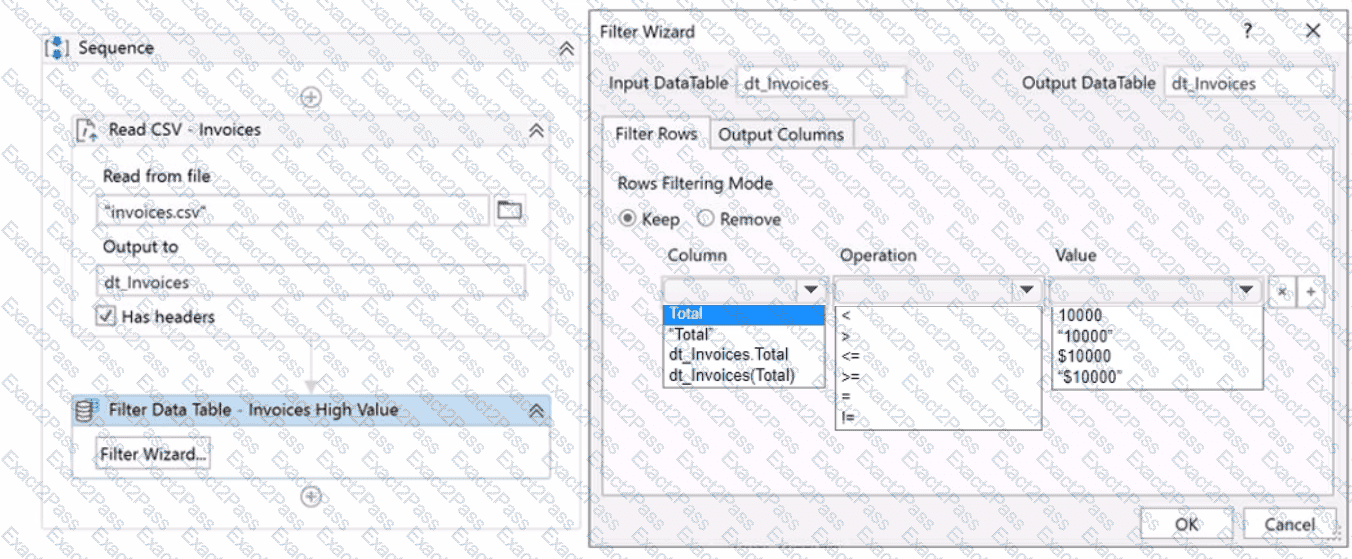
A developer is building a process which reads invoice data from the " mvoices.csv " file that includes a Total column of type Double.

Instructions: Using the drop-down lists shown in the following exhibit, configure the Filter Data Table Wizard to keep all invoices with a Total value that is over 10 000 USD.
Question # 100

A developer utilized the Add Data Row activity to insert a row into a DataTable called " dtReports " . However, during runtime, UiPath Studio encounters an exception:

" Add Data Row: Object reference not set to an instance of an object. "

The reason is that the DataTable has not been initialized.

To rectify this issue, what should the developer include in an Assign activity before the Add Data Row activity?


A.

Assign dtReports = New System.Data.DataTable

B.

Assign New System.Data.DataTable = dtReports

C.

Assign dtReports = New System.Data.DataRow

D.

Assign dtReports = New List(Of DataRow)

Go to page: