
Spring Sale Special Limited Time 70% Discount Offer - Ends in 0d 00h 00m 00s - Coupon code: buysanta

Exact2Pass Menu

UiPath Automation Developer Associate Exam (2023.10)

Last Update 5 hours ago Total Questions : 382

The UiPath Automation Developer Associate Exam (2023.10) content is now fully updated, with all current exam questions added 5 hours ago. Deciding to include UiPath-ADAv1 practice exam questions in your study plan goes far beyond basic test preparation.

You'll find that our UiPath-ADAv1 exam questions frequently feature detailed scenarios and practical problem-solving exercises that directly mirror industry challenges. Engaging with these UiPath-ADAv1 sample sets allows you to effectively manage your time and pace yourself, giving you the ability to finish any UiPath Automation Developer Associate Exam (2023.10) practice test comfortably within the allotted time.

Question # 111

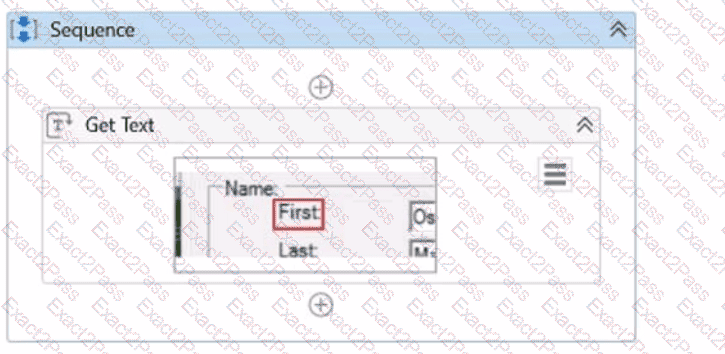
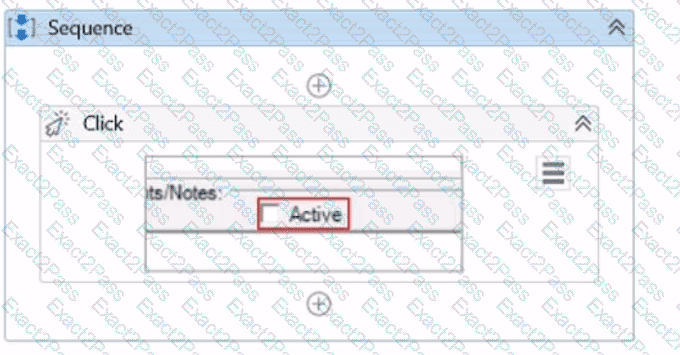
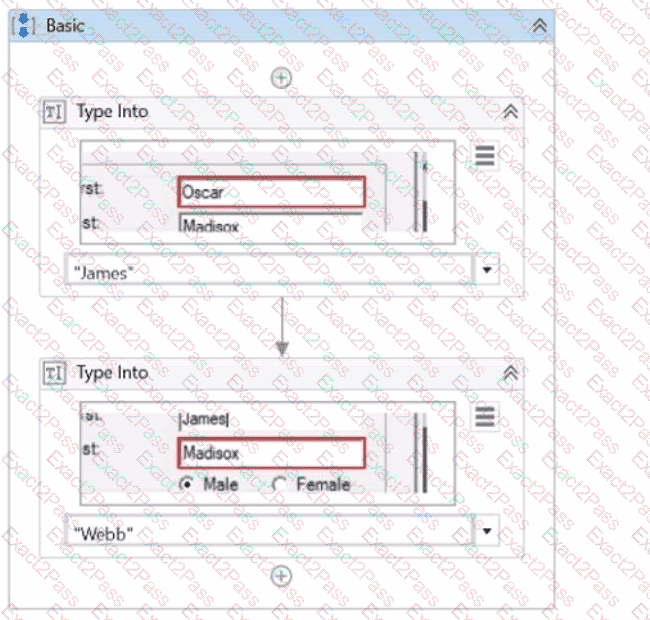
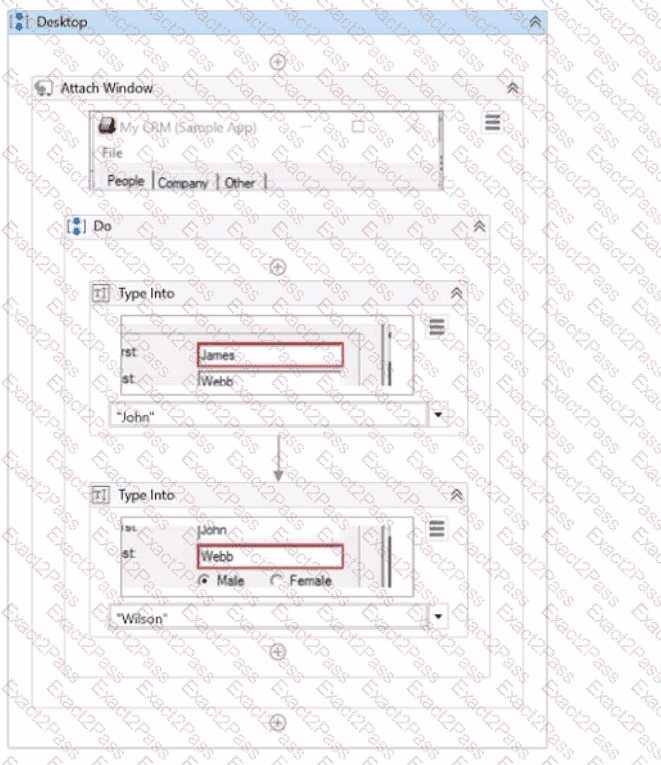
What represents a sequence that contains an activity with a partial selector?

A)
B)
C)
D)
A.

Option A

B.

Option B

C.

Option C

D.

Option D

Question # 112

What are the three main components of UiPath Integration Service?

A.

Connectors, API Tokens, Triggers.

B.

Connectors, Connections, Orchestrator.

C.

Connectors, Connections, Triggers.

D.

Activities, Connections, Triggers.

Question # 113

Which type of automation is most suitable for extracting text from an image-based document in UiPath?

A.

Screen Scraping

B.

OCR

C.

Regex

D.

String Manipulation

Question # 114

How can a user change the profile from UiPath Studio to UiPath StudioX from the backstage view?

A.

By going to Home - Settings - Design - Change profile and clicking on the UiPath StudioX profile, then clicking " Yes " when prompted to restart the application.

B.

By going to Home - Tools - Design - Change profile and clicking on the UiPath StudioX profile, then clicking " Yes " when prompted to restart the application.

C.

By going to Home - Settings - License and profile - Change profile and clicking on the UiPath StudioX profile, then clicking " Yes " when prompted to restart the application.

D.

By going to Home - Settings - Locations - Change profile and clicking on the UiPath StudioX profile, then clicking " Yes " when prompted to restart the application.

Go to page:
