
Spring Sale Special Limited Time 70% Discount Offer - Ends in 0d 00h 00m 00s - Coupon code: buysanta

Exact2Pass Menu

OS X Support Essentials 10.9

Last Update 19 hours ago Total Questions : 218

The OS X Support Essentials 10.9 content is now fully updated, with all current exam questions added 19 hours ago. Deciding to include 9L0-415 practice exam questions in your study plan goes far beyond basic test preparation.

You'll find that our 9L0-415 exam questions frequently feature detailed scenarios and practical problem-solving exercises that directly mirror industry challenges. Engaging with these 9L0-415 sample sets allows you to effectively manage your time and pace yourself, giving you the ability to finish any OS X Support Essentials 10.9 practice test comfortably within the allotted time.

Question # 11

You are logged into a MacBook Pro as a standard user. How can you display the OS X Mountain Lion build number?

A.

Choose About This Mac from the Apple menu, and then click the text directly under OS X until the build number is revealed.

B.

Type build_number in Spotlight, and then scroll through the resulting information until the build number is revealed.

C.

In the General pane of System Preferences, click the Info disclosure triangle to reveal the build number.

D.

Choose Software Update from the Apple menu, and then choose Build Number from the Update menu.

Question # 12

Review the screenshot, and then answer the question below.
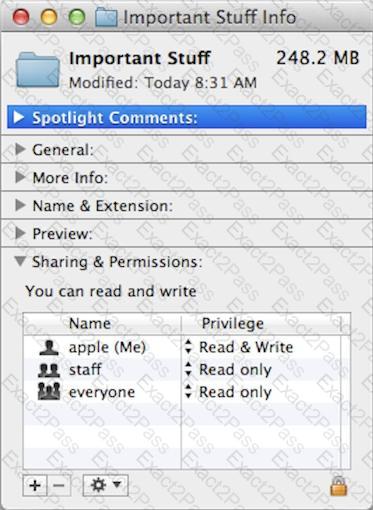
If you change the folder privilege for " everyone " to Read & Write, Finder, by default, will change the permissions of items inside the folder to match.

A.

True

B.

False

Question # 13

In OS X, Disk Utility can create file archives in which format?

A.

zip

B.

dmg

C.

sitx

D.

gzip

Question # 14

You have a Mac OS X v10.6.8 computer that has several user accounts. If you install OS X Mountain Lion without first erasing the target volume, what will happen to the 10.6.8 operating system and the existing user accounts?

A.

The Installer archives the 10.6.8 OS and installs Mountain Lion. It maintains the user accounts.

B.

The Installer upgrades the 10.6.8 OS to Mountain Lion. It maintains the user accounts.

C.

The Installer replaces the 10.6.8 OS with Mountain Lion. It archives the user accounts, but they can be restored manually.

D.

The Installer erases the 10.6.8 OS and installs Mountain Lion. It archives the user accounts, but they can be restored manually.

Question # 15

An OS X Mountain Lion computer is connected to both an Ethernet and a Wi-Fi network. How can you specify which interface the Mac will use to access the Internet?

A.

Use Internet Connect to select the preferred interface, and disable the other interface(s).

B.

Enter a DNS configuration for the preferred interface, and delete the DNS configuration for the other interface(s).

C.

Assign a public IP address to the preferred interface, and a private IP address to the other interface(s).

D.

Use the Set Service Order action to move the preferred interface to the top of the Service Order list.

Question # 16

When a user opens an application, in what order does OS X Mountain Lion search the three Library folders in the local file system for resources that the application needs to access, such as fonts?

A.

1. ~/Library/

2. /Library/

3. /System/Library/

B.

1. /Library/

2. ~/Library/

3. /System/Library/

C.

1. ~/Library/

2. /System/Library/

3. /Library/

D.

1. /Library/

2. /System/Library/

3. ~/Library/

Question # 17

You can configure Time Machine to delete versions of files as soon as they reach a specified age.

A.

True

B.

False

Question # 18

Which OS X startup keyboard shortcut causes the system to display the most detailed information about the startup process?

A.

Command-S

B.

Shift

C.

F12

D.

Command-V

Question # 19

Which utility is on the OS X Recovery partition?

A.

Boot Camp Assistant

B.

Console

C.

Firmware Password Utility

D.

Activity Monitor

Question # 20

A new 5 MB file was backed up by Time Machine yesterday. Today the file was edited, and has grown to 6 MB. It is about to be backed up by Time Machine again. How does Time Machine perform this backup?


A.

Time Machine copies the 6 MB file to the backup drive, and deletes the original backup copy of the file from the backup drive.

B.

Time Machine copies the 6 MB file to the backup drive, and keeps both the new backup file and the original backup file on the backup drive.

C.

Time Machine identifies the 1 MB of file changes, copies those changes to a new file on the backup drive, and keeps both the new backup file and the original backup file.

D.

Time Machine identifies the 1 MB of file changes, copies those changes to a new file on the backup drive, then creates a 500 KB parity file, and keeps all three files: the two new files representing the 1 MB of file changes, and the original backup file.

Go to page: