Spring Sale Special Limited Time 70% Discount Offer - Ends in 0d 00h 00m 00s - Coupon code: buysanta

Exact2Pass Menu

OS X Support Essentials 10.9

Last Update 17 hours ago Total Questions : 218

The OS X Support Essentials 10.9 content is now fully updated, with all current exam questions added 17 hours ago. Deciding to include 9L0-415 practice exam questions in your study plan goes far beyond basic test preparation.

You'll find that our 9L0-415 exam questions frequently feature detailed scenarios and practical problem-solving exercises that directly mirror industry challenges. Engaging with these 9L0-415 sample sets allows you to effectively manage your time and pace yourself, giving you the ability to finish any OS X Support Essentials 10.9 practice test comfortably within the allotted time.

Question # 31

How can a user with the short name anna exclude the /Users/anna/Downloads/ folder from Time Machine backups?

A.

Open Time Machine, choose Preferences from the Time Machine menu, click the Exclusions tab, click the Add (+) button, navigate to the /Users/anna/Downloads/ folder, and click Submit.

B.

Open the Time Machine pane of System Preferences, click Options, and add the /Users/anna/Downloads/ folder to the list of excluded items.

C.

Control-click the anna account ' s Downloads folder in the Finder, click the Sharing and Permissions disclosure button, click the Add (+) button, add the Time Machine user to the list of users, and set the Time Machine user ' s access to " No Access. "

D.

In Terminal, execute the command sudo defaults write /Library/Preferences/com.apple.TimeMachine

excludedFolders -array-add /Users/anna/Downloads.

Question # 32

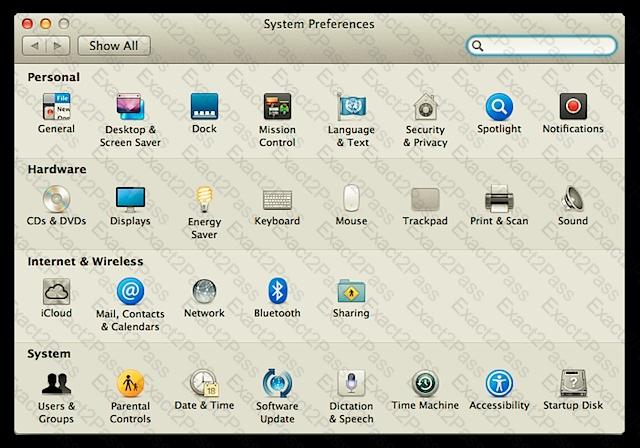
In the screenshot below, click the icon of the OS X Mountain Lion System Preferences pane where you can disable the feature that restores windows when apps are reopened.
Question # 33

How can you find out which application the Finder will use to open a specific document?

A.

Select the document icon in the Finder, choose Get Info from the File menu, and click the disclosure triangle next to

" Open with " in the Info window to reveal the selected application in the pop-up menu.

B.

Select the document icon in the Finder, and choose Show Default Application from the File menu.

C.

Control-click the document icon in the Finder, and choose Show Application from the shortcut menu.

D.

Select the document icon in the Finder, choose Show Inspector from the File menu, click Application Bindings in the Inspector window, and scroll to locate the selected application in the pop-up menu.

Question # 34

What is the role of the launchd process in the startup of an OS X Mountain Lion computer?

A.

The kernel starts launchd, then launchd starts all the other processes involved in startup.

B.

The init process starts launchd, then launchd starts the items stored in the StartupItems folder.

C.

launchd starts the init process, then init starts all the other processes involved in startup.

D.

The init process starts launchd, then launchd starts the scripts stored in /etc/chron/.

Question # 35

How can you display the contents of a hidden folder on a mounted volume in Finder?

A.

From the Go menu, choose " Go to Folder, " enter the path to the hidden folder, and click Go.

B.

From the View menu, choose " Show hidden items. "

C.

From the Finder menu, choose Preferences, and select " Show hidden items. "

D.

Select the volume icon and choose " Show hidden items " from the Action menu.

Question # 36

Which dynamic service discovery protocol does OS X use to discover devices on a network?

A.

SLP

B.

AppleTalk

C.

Bonjour

D.

DynDNS

Question # 37

How do you identify the ownership and permissions of a file or folder in the Finder?

A.

A Service Set Identifier, or SSID, is used to identify a Wi-Fi network name and associated configuration.

B.

Standard UNIX file system permissions allow only for permissions to be set for one owner, one group, and all others. ACLs, on the other hand, allow for an essentially unlimited list of permissions entries.

C.

An item ' s ownership and permissions can be identified using the Info or Inspector windows in the Finder.

D.

A user ' s home folder permissions can be reset from the Reset Password application on OS X Recovery.

Question # 38

What ' s target disk mode and how is it engaged?

A.

Documents saved to iCloud can be managed from the application that was used to create and save the document. iCloud documents don ' t appear anywhere in the Finder that a user would normally look.

B.

The Disk Utility Verify and Repair feature is used to verify or repair the partition scheme and directory structure of a volume. These elements contain the information used to locate files and folders on the volume.

C.

A network location is a saved state of Network preferences that contains all network interface settings. Only administrators can define network locations, but if more than one location exists, all users can switch between the various network locations via the Apple menu.

D.

Target disk mode is a Mac-specific hardware feature that, when engaged, will share the Mac computer ' s internal disks through the FireWire ports. Target disk mode can be engaged from Startup Disk preferences or by holding down the T key as you turn on the Mac.

Question # 39

What three primary sources can Migration Assistant pull from?

A.

The OS X Recovery Disk Assistant can create a small OS X B. Recovery disk that lacks the OS X installation assets. An OS X Installation disk, which includes the full OS X installation assets, can be created by using the create install media command line tool found inside the Install OS X Mavericks application.

B.

A network client uses the subnet mask to determine whether the destination IP address is on the LAN. If the destination IP address isn ' t on the LAN, it ' s assumed the destination address is on another network, and the client sends the data to the IP address of the local network router. The network router then sends the data, via a WAN connection, on to another router that it thinks is closer to the destination. This continues across WAN

C.

Time Machine starts with a full copy of the file system to the backup disk. Then it maintains a list of changes to the file system, and every hour copies only the changes to the backup disk. In the backup, it creates a simulation of the full file system using hard links for files that haven ' t changed.

D.

Migration Assistant can migrate information from other OS X systems, Windows systems, and other disks, including Time Machine backups.

Question # 40

The OS X Recovery Disk Assistant can create a small OS X Recovery disk that lacks the OS X installation assets. An OS X Installation disk, which includes the full OS X installation assets, can be created by using the createinstallmedia command line tool found inside the Install OS X Mavericks application.


A.

What four methods can be used to eject a volume or disk from the Finder?

B.

What two methods can be used to create an external OS X Recovery disk?

C.

What does OS X use bundles or packages for?

D.

What two volume formats are supported for an OS X system volume?

Go to page: