Summer Sale Special Limited Time 70% Discount Offer - Ends in 0d 00h 00m 00s - Coupon code: buysanta

Exact2Pass Menu

Fortinet NSE 5 - FortiManager 7.2

Last Update 1 day ago Total Questions : 101

The Fortinet NSE 5 - FortiManager 7.2 content is now fully updated, with all current exam questions added 1 day ago. Deciding to include NSE5_FMG-7.2 practice exam questions in your study plan goes far beyond basic test preparation.

You'll find that our NSE5_FMG-7.2 exam questions frequently feature detailed scenarios and practical problem-solving exercises that directly mirror industry challenges. Engaging with these NSE5_FMG-7.2 sample sets allows you to effectively manage your time and pace yourself, giving you the ability to finish any Fortinet NSE 5 - FortiManager 7.2 practice test comfortably within the allotted time.

Question # 21

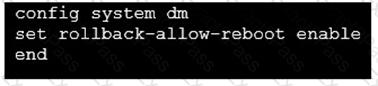
Refer to the exhibit.

An administrator has configured the command shown in the exhibit on FortiManager. A configuration change has been installed from FortiManager to the managed FortiGate that causes the FGFM tunnel to go down for more than 15 minutes.

What is the purpose of this command?

A.

It allows FortiGate to unset central management settings.

B.

It allows FortiGate to reboot and recover the previous configuration from its configuration file.

C.

It allows the FortiManager to revert and install a previous configuration revision on the managed FortiGate.

D.

It allows FortiGate to reboot and restore a previously working firmware image.

Question # 22

An administrator configures a new firewall policy on FortiManager and has not yet pushed the changes to the

managed FortiGate.

In which database will the configuration be saved?

A.

Device-level database

B.

Revision history database

C.

ADOM-level database

D.

Configuration-level database

Question # 23

Which two items are included in the FortiManager backup? (Choose two.)

A.

FortiGuard database

B.

Global database

C.

Logs

D.

All devices

Question # 24

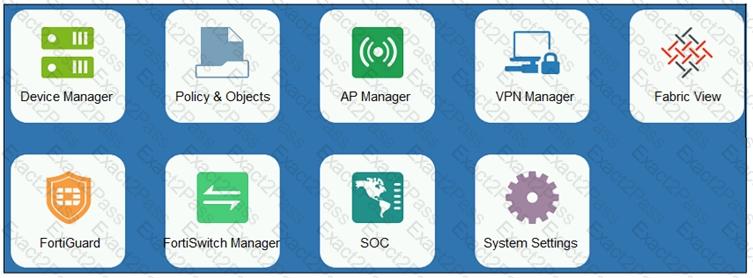
Refer to the exhibit.

An administrator logs into the FortiManager GUI and sees the panes shown in the exhibit.

Which two reasons can explain why the FortiAnalyzer feature panes do not appear? (Choose two.)

A.

The administrator logged in using the unsecure protocol HTTP, so the view is restricted.

B.

The administrator profile does not have full access privileges like the Super_User profile.

C.

The administrator IP address is not a part of the trusted hosts configured on FortiManager interfaces.

D.

FortiAnalyzer features are not enabled on FortiManager.

Question # 25

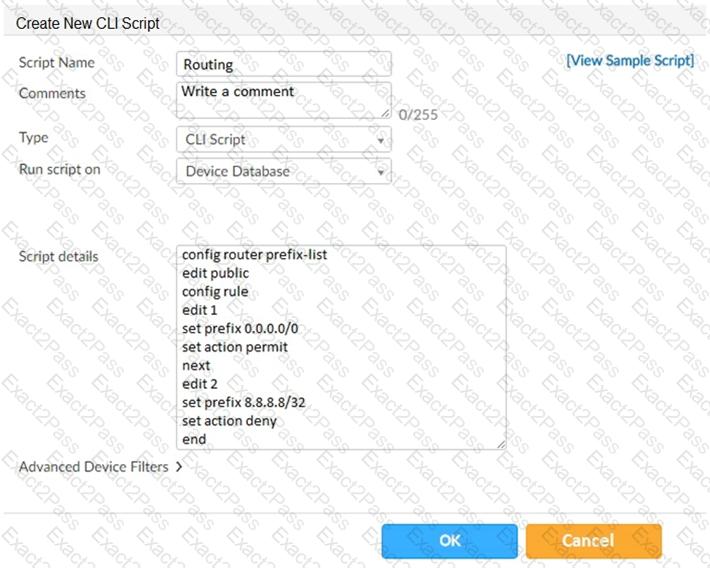
Refer to the exhibit.

Which two statements are true if the script is executed using the Device Database option? (Choose two.)

A.

You must install these changes using the Install Wizard to a managed device

B.

The successful execution of a script on the Device Database will create a new revision history

C.

The script history will show successful installation of the script on the remote FortiGate

D.

The Device Settings Status will be tagged as Modified

Question # 26

Which two statements regarding device management on FortiManager are true? (Choose two.)

A.

FortiGate devices in HA cluster devices are counted as a single device.

B.

FortiGate in transparent mode configurations are not counted toward the device count on FortiManager.

C.

FortiGate devices in an HA cluster that has five VDOMs are counted as five separate devices.

D.

The maximum number of managed devices for each ADOM is 500.

Question # 27

Which two statements about Security Fabric integration with FortiManager are true? (Choose two.)

A.

The Security Fabric license, group name and password are required for the FortiManager Security Fabric

integration

B.

The Fabric View module enables you to generate the Security Fabric ratings for Security Fabric devices

C.

The Security Fabric settings are part of the device level settings

D.

The Fabric View module enables you to view the Security Fabric ratings for Security Fabric devices

Question # 28

An administrator’s PC crashes before the administrator can submit a workflow session for approval. After the PC is restarted, the administrator notices that the ADOM was locked from the session before the crash.

How can the administrator unlock the ADOM?

A.

Restore the configuration from a previous backup.

B.

Log in as Super_User in order to unlock the ADOM.

C.

Log in using the same administrator account to unlock the ADOM.

D.

Delete the previous admin session manually through the FortiManager GUI or CLI.

Question # 29

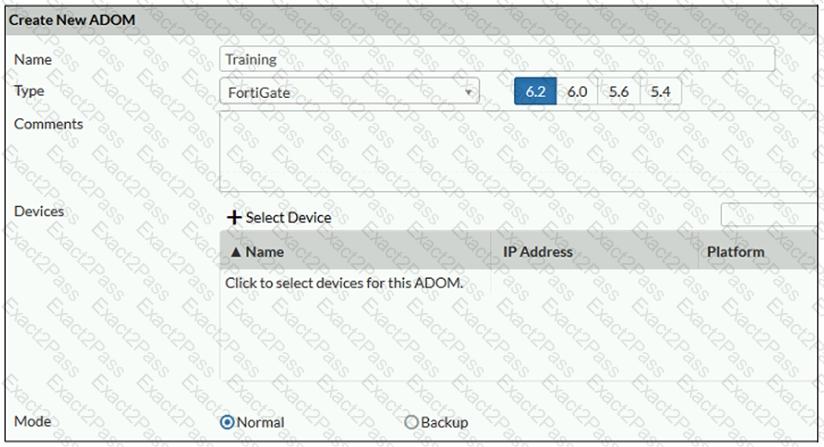
Refer to the exhibit.

Which two statements about an ADOM set in Normal mode on FortiManager are true? (Choose two.)

A.

It supports the FortiManager script feature

B.

It allows making configuration changes for managed devices on FortiManager panes

C.

FortiManager automatically installs the configuration difference in revisions on the managed FortiGate

D.

You cannot assign the same ADOM to multiple administrators

Question # 30

What does a policy package status of Conflict indicate?

A.

The policy package reports inconsistencies and conflicts during a Policy Consistency Check .

B.

The policy package does not have a FortiGate as the installation target.

C.

The policy package configuration has been changed on both FortiManager and the managed device

independently.

D.

The policy configuration has never been imported after a device was registered on FortiManager.

Go to page: