Spring Sale Special Limited Time 70% Discount Offer - Ends in 0d 00h 00m 00s - Coupon code: buysanta

Exact2Pass Menu

UiPath Automation Developer Associate Exam (2023.10)

Last Update 22 hours ago Total Questions : 382

The UiPath Automation Developer Associate Exam (2023.10) content is now fully updated, with all current exam questions added 22 hours ago. Deciding to include UiPath-ADAv1 practice exam questions in your study plan goes far beyond basic test preparation.

You'll find that our UiPath-ADAv1 exam questions frequently feature detailed scenarios and practical problem-solving exercises that directly mirror industry challenges. Engaging with these UiPath-ADAv1 sample sets allows you to effectively manage your time and pace yourself, giving you the ability to finish any UiPath Automation Developer Associate Exam (2023.10) practice test comfortably within the allotted time.

Question # 11

How should arguments be named according to best practices ?

A.

The name should have a prefix stating the argument type.

B.

The name should contain the name of the workflow to which they are defined.

C.

The name must exactly match the variable name given in the Value field.

D.

The name should conclude with the direction and be comparable to the variable name provided in the Value.

Question # 12

Which of the following statements is true about Global Constants?

A.

Global Constants can be created only from the Data Manager panel.

B.

Global Constants values can be modified during the automation execution.

C.

Global Constants have a Direction property (In/Out).

D.

Global Constants can be created from the Data Manager panel and from the Variables panel.

Question # 13

Which compatibility option should be selected when creating a new project to use .NET 6 with Windows support?

A.

Windows - Legacy

B.

Linux & MacOS

C.

Windows

D.

Cross-platform

Question # 14

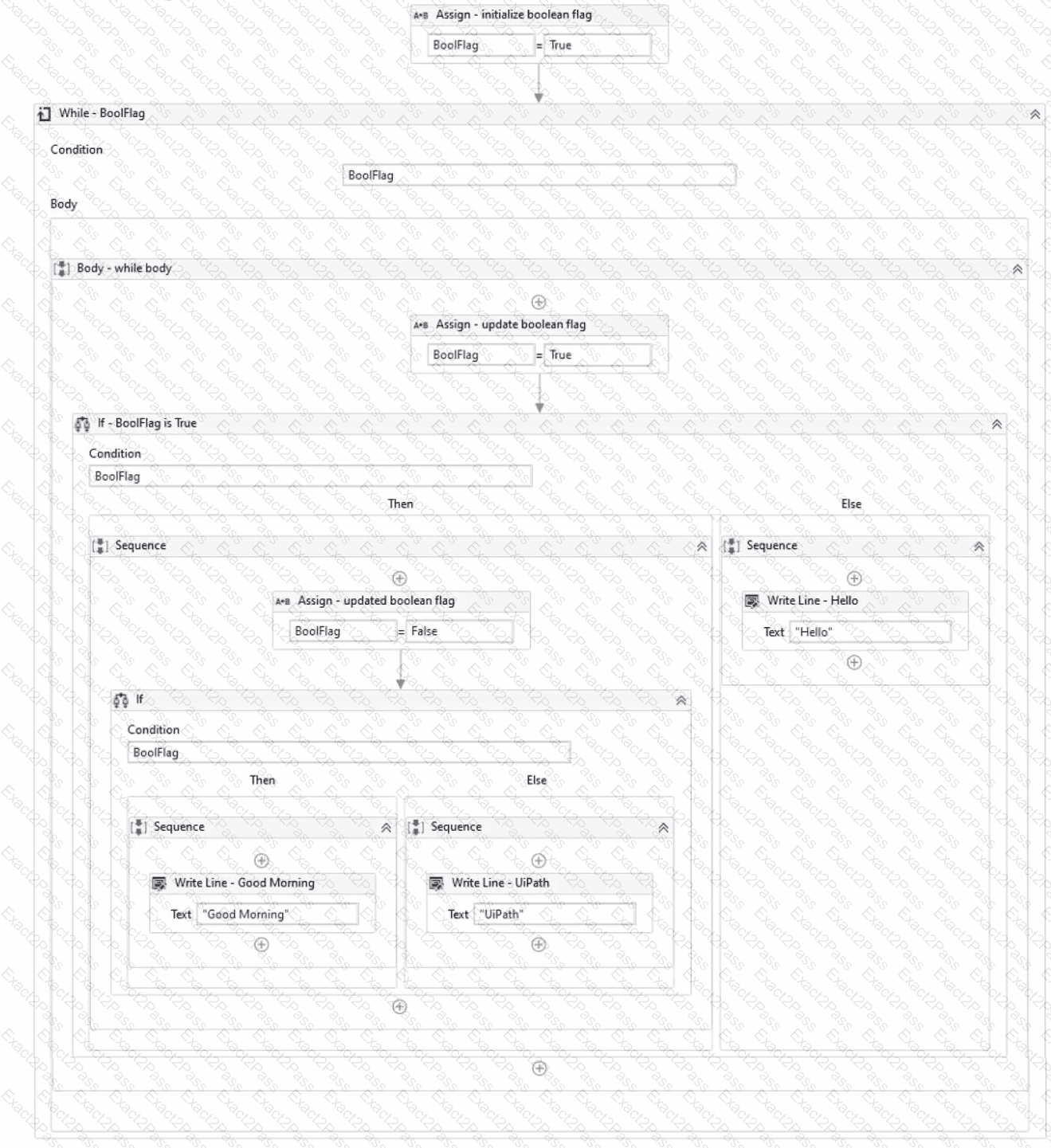
Review the following exhibit.

Based on the exhibit, which output is produced in the Output panel?

A.

Hello

B.

Good Morning UiPath

C.

Good Morning

D.

UiPath

Question # 15

Which of the following properties can be modified once global constants and variables are created?

A.

Value

B.

Data Type

C.

Scope

D.

Name

Question # 16

What will be the outcome when executing a Try Catch activity with a sequence placed within the Try section and no Catches section present?

A.

In case of an exception, a System Exception will be caught by default.

B.

Due to a validation error, the workflow will not execute.

C.

Process execution will terminate only if the sequence throws an exception.

D.

The sequence will result in a runtime error.

Question # 17

What is the purpose of the Interval filter in the Orchestrator ' s Monitoring page?

A.

It allows you to control the granularity of the displayed data and check the health of your system in either the last day or the last hour.

B.

It allows you to allocate licenses per machine for the displayed data.

C.

It allows you to choose between background and foreground processes for the displayed data.

D.

It enables you to sort the displayed data based on job priorities.

Question # 18

What is the purpose of the Capture All Elements feature in Object Repository?

A.

To capture the selected elements of an application from multiple screens simultaneously using the Computer Vision technology.

B.

To capture all the available elements of an application using the Computer Vision technology.

C.

To capture the selected elements of an application using the Computer Vision technology.

D.

To capture all elements of an application from multiple screens simultaneously using the Computer Vision technology.

Question # 19

When choosing a process for automation, what factor contributes to its increased complexity?

A.

Unstructured input data source.

B.

Standard desktop applications.

C.

Low number of decision points.

D.

Low number of steps required in the automation.

Question # 20

Which LINQ method is used to filter data in a List or Data Table based on a condition?

A.

OrderBy

B.

Where

C.

GroupBy

D.

Select

Go to page: