Exact2Pass

Last Update 23 hours ago Total Questions : 109
The Workday Pro Integrations Certification Exam content is now fully updated, with all current exam questions added 23 hours ago. Deciding to include Workday-Pro-Integrations practice exam questions in your study plan goes far beyond basic test preparation.
You'll find that our Workday-Pro-Integrations exam questions frequently feature detailed scenarios and practical problem-solving exercises that directly mirror industry challenges. Engaging with these Workday-Pro-Integrations sample sets allows you to effectively manage your time and pace yourself, giving you the ability to finish any Workday Pro Integrations Certification Exam practice test comfortably within the allotted time.
You have an existing EIB that you configured with a filename sequence generator that is associated with the EIB in the Deliver section. However, after testing the EIB, you notice that the filename is not using the configured sequence generator.
What is causing the sequence generator to not be used?
You have an existing Core Connector: Organization (non-IS) integration that sends organization data to an external vendor. The vendor now requires a specific Legacy ID for each organization to be added to the output. A calculated field that generates this Legacy ID already exists in the tenant.
What is the high-level workflow order you would follow to add this calculated field to the output of the integration?
Which features must all XSLT files contain to be considered valid?
What is the purpose of the < xsl:template > element?
The following XML code was generated using Core Connector: Location.
You need to validate that both the locc:Location_Name and locc:Municipality elements are not empty, and provide custom error messages with a severity level for each.
Which XSLT attributes and values should you use when producing a pipe-delimited file?
Refer to the following XML data source to answer the question below.
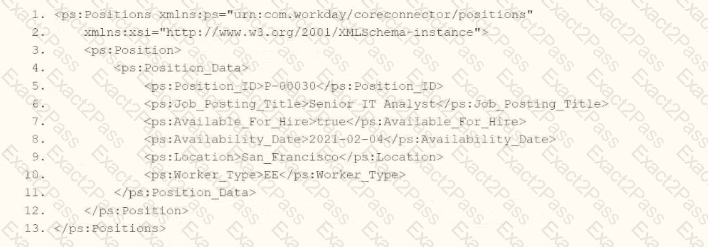
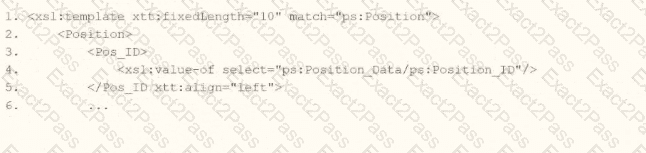
You need the integration file to format the ps:Position_ID field to 10 characters, truncate the value if it exceeds, and align everything to the left.
How will you start your template match on ps:Position to use Document Transformation (DT) to do the transformation using XTT?



Refer to the following scenario to answer the question below.
You have configured a Core Connector: Worker integration, which utilizes the following basic configuration:
• Integration field attributes are configured to output the Position Title and Business Title fields from the Position Data section.
• Integration Population Eligibility uses the field Is Manager which returns true if the worker holds a manager role.
• Transaction Log service has been configured to Subscribe to specific Transaction Types: Position Edit Event.
You launch your integration with the following date launch parameters (Date format of MM/DD/YYYY):
• As of Entry Moment: 05/25/2024 12:00:00 AM • Effective Date: 05/25/2024
• Last Successful As of Entry Moment: 05/23/2024 12:00:00 AM
• Last Successful Effective Date: 05/23/2024
To test your integration, you made a change to a worker named Jared Ellis who is assigned to the manager role for the IT Help Desk department. You use the Change Business Title related action on Jared and update the Business Title of the position to a new value. Jared Ellis ' worker history shows the Title Change Event as being successfully completed with an effective date of 05/24/2024 and an Entry Moment of 05/24/2024 07:58:53 AM however Jared Ellis does not show up in your output. What configuration element would have to be modified for the integration to include Jared Ellis in the output?
Refer to the following scenario to answer the question below.
You need to configure a Core Connector: Candidate Outbound integration for your vendor. The connector requires the data initialization service (DIS).
The vendor needs the file to only include candidates that undergo a candidate assessment event in Workday.
How do you accomplish this?
Refer to the following XML to answer the question below.
Refer to the following XML to answer the question below.

You are an integration developer and need to write XSLT to transform the output of an EIB which is making a request to the Get Job Profiles web service operation. The root template of your XSLT matches on the < wd:Get_Job_Profiles_Response > element. This root template then applies templates against < wd:Job_Profile > . XPath contains a number of delivered functions such as format-date. The format-date function uses the following syntax: format-date ($value as xs: date? $picture as xs:string). Within the template which matches on < wd:Job_Profile > , what XPath syntax would you use to output the value of the < wd:Effective_Date > element formatted with the day-month-year format of " 15-07-2024 " ?
Refer to the following scenario to answer the question below. You have configured a Core Connector: Worker integration, which utilizes the following basic configuration:
• Integration field attributes are configured to output the Position Title and Business Title fields from the Position Data section.
• Integration Population Eligibility uses the field Is Manager which returns true if the worker holds a manager role.
• Transaction Log service has been configured to Subscribe to specific Transaction Types: Position Edit Event. You launch your integration with the following date launch parameters (Date format of MM/DD/YYYY):
• As of Entry Moment: 05/25/2024 12:00:00 AM
• Effective Date: 05/25/2024
• Last Successful As of Entry Moment: 05/23/2024 12:00:00 AM
• Last Successful Effective Date: 05/23/2024
To test your integration, you made a change to a worker named Jared Ellis who is assigned to the manager role for the IT Help Desk department. You perform an Edit Position on Jared and update their business title to a new value. Jared Ellis ' worker history shows the Edit Position Event as being successfully completed with an effective date of 05/27/2024 and an Entry Moment of 05/24/2024 07:58:53 AM however Jared Ellis does not show up in your output. What configuration element would have to be modified for the integration to include Jared Ellis in the output?

