Exact2Pass

Last Update 14 hours ago Total Questions : 845
The CompTIA A+ Certification Core 2 Exam content is now fully updated, with all current exam questions added 14 hours ago. Deciding to include 220-1102 practice exam questions in your study plan goes far beyond basic test preparation.
You'll find that our 220-1102 exam questions frequently feature detailed scenarios and practical problem-solving exercises that directly mirror industry challenges. Engaging with these 220-1102 sample sets allows you to effectively manage your time and pace yourself, giving you the ability to finish any CompTIA A+ Certification Core 2 Exam practice test comfortably within the allotted time.
Which of the following should be used to secure a device from known exploits?
A technician installed Windows 10 on a workstation. The workstation only has 3.5GB of usable RAM, even though the technician installed 8GB. Which of the following is the MOST likely reason this system is not utilizing all the available RAM?
All the desktop icons on a user ' s newly issued PC are very large. The user reports that the PC was working fine until a recent software patch was deployed. Which of the following would BEST resolve the issue?
A technician receives a high-priority ticket about sensitive information collected from an end user’s workstation. Which of the following steps should a technician take to preserve the chain of custody for a forensic investigation?
A user accidentally installed the incorrect word processing application on an iMac. Which of the following would allow the user to uninstall the incorrect application?
A customer who uses a Linux OS called the help desk to request assistance in locating a missing file. The customer does not know the exact name of the file but can provide a partial file name. Which of the following tools should the technician use? (Select two).
A user ' s computer is running slower than usual and takes a long time to start up. Which of the following tools should the technician use first to investigate the issue?
A user wants to back up a device ' s OS and data. Which of the following is the best way to accomplish this task?
A malicious user was able to export an entire website ' s user database by entering specific commands into a field on the company ' s website. Which of the following did the malicious user most likely exploit to extract the data?
A company installed WAPs and deployed new laptops and docking stations to all employees. The docking stations are connected via LAN cables. Users are now reporting degraded network service. The IT department has determined that the WAP mesh network is experiencing a higher than anticipated amount of traffic. Which of the following would be the most efficient way to ensure the wireless network can support the expected number of wireless users?
A user opened an infected email. A security administrator responded to the malicious event, successfully mitigated the situation, and returned the machine to service Which of the following needs to be completed before this event is considered closed?
A user is experiencing the following issues with Bluetooth on a smartphone:
•The user cannot hear any sound from a speaker paired with the smartphone.
•The user is having issues synchronizing data from their smart watch, which is also connected via Bluetooth.
A technician checked the Bluetooth settings, confirmed it is successfully paired with a speaker, and adjusted the volume levels, but still could not hear anything. Which of the following steps should the technician take next to troubleshoot the Bluetooth issues?
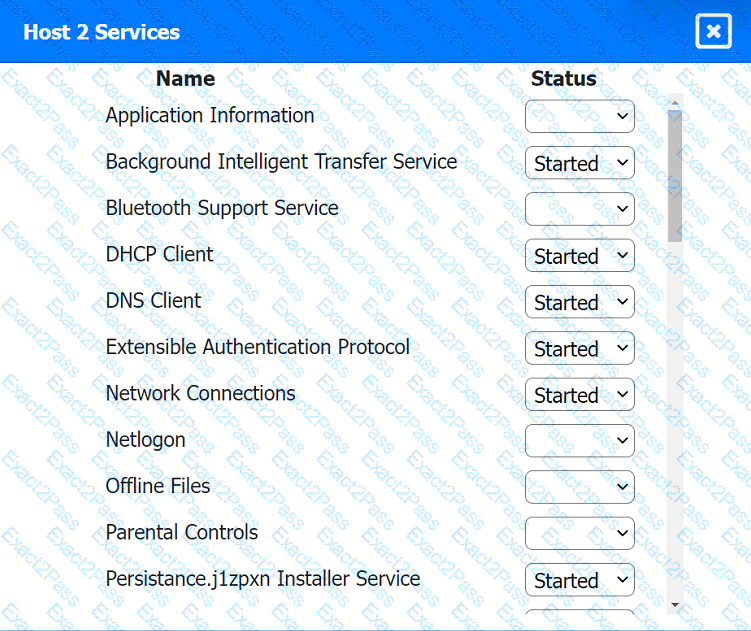
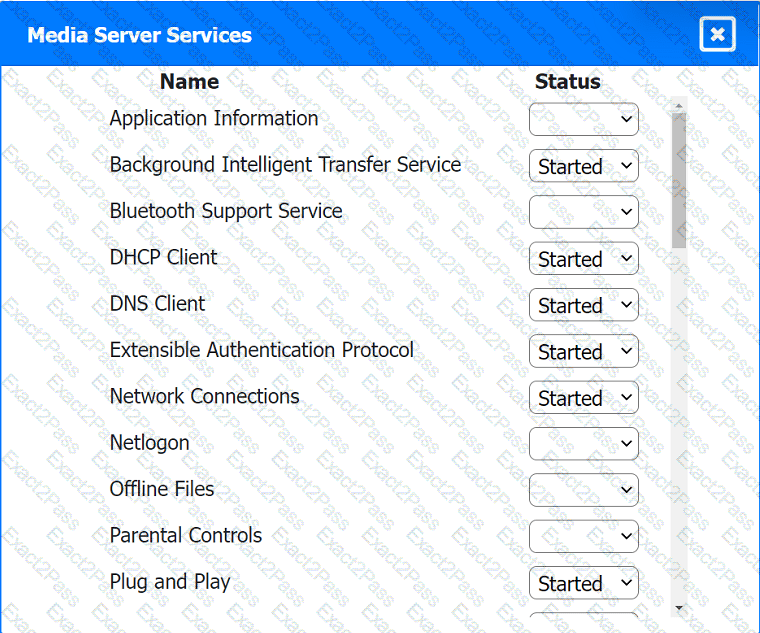
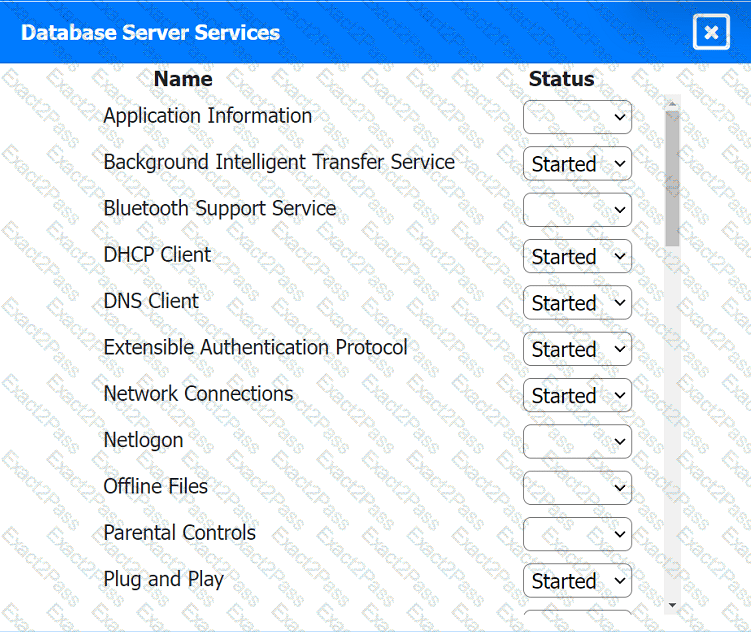
Multiple users are reporting audio issues as well as performance issues after downloading unauthorized software. You have been dispatched to identify and resolve any issues on the network using best practice procedures.
INSTRUCTIONS
Quarantine and configure the appropriate device(s) so that the users ' audio issues are
resolved using best practice procedures.
Multiple devices may be selected for quarantine.
Click on a host or server to configure services.
A user’s Windows 10 workstation with an HDD is running really slowly. The user has opened, closed, and saved many large files over the past week. Which of the following tools should a technician use to remediate the issue?
Which of the following is used to generate passcodes necessary to access applications or systems that require an extra layer of security?
A technician is following the ticketing system’s best practices when handling user support requests. Which of the following should the technician do first when responding to a user support request that contains insufficient information?
A user received an alert from a Windows computer indicating low storage space. Which of the following will best resolve this issue?
A technician needs to strengthen security controls against brute-force attacks. Which of the following options best meets this requirement?
A technician is troubleshooting a smartphone that is unable to download and install the latest OS update. The technician notices the device operates more slowly than expected, even after rebooting and closing all applications. Which of the following should the technician check next?
A user ' s Windows desktop has low disk space. A technician thinks some upgrade files were never removed. Which of the following tools should the technician use to correct the issue?

