Exact2Pass

We have coached hundreds of senior enterprise architects, network design engineers, and principal virtualization specialists through this elite VMware Cloud Foundation milestone. Let's be completely transparent about this advanced infrastructure validation process. The candidates who fall short on this VCAP-tier evaluation are almost always those who relied on low-tier test pools—those flat, context-stripped answer repositories floating around community boards. Those static, unverified files simply cannot prepare you for the complex architectural scenarios or the intricate multi-site packet routing loops tested on the real exam. At Exact2Pass, our framework targets the underlying structural design and troubleshooting logic of full-stack cloud virtualization fabrics instead. Our 3V0-25.25 exam prep delivers comprehensive engineering breakdowns for every Tier-0/Tier-1 edge configuration and multi-tenant isolation scenario.
You will master actual production-grade logical designs instead of leaning on superficial memorization shortcuts. We map out NSX Federation control plane synchronization, Edge Cluster transport zone paths, stateful firewall service deployments, and native Virtual Private Cloud (VPC) tenancy boundaries step by step. Our learning material is built from the ground up by active network virtualization architects who orchestrate global software-defined data centers daily. Because of that, we completely avoid mindless, repetitive question-and-answer lists. Instead, our platform acts as a dynamic workspace that forces you to evaluate data center scaling like a principal solutions architect. You will learn the exact reason why a specific global routing preference or overlay network segment succeeds or breaks under heavy parallel multi-region workloads. That is how you build real confidence before logging into the official Pearson VUE and OnVUE testing environment. Our adaptive testing system develops genuine architectural mastery that transfers perfectly to live cloud deployments, helping you pass on your first attempt.
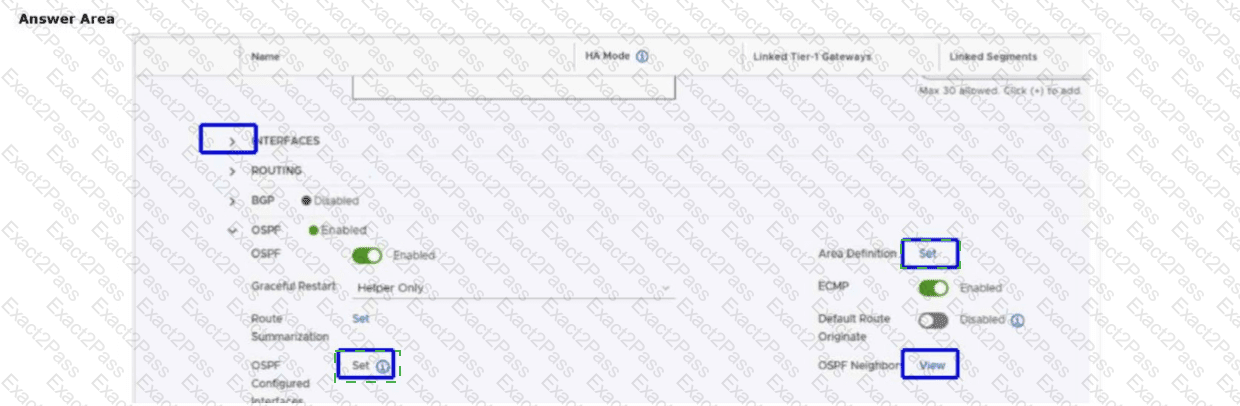
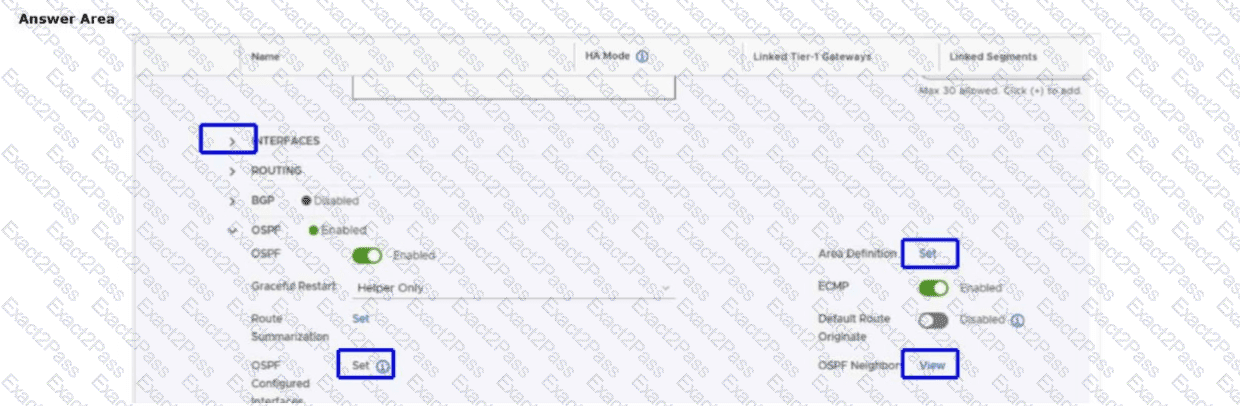
An administrator has been tasked with enabling OSPF as the routing protocol for a Tier-0 Gateway. Which two items must be configured to enable OSPF for a Tier-0 Gateway?
Mark two answers by clicking the two correct locations on the image. (Choose two.)
An administrator is enabling IPv6-to-IPv4 communication for workloads hosted in an NSX environment. The workloads use IPv6-only addressing, but the external systems they must reach are IPv4-only. To provide this translation service, the administrator decides to configure NAT64. Which two following characteristics about NAT64 are true? (Choose two.)
In an NSX environment, an administrator is observing low throughput and intermittent congestion between the Tier-0 Gateway and the upstream physical routers. The environment was designed for high availability and load balancing, using two Edge Nodes deployed in Active/Active mode. The administrator enables ECMP on the Tier-0 gateway, but the issues persist. Which action would address low throughput and congestion?
An administrator has deployed a new VMware Cloud Foundation (VCF) management domain. To be compliant with company policy, backups must be configured to occur anytime a change is made to the NSX configuration. How can the administrator ensure that complete configuration backups are captured every time a change occurs?
An administrator has a vSphere 8 Update 1a with NSX 4.1.0.2 environment. What option can the administrator use to converge this vSphere with NSX environment into a VMware Cloud Foundation (VCF) Workload Domain?
An administrator has a standalone vSphere 8.0 Update 1a deployment that is running with VMware NSX 4.1.0.2 and has to converge the deployment into a new VMware Cloud Foundation (VCF) instance. How can the administrator accomplish this task?
During a design review, the administrator is asked to explain which underlying technology enables the NSX Edge to perform fast packet processing and achieve near line-rate performance for Virtual Network Functions (VNFs). Which technology is leveraged in the NSX Edge for fast packet processing?
An administrator has deployed a workload domain in VMware Cloud Foundation (VCF). The workload domain was deployed with NSX managers using the XL form factor. After deployment, the administrator realizes the NSX manager is oversized and needs to change to a smaller form factor. What should the administrator do to accomplish this task?
An administrator is troubleshooting east—west network performance between several virtual machines connected to the same logical segment. The administrator inspects the internal forwarding tables used by ESXi and notices that different tables exist for MAC and IP mapping. Which table on an ESXi host is used to determine the location of a particular workload for frame forwarding?
An administrator encountered a failure with one of the NSX Managers in a VCF Fleet. The administrator has successfully re-deployed an NSX Manager from SFTP backups. However, after replacing the failed manager node, the new node joins successfully, but the cluster status remains "Degraded".
• The get cluster status command on the leader still shows the old UUID with state "REMOVED".
What is the command to resolve the issue?