Exact2Pass

Last Update 5 hours ago Total Questions : 212
The Salesforce Certified CPQ Administrator content is now fully updated, with all current exam questions added 5 hours ago. Deciding to include Sales-Admn-202 practice exam questions in your study plan goes far beyond basic test preparation.
You'll find that our Sales-Admn-202 exam questions frequently feature detailed scenarios and practical problem-solving exercises that directly mirror industry challenges. Engaging with these Sales-Admn-202 sample sets allows you to effectively manage your time and pace yourself, giving you the ability to finish any Salesforce Certified CPQ Administrator practice test comfortably within the allotted time.
Universal Containers has a new eco-friendly business line, and wants to create a subset of products that include those tagged as eco-friendly, and those that are bundles. When quoting on Opportunities that are flagged as eco-friendly, the sales reps should see only those products when they click Add Products. However, UC wants the flexibility to allow the sales reps to bypass the default subset and include all bundles, even if the Opportunity is flagged as eco-friendly.
Which strategy should UC apply?
Universal Containers (UC) created a Custom Action called Add Subscriptions and a Search Filter for Products flagged as subscription Products.
How can UC ensure that sales reps are restricted to subscription Products when the reps click on the Custom Action called Add Subscriptions?
Universal Containers (UC) sells its Products in three currencies: USD, GBP, and EUR. UC wants to make a renewable Support SKU available for selection in only USD and EUR and has completed the necessary configuration and/or record creation to support the behavior.
What is the expected behavior when a user attempts to add the Support SKU to a Quote in each currency?
An Admin creates a Search Filter for Product Code that has a predefined Filter Value of Green and an operator of “starts with”.
If the Search Filter is visible, how can sales reps interact with the filter on the Product Selection screen?
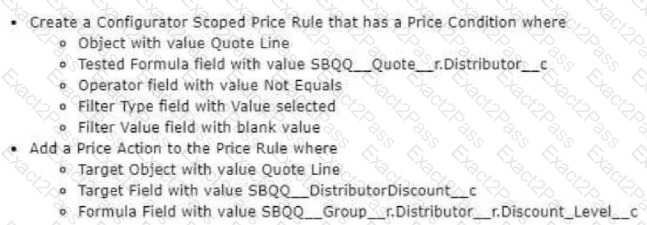
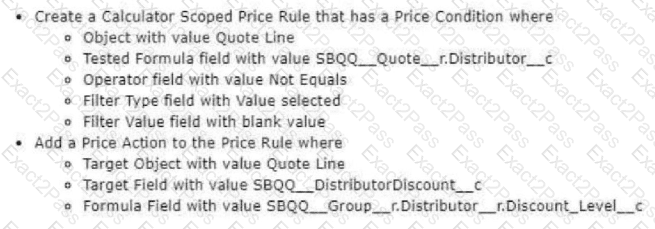
Universal Containers has set up an Account lookup field, Distributor__c, on the Quote to identify different distributors per group. Distributor accounts have a Discount_Level__c field populated with the base discount percentage that products provided by that distributor will receive.
Which set of actions should the admin take to ensure that the distributor receives the appropriate Distributor Discount?
A)
B)
Universal Containers sells a total of 100 Products. There are 80 Products that are generally available for selection by all users (General Access). The remaining 20 Products should only be available to a certain group of users (Special Access).
Which Product Selection and Price Book strategy should the admin utilize to meet the requirements?
Universal Containers uses over 45,000 different container Product records with CPQ. When a sales rep views the Add Products page, a list of the first 2,000 Products Is displayed in a disorganized manner. The product management team wants the
products to display in collapsible groups based on the product family.
How should a CPQ specialist enable this functionality from the
Salesforce CPQ managed package configuration settings?
Sales reps at Universal Containers want to be able to filter products based on their Release Date. For example, a sales rep would like to see products with a Release Date between their input values of 11/23/04 and 01/16/07 when adding products.
What should the admin create for this use case?
The options are:
Universal Containers is utilizing Lookup Price Rules to pull Daily Rate values from the Rental Rates object. After activating the Price Rule, the admin notices the Daily Rate value remains blank, but the user is still able to save the quote.
Which aspect of the Price Rule should the admin review to identify the underlying issue?
The Admin at Universal Containers wants to add Maintenance and Support products to the parent bundle. Maintenance and Support products should display in separate sections during configuration, with the Support products displaying above the Maintenance products. How should the Admin set up the Product to meet both requirements?

