Exact2Pass

Last Update 14 hours ago Total Questions : 209
The LTM Specialist: Maintain & Troubleshoot content is now fully updated, with all current exam questions added 14 hours ago. Deciding to include 301b practice exam questions in your study plan goes far beyond basic test preparation.
You'll find that our 301b exam questions frequently feature detailed scenarios and practical problem-solving exercises that directly mirror industry challenges. Engaging with these 301b sample sets allows you to effectively manage your time and pace yourself, giving you the ability to finish any LTM Specialist: Maintain & Troubleshoot practice test comfortably within the allotted time.
-- Exhibit –
-- Exhibit --
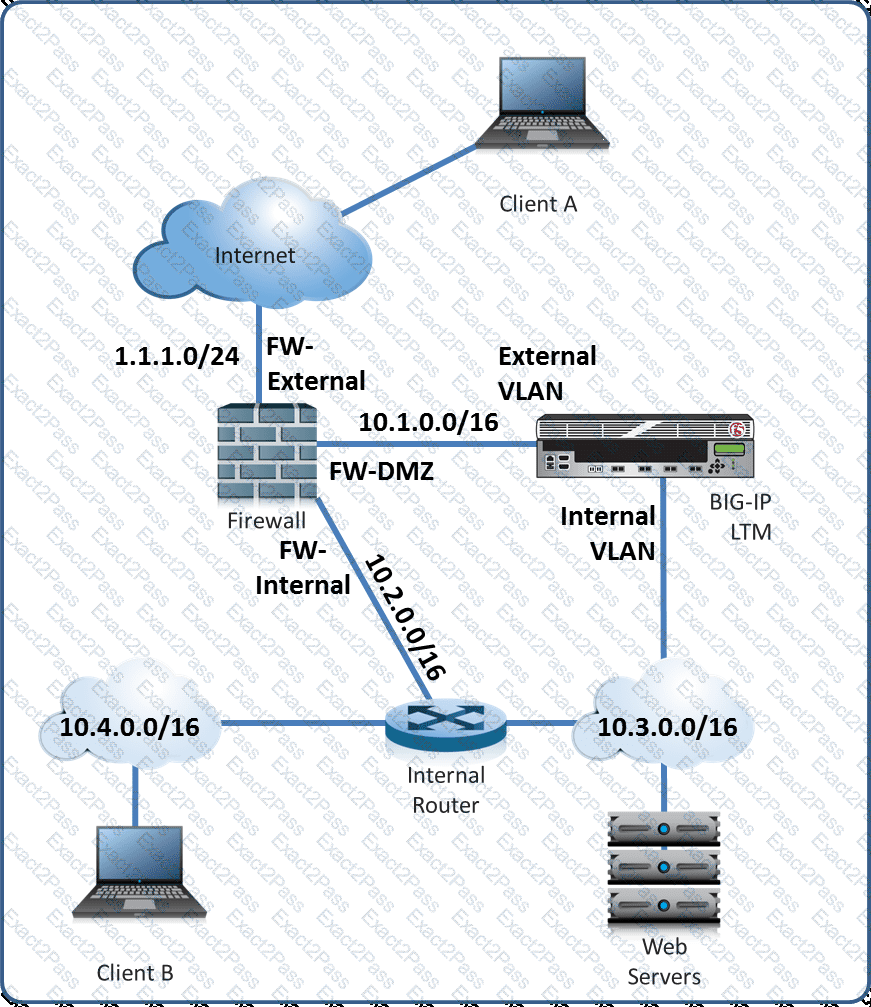
Refer to the exhibit.
A layer 2 nPath routing configuration has been deployed. A packet capture contains a client connection packet with the following properties:
Source IP: < Virtual Server >
Destination IP: < Client A >
At which two locations could the packet capture have been taken? (Choose two.)
-- Exhibit --
-- Exhibit --
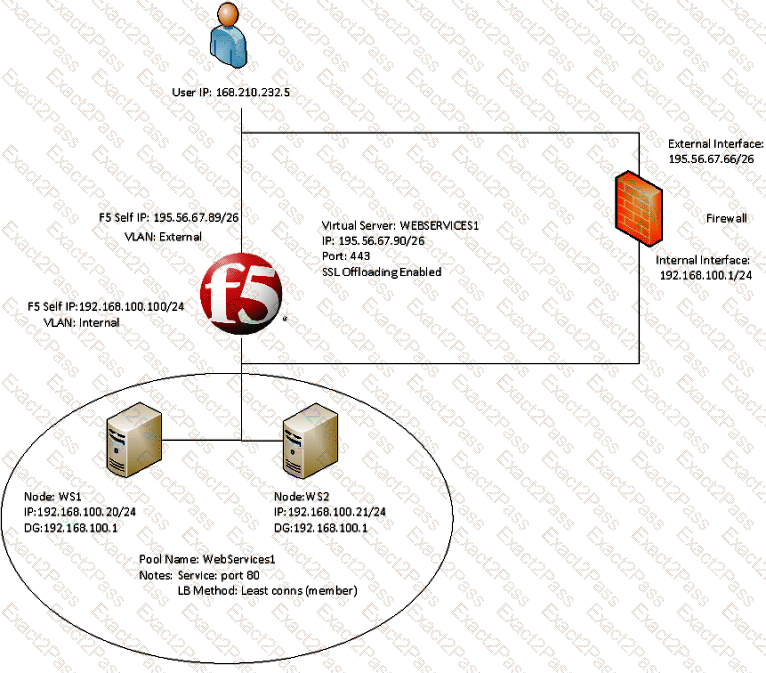
Refer to the exhibit.
A company uses a complex piece of client software that connects to one or more virtual servers (VS) hosted on an LTM device. The client software is experiencing issues. An LTM Specialist must determine the cause of the problem.
The LTM Specialist is seeing a client source IP of 168.210.232.5 in the tcpdump. However, the client source IP is actually 10.123.17.12.
Why does the IP address of 10.123.17.12 fail to appear in the tcpdump?
An LTM Specialist configures the following iRule on an LTM device:
when HTTP_REQUEST {
if {[string tolower [HTTP::uri]] contains "/URI1/" } {
pool Pool1
}
elseif {[string tolower [HTTP::uri]] contains "/URI2/" } {
pool Pool2
}
elseif {[string tolower [HTTP::uri]] contains "/URI3/" } {
pool Pool3
}
else { pool Pool4}
}
Given the following request: http://www.example.comURI1/index.html?fu=bar & pass=1234
Which pool will be selected by the iRule?
An LTM Specialist troubleshooting an issue looks at the following /var/log/ltm entries:
Oct 2 04:52:42 slot1/tmm7 crit tmm7[21734]: 01010201:2: Inet port exhaustion on 10.143.109.5 to 10.143.147.150:53 (proto 17)
Oct 2 05:37:16 slot1/tmm7 crit tmm7[21734]: 01010201:2: Inet port exhaustion on 10.143.109.5 to 10.143.147.150:53 (proto 17)
Oct 2 05:57:32 slot1/tmm2 crit tmm2[21729]: 01010201:2: Inet port exhaustion on 10.143.109.5 to 10.143.147.150:53 (proto 17)
Oct 2 06:30:03 slot1/tmm7 crit tmm7[21734]: 01010201:2: Inet port exhaustion on 10.143.109.5 to 10.143.147.150:53 (proto 17)
Oct 2 06:37:44 slot1/tmm2 crit tmm2[21729]: 01010201:2: Inet port exhaustion on 10.143.109.5 to 10.143.147.150:53 (proto 17)
Oct 2 06:47:05 slot1/tmm5 crit tmm5[21732]: 01010201:2: Inet port exhaustion on 10.143.109.5 to 10.143.147.150:53 (proto 17)
Which configuration item should the LTM Specialist review to fix the issue?
What is the correct command to reset an LTM device to its default settings?
An LTM Specialist is setting up a monitor for an HTTP 1.1 server. The response to a GET / is:
HTTP/1.1 302 Moved Temporarily
Location: http://www.example.com/new/location.html
Which send string settings should the LTM Specialist use to force a proper response?
The LTM device is configured to provide load balancing to a set of web servers that implement access control lists (ACL) based on the source IP address of the client. The ACL is at the network level and the web server is configured to send a TCP reset back to the client if it is NOT permitted to connect.
The virtual server is configured with the default OneConnect profile.
The ACL is defined on the web server as:
Permit: 192.168.136.0/24
Deny: 192.168.116.0/24
The packet capture is taken of two individual client flows to a virtual server with IP address 192.168.136.100.
Client A - Src IP 192.168.136.1 - Virtual Server 192.168.136.100:
Clientside:
09:35:11.073623 IP 192.168.136.1.55684 > 192.168.136.100.80: S 869998901:869998901(0) win 8192 < mss 1460,nop,wscale 2,nop,nop,sackOK >
09:35:11.073931 IP 192.168.136.100.80 > 192.168.136.1.55684: S 2273668949:2273668949(0) ack 869998902 win 4380 < mss 1460,nop,wscale 0,sackOK,eol >
09:35:11.074928 IP 192.168.136.1.55684 > 192.168.136.100.80: . ack 1 win 16425
09:35:11.080936 IP 192.168.136.1.55684 > 192.168.136.100.80: P 1:299(298) ack 1 win 16425
09:35:11.081029 IP 192.168.136.100.80 > 192.168.136.1.55684: . ack 299 win 4678
Serverside:
09:35:11.081022 IP 192.168.136.1.55684 > 192.168.116.128.80: S 685865802:685865802(0) win 4380 < mss 1460,nop,wscale 0,sackOK,eol >
09:35:11.081928 IP 192.168.116.128.80 > 192.168.136.1.55684: S 4193259095:4193259095(0) ack 685865803 win 5840 < mss 1460,nop,nop,sackOK,nop,wscale 6 >
09:35:11.081943 IP 192.168.136.1.55684 > 192.168.116.128.80: . ack 1 win 4380
09:35:11.081955 IP 192.168.136.1.55684 > 192.168.116.128.80: P 1:299(298) ack 1 win 4380
09:35:11.083765 IP 192.168.116.128.80 > 192.168.136.1.55684: . ack 299 win 108
Client B - Src IP 192.168.116.1 - Virtual Server 192.168.136.100:
Clientside:
09:36:11.244040 IP 192.168.116.1.55769 > 192.168.136.100.80: S 3320618938:3320618938(0) win 8192 < mss 1460,nop,wscale 2,nop,nop,sackOK >
09:36:11.244152 IP 192.168.136.100.80 > 192.168.116.1.55769: S 3878120666:3878120666(0) ack 3320618939 win 4380 < mss 1460,nop,wscale 0,sackOK,eol >
09:36:11.244839 IP 192.168.116.1.55769 > 192.168.136.100.80: . ack 1 win 16425
09:36:11.245830 IP 192.168.116.1.55769 > 192.168.136.100.80: P 1:299(298) ack 1 win 16425
09:36:11.245922 IP 192.168.136.100.80 > 192.168.116.1.55769: . ack 299 win 4678
Serverside:
09:36:11.245940 IP 192.168.136.1.55684 > 192.168.116.128.80: P 599:897(298) ack 4525 win 8904
09:36:11.247847 IP 192.168.116.128.80 > 192.168.136.1.55684: P 4525:5001(476) ack 897 win 142
Why was the second client flow permitted by the web server?
-- Exhibit –
-- Exhibit --
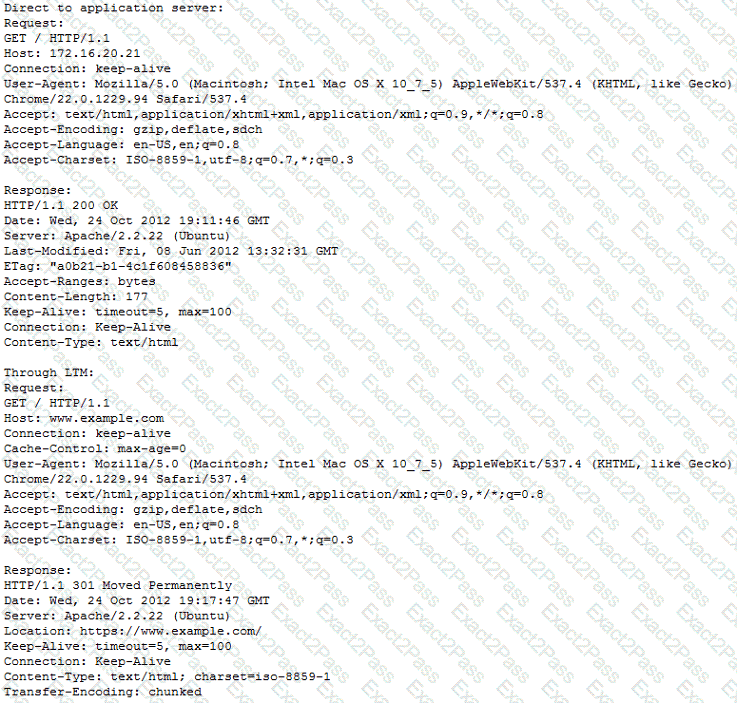
Refer to the exhibits.
An LTM Specialist configures a virtual server for an internal application to perform client-side encryption while allowing the server-side traffic to be unencrypted. Application users report that images are NOT loading through the virtual server; however, images load when going directly to the server.
What should the LTM Specialist configure to allow the images to load through the virtual server?
What is a benefit provided by F5 Enterprise Manager?
A user is having issues with connectivity to an HTTPS virtual server. The virtual server is on the LTM device's external vlan, and the pools associated with the virtual server are on the internal vlan. An LTM Specialist does a tcpdump on the external interface and notices that the host header is incomplete.
In which location should the LTM Specialist put a traffic analyzer to gather the most pertinent data?

