Exact2Pass

Last Update 2 hours ago Total Questions : 64
The Certified Kubernetes Security Specialist (CKS) content is now fully updated, with all current exam questions added 2 hours ago. Deciding to include CKS practice exam questions in your study plan goes far beyond basic test preparation.
You'll find that our CKS exam questions frequently feature detailed scenarios and practical problem-solving exercises that directly mirror industry challenges. Engaging with these CKS sample sets allows you to effectively manage your time and pace yourself, giving you the ability to finish any Certified Kubernetes Security Specialist (CKS) practice test comfortably within the allotted time.
You must connect to the correct host . Failure to do so may
result in a zero score.
[candidato@base] $ ssh cks000023
Task
Analyze and edit the Dockerfile located at /home/candidate/subtle-bee/build/Dockerfile, fixing one instruction present in the file that is a prominent security/best-practice issue.
Do not add or remove instructions; only modify the one existing instruction with a security/best-practice concern.
Do not build the Dockerfile, Failure to do so may result in running out of storage and a zero score.
Analyze and edit the given manifest file /home/candidate/subtle-bee/deployment.yaml, fixing one fields present in the file that are a prominent security/best-practice issue.
Do not add or remove fields; only modify the one existing field with a security/best-practice concern.
Should you need an unprivileged user for any of the tasks, use user nobody with user ID 65535.
Cluster: qa-cluster
Master node: master Worker node: worker1
You can switch the cluster/configuration context using the following command:
[desk@cli] $ kubectl config use-context qa-cluster
Task:
Create a NetworkPolicy named restricted-policy to restrict access to Pod product running in namespace dev.
Only allow the following Pods to connect to Pod products-service:
1. Pods in the namespace qa
2. Pods with label environment: stage, in any namespace
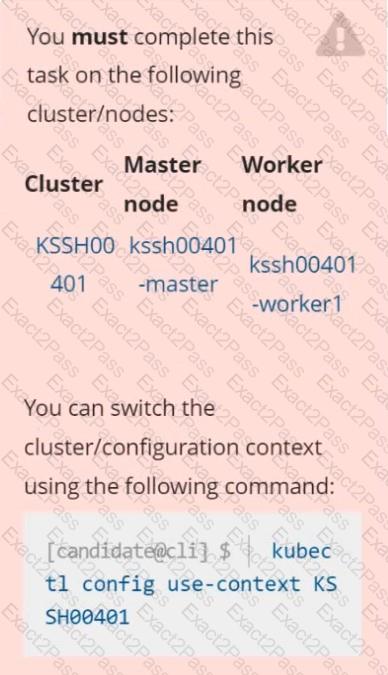
Context
AppArmor is enabled on the cluster ' s worker node. An AppArmor profile is prepared, but not enforced yet.
Task
On the cluster ' s worker node, enforce the prepared AppArmor profile located at /etc/apparmor.d/nginx_apparmor.
Edit the prepared manifest file located at /home/candidate/KSSH00401/nginx-pod.yaml to apply the AppArmor profile.
Finally, apply the manifest file and create the Pod specified in it.
You can switch the cluster/configuration context using the following command:
[desk@cli] $ kubectl config use-context test-account
Task: Enable audit logs in the cluster.
To do so, enable the log backend, and ensure that:
1. logs are stored at /var/log/Kubernetes/logs.txt
2. log files are retained for 5 days
3. at maximum, a number of 10 old audit log files are retained
A basic policy is provided at /etc/Kubernetes/logpolicy/audit-policy.yaml . It only specifies what not to log.
Note: The base policy is located on the cluster ' s master node.
Edit and extend the basic policy to log:
1. Nodes changes at RequestResponse level
2. The request body of persistentvolumes changes in the namespace frontend
3. ConfigMap and Secret changes in all namespaces at the Metadata level
Also, add a catch-all rule to log all other requests at the Metadata level
Note: Don ' t forget to apply the modified policy.
You can switch the cluster/configuration context using the following command:
[desk@cli] $ kubectl config use-context stage
Context:
A PodSecurityPolicy shall prevent the creation of privileged Pods in a specific namespace.
Task:
1. Create a new PodSecurityPolcy named deny-policy, which prevents the creation of privileged Pods.
2. Create a new ClusterRole name deny-access-role, which uses the newly created PodSecurityPolicy deny-policy.
3. Create a new ServiceAccount named psd-denial-sa in the existing namespace development.
Finally, create a new ClusterRoleBindind named restrict-access-bind, which binds the newly created ClusterRole deny-access-role to the newly created ServiceAccount psp-denial-sa
Create a User named john, create the CSR Request, fetch the certificate of the user after approving it.
Create a Role name john-role to list secrets, pods in namespace john
Finally, Create a RoleBinding named john-role-binding to attach the newly created role john-role to the user john in the namespace john.
To Verify: Use the kubectl auth CLI command to verify the permissions.
You can switch the cluster/configuration context using the following command:
[desk@cli] $ kubectl config use-context dev
Context:
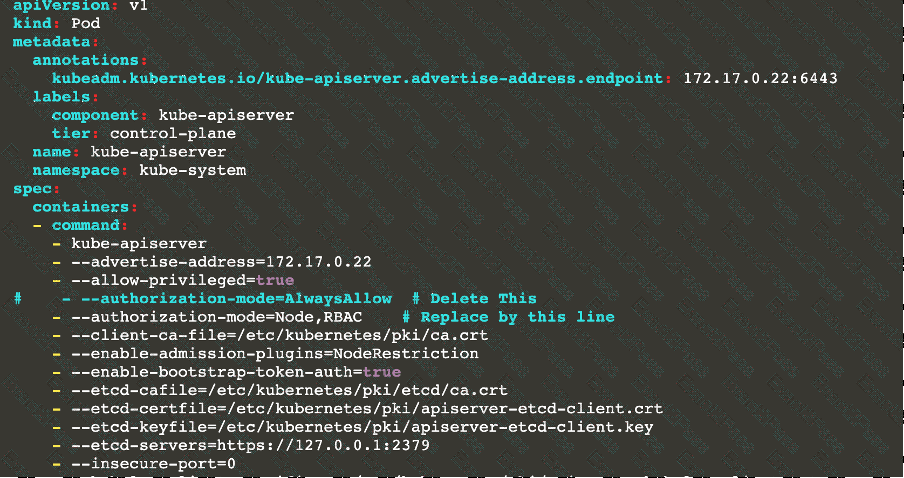
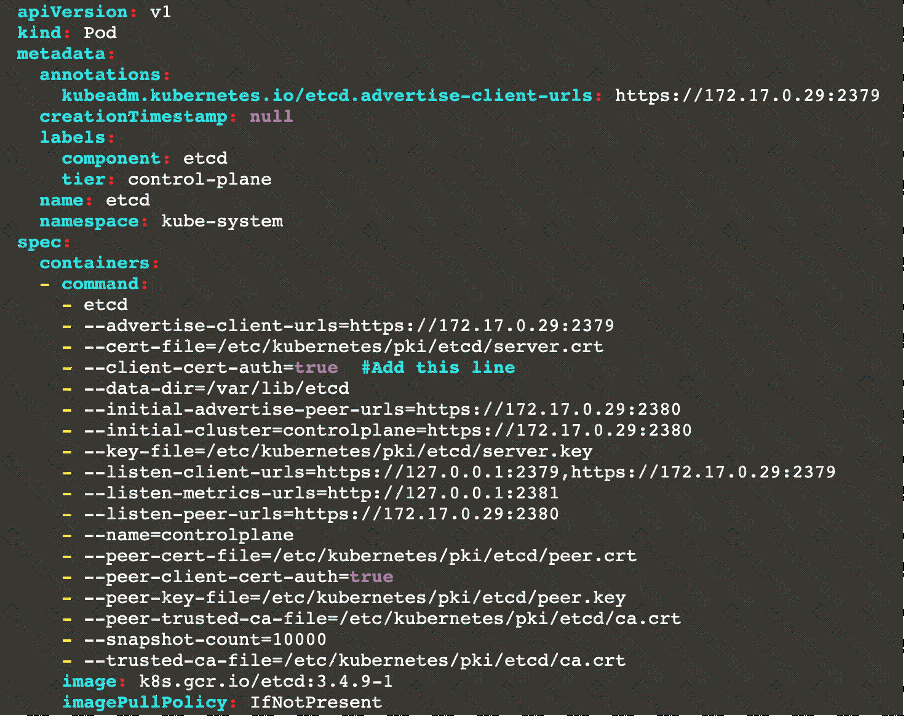
A CIS Benchmark tool was run against the kubeadm created cluster and found multiple issues that must be addressed.
Task:
Fix all issues via configuration and restart the affected components to ensure the new settings take effect.
Fix all of the following violations that were found against the API server:
1.2.7 authorization-mode argument is not set to AlwaysAllow FAIL
1.2.8 authorization-mode argument includes Node FAIL
1.2.7 authorization-mode argument includes RBAC FAIL
Fix all of the following violations that were found against the Kubelet:
4.2.1 Ensure that the anonymous-auth argument is set to false FAIL
4.2.2 authorization-mode argument is not set to AlwaysAllow FAIL (Use Webhook autumn/authz where possible)
Fix all of the following violations that were found against etcd:
2.2 Ensure that the client-cert-auth argument is set to true
Analyze and edit the given Dockerfile
FROM ubuntu:latest
RUN apt- get update -y
RUN apt-install nginx -y
COPY entrypoint.sh /
ENTRYPOINT [ " /entrypoint.sh " ]
USER ROOT
Fixing two instructions present in the file being prominent security best practice issues
Analyze and edit the deployment manifest file
apiVersion: v1
kind: Pod
metadata:
name: security-context-demo-2
spec:
securityContext:
runAsUser: 1000
containers:
- name: sec-ctx-demo-2
image: gcr.io/google-samples/node-hello:1.0
securityContext:
runAsUser: 0
privileged: True
allowPrivilegeEscalation: false
Fixing two fields present in the file being prominent security best practice issues
Don ' t add or remove configuration settings; only modify the existing configuration settings
Whenever you need an unprivileged user for any of the tasks, use user test-user with the user id 5487
Given an existing Pod named nginx-pod running in the namespace test-system, fetch the service-account-name used and put the content in /candidate/KSC00124.txt
Create a new Role named dev-test-role in the namespace test-system, which can perform update operations, on resources of type namespaces.
Create a new RoleBinding named dev-test-role-binding, which binds the newly created Role to the Pod ' s ServiceAccount ( found in the Nginx pod running in namespace test-system).