Exact2Pass

Last Update 20 hours ago Total Questions : 380
The Microsoft Identity and Access Administrator content is now fully updated, with all current exam questions added 20 hours ago. Deciding to include SC-300 practice exam questions in your study plan goes far beyond basic test preparation.
You'll find that our SC-300 exam questions frequently feature detailed scenarios and practical problem-solving exercises that directly mirror industry challenges. Engaging with these SC-300 sample sets allows you to effectively manage your time and pace yourself, giving you the ability to finish any Microsoft Identity and Access Administrator practice test comfortably within the allotted time.
You have an Azure subscription named Sub1 that contains a user named User1.
You need to ensure that User1 can purchase a Microsoft Entra Permissions Management license for Sub1. The solution must follow the principle of least privilege.
Which role should you assign to User1?
You have an Azure Active Directory (Azure AD) tenant that contains three users named User1, User1, and User3,
You create a group named Group1. You add User2 and User3 to Group1.
You configure a role in Azure AD Privileged identity Management (PIM) as shown in the application administrator exhibit. (Click the application Administrator tab.)
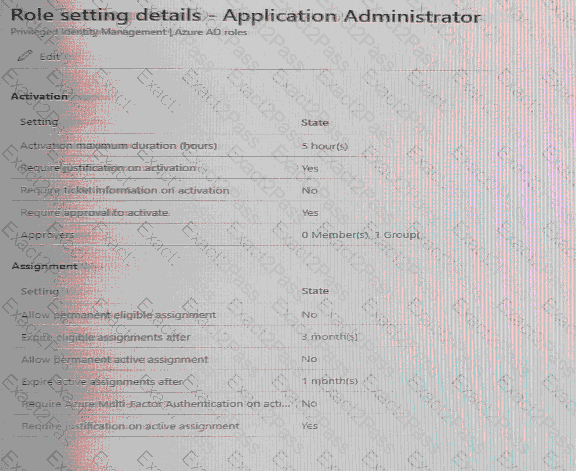
Group1 is configured as the approver for the application administrator role.
You configure User2to be eligible for the application administrator role.
For User1, you add an assignment to the Application administrator role as shown in the Assignment exhibit. (Click Assignment tab)
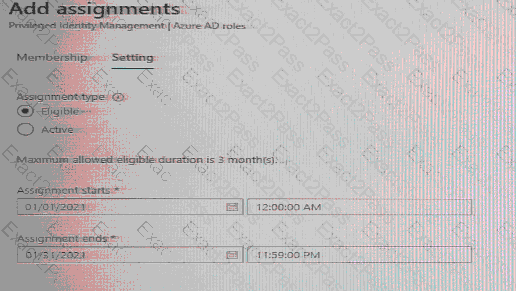
For each of the following statement, select Yes if the statement is true, Otherwise, select No.
NOTE: Each correct selection is worth one point.

You have an Azure subscription.
From Entitlement management, you plan to create a catalog named Catalog1 that will contain a custom extension.
What should you create first and what should you use to distribute Catalog1? To answer, select the appropriate options in the answer area.
NOTE: Each correct selection is worth one point.
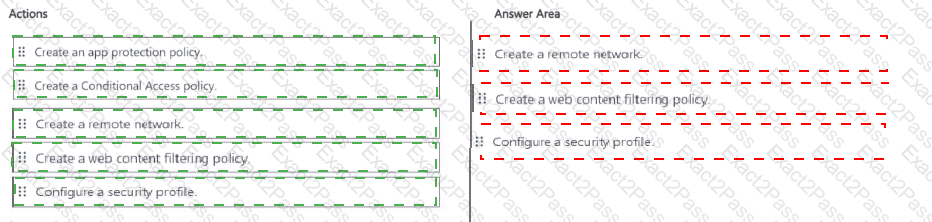
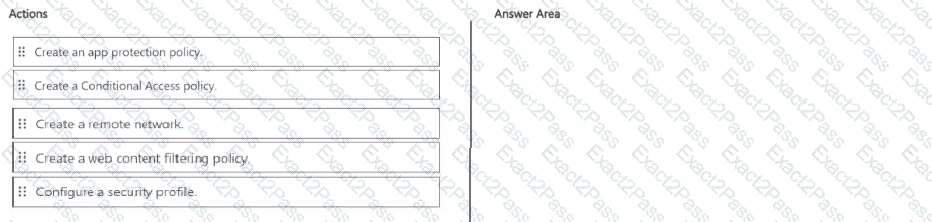
You have a Microsoft 365 E5 subscription. The subscription contains 500 devices that run Windows
You deploy the Global Secure Access client to the devices.
You need to prevent users from accessing httpsy/contoso.com from the devices
Which three actions should you perform in sequence? To answer move the appropriate actions from the list of actions to the answer area and arrange them in the correct order.
Task 2
You need to implement a process to review guest users who have access to the Salesforce app. The review must meet the following requirements:
• The reviews must occur monthly.
• The manager of each guest user must review the access.
• If the reviews are NOT completed within five days, access must be removed.
• If the guest user does not have a manager, Megan Bowen must review the access.
You have a Microsoft 365 subscription that contains the following:
• An Azure Active Directory (Azure AD) tenant that has an Azure Active Directory Premium P2 license
• A Microsoft SharePoint Online site named Site1
• A Microsoft Teams team named Team1
You need to create an entitlement management workflow to manage Site1 and Team1. What should you do first?
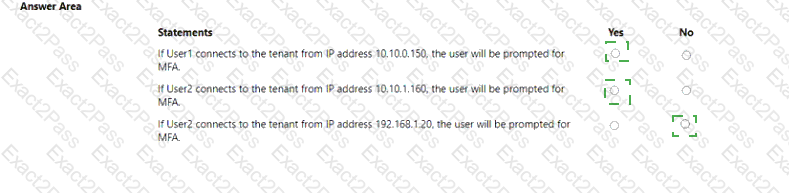
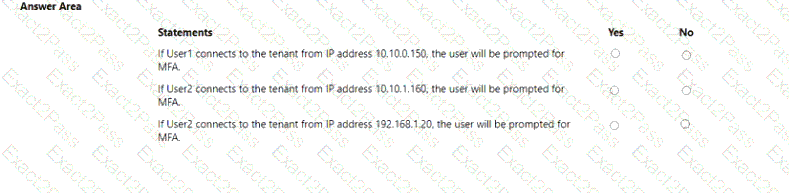
You have an AzureAD tenant that contains the users shown in the following table.

You have the locations shown in the following table.

The tenant contains a named location that Das the following configurations:
• Name: location1
• Mark as trusted location: Enabled
• IPv4 range: 10.10.0.0/16
MFA has a trusted iPad dress range of 193.17.17.0/24.
You have a Conditional Access policy that has the following settings:
• Name: CAPolicy1
• Assignments
o Users or workload identities: Group 1
o Cloud apps or actions: All cloud apps
* Conditions
* Locations All trusted locations
• Access controls
o Gant
• Grant access: Require multi-factor authentication
© Session: 0 controls selected
• Enable policy: On
For each of the following statements select Yes if the statement is true. Otherwise, select No. NOTE: Each correct selection is worth one point.
You have a Microsoft Entra tenant named contoso.com that contains an enterprise application named Appl.
A contractor uses the credentials of user1@outlook.com.
You need to ensure that you can provide the contractor with access to App1. The contractor must be able to authenticate as user1 @outlook.com.
What should you do?
You have a Microsoft Entra tenant that contains a terms of use (ToU) named Terms1. You create a Conditional Access policy named Policy1 to deploy Terms1. You need to configure Policy1 to require users to accept Terms1. Which settings should you configure for Policy1?
You have an Azure subscription that contains a user named User1. The subscription is onboarded to Microsoft Entra Permissions Management. You need to provide User! with access to Permissions Management. The solution must meet the following requirements:
• Follow the principle of least privilege.
• Minimize administrative effort.
What should you do first?